Day trading order types: what scalpers actually use
By Scalpel Team. , updated . 15 min read.
In short
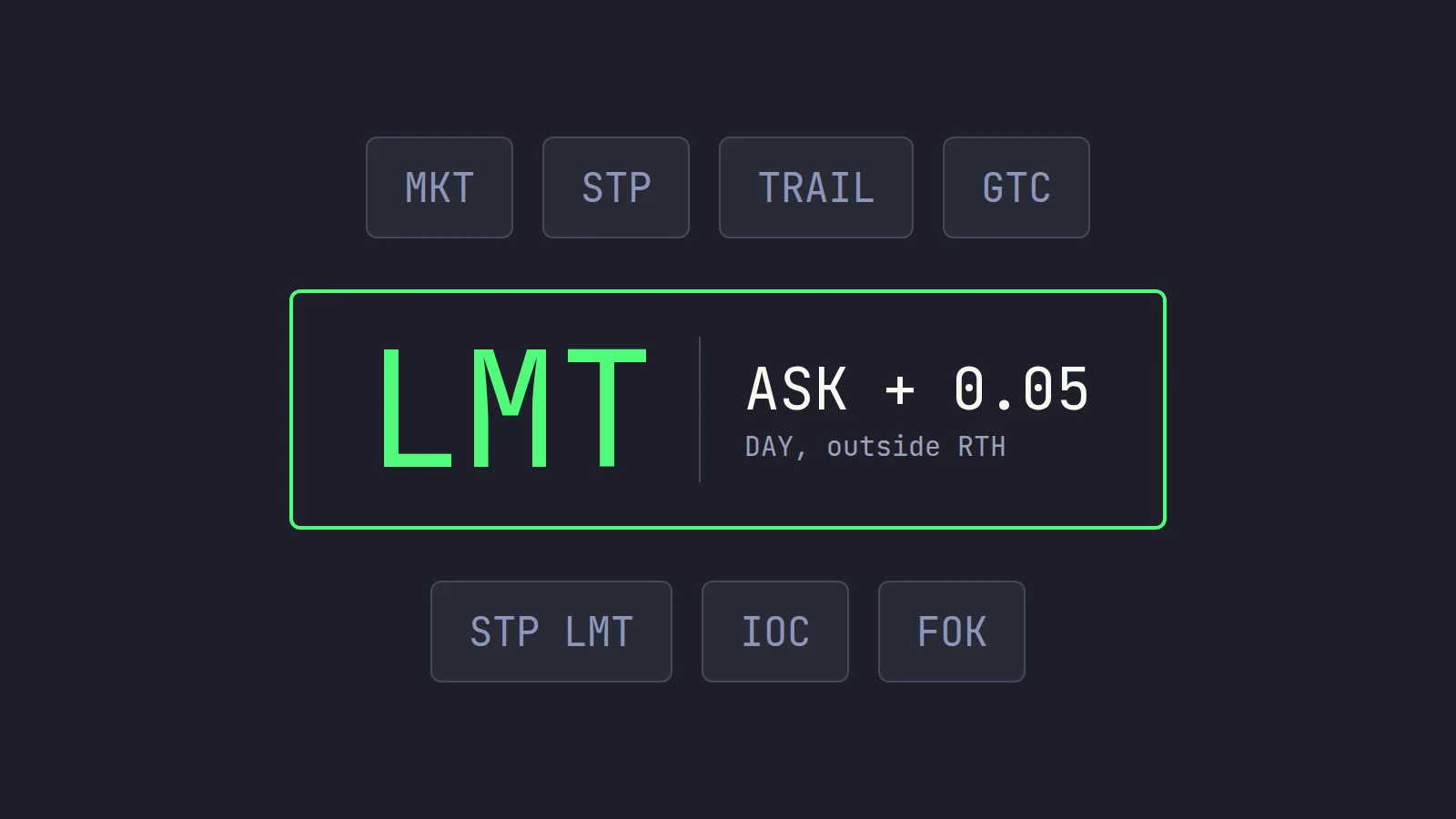
The day trading order types a small-cap scalper actually uses are few: a marketable limit (a limit priced through the ask, such as the ask plus 5 to 10 cents) for entries and most exits, a plain limit for resting scale-out offers, and a stop-limit or an app-held stop for protection, all sent as DAY orders with outside RTH allowed so they work from 04:00 ET. Market orders and plain stops are the ones to avoid on thin stocks: they guarantee a fill but not the price, and IBKR does not run them before the open. Trailing stops, brackets, GTC and IOC have their uses, but they are tools for specific jobs, not the core kit.
Most "why did that fill there" problems start with the order type, not the stock. The broker offers dozens of order types and the textbooks explain all of them, yet a scalper on a $3 gapper at 07:45 ET needs about four, and needs to know exactly how each one behaves when the book is thin and moving. This guide walks through the day trading order types one at a time, says which ones we use and why, and runs one worked example through all of them so you can see the difference in cents.
We build a trading cockpit on the Interactive Brokers API, so the IBKR details here are ones we work with every day. Facts, fees and rules checked on October 22, 2026. Scalpel is independent and not affiliated with or endorsed by Interactive Brokers.
Day trading order types at a glance
Interactive Brokers advertises access to over 100 order types, algos and tools. You can ignore nearly all of them. Here are the ones that matter for long scalping of US small caps, and what we think of each:
| Order type | What it does | What it guarantees | Our verdict for scalping small caps |
|---|---|---|---|
| Market | Buys or sells right away at whatever price is available | A fill, not a price | Avoid on thin stocks; not run before 09:30 at IBKR |
| Limit | Buys at your price or lower, sells at your price or higher | A price, not a fill | For resting offers and bids only |
| Marketable limit | A limit priced at or through the other side of the book | A worst price, and usually a fill | The default for entries and exits |
| Stop | Becomes a market order when price hits the stop | Nothing about price | Regular hours only; jumps in a gap |
| Stop-limit | Becomes a limit order when price hits the stop | A worst price, not a fill | The broker-side stop that works pre-market |
| Trailing stop | A stop that follows price up by a set amount | Same as a stop | Useful for runners, noisy on a thin tape |
| Bracket | An entry with a profit target and a stop attached | Same as its parts | Handy in TWS, but the stop is still a stop |
The short version: a fill or a price, choose one. IBKR's own disclaimer under its lessons says it plainly: "In general, orders guarantee a fill or guarantee a price, but not both." Everything below is about choosing which one you need at that moment, and how much price you are willing to give up for the fill.
If you have never placed these in TWS, IBKR's own introduction is a short, clear tour of where the order types live in the order entry panel and what each one is for:
Market orders: fill first, price later
The SEC's investor site defines a market order as an order to buy or sell immediately, one that "guarantees that the order will be executed, but does not guarantee the execution price." It adds the line every scalper should remember: "the last-traded price is not necessarily the price at which a market order will be executed."
On a liquid large cap that matters little. On a small cap with 300 shares on each price level, a market order walks up the book until it is filled, at every price on the way. IBKR's own lesson on market orders warns that "if markets are less liquid, this order type could move prices adversely, especially for larger orders."
Three facts make market orders a poor fit for this style:
- IBKR does not run them before the open. Its commission page says that "Market orders placed prior to regular trading hours will be treated as Market OnOpen orders" (IBKR commissions). A market buy you send at 07:45 waits for the 09:30 opening auction, when the gapper may be 15% away.
- Almost nobody at IBKR uses them on small caps. IBKR's Rule 606 routing report for the second quarter of 2026 shows that in June 2026, market orders were 0.35% of its non-directed orders in non-S&P 500 stocks. Marketable limit orders were 26.75% and non-marketable limits 70.93%.
- The worst case is very bad. In the May 6, 2010 flash crash, the joint SEC and CFTC staff report found that over 20,000 trades across more than 300 securities executed at prices 60% or more away from their prices minutes earlier, many of them from retail customers. The report found that market orders and limit orders alike traded against stub quotes, placeholder quotes far from the real price, once the real bids and offers had gone.
Today the Limit Up-Limit Down plan stops a trade from printing outside a price band during regular hours. For most small caps (Tier 2) the band is 10% either side of the average price of the last five minutes for a stock that closed above $3, 20% for one that closed between $0.75 and $3, and the lesser of $0.15 or 75% under $0.75. If the book cannot trade inside the band for 15 seconds, the listing exchange calls a five-minute trading pause. That protects you from the flash-crash extreme, not from paying 20 cents more than you meant to.
When is a market order fine? On a liquid stock in regular hours, for a size that is small next to the displayed depth, and when getting out matters more than the last few cents. That is rarely the situation on a pre-market gapper.
Limit orders and the price you pick
A limit order "can only be executed at the limit price or lower" for a buy, and at the limit price or higher for a sell. It caps your price and does not promise a fill.
The order type is the same in every case below. What changes the behavior is where you put the price:
- A buy limit under the ask (at the bid, or lower) rests on the book and waits for a seller. It is how you add liquidity, and on a momentum stock it is how you miss the trade: by the time a seller hits your bid, the move you wanted is usually over or reversing.
- A buy limit at exactly the ask is a coin toss in a fast stock. If the ask lifts by a cent between your look and your press, the order rests unfilled while price leaves without you.
- A buy limit through the ask is a marketable limit, the next section.
For sells it mirrors. A sell limit above the bid rests, which is exactly what you want for a scale-out offer: offering half your shares at the ask, or at the next whole dollar, lets buyers come to you.
The marketable limit: the order scalpers actually use
A marketable limit is a limit order priced at or through the other side of the book. SEC Regulation NMS defines it precisely: a buy limit at or above the best offer, or a sell limit at or below the best bid, at the moment the order arrives. In practice a scalper prices it a few cents beyond: the ask plus 5 to 10 cents to buy, the bid minus 5 to 10 cents to sell.
It behaves like a market order up to your cap. It takes every share offered from the ask up to your limit, best price first, and never pays a cent more. Anything the book cannot fill keeps working at the limit as a partial fill. And because it is a limit order, the exchanges accept it before 09:30 and after 16:00.
The offset is your slippage budget, so size it against your stop. A 5 cent offset on a 20 cent stop means the worst fill on the whole position costs a quarter of your planned risk. On a $2 stock, 10 cents is 5% of the price; on a $20 stock it is 0.5%. The full walkthrough, with a level-by-level example and the TWS preset to build one, is in our guide to the marketable limit order.
Limit vs market vs stop: one worked example
Here is the same trade with each order type. ABCD is gapping up on news at 07:45 ET. The bid is 4.98 and the asks are:
| Price | Shares offered |
|---|---|
| 5.02 | 300 |
| 5.03 | 500 |
| 5.05 | 400 |
| 5.10 | 1,000 |
You want 1,000 shares.
- Market order. At 07:45 IBKR holds it for the open, so it does not fill now. In regular hours, against this book, it takes 300 at 5.02, 500 at 5.03 and 200 at 5.05: $5,031 in all, an average of 5.031. If the 5.02 and 5.03 sellers cancel as you press, which is common on a fast tape, it fills at 5.05 and 5.10 instead, and you find out after the fact.
- Marketable limit at the ask plus 5 cents (5.07). Against the same book it fills exactly like the market order: 1,000 shares at 5.031. If the first two levels vanish, it takes 400 at 5.05 and then rests the other 600 at 5.07. You hold 400 shares at a price you chose, not 1,000 at a price you did not.
- Limit at the ask (5.02). It takes the 300 at 5.02 and rests 700 at 5.02. If the stock runs, you have 30% of the position you wanted.
- Limit at the bid (4.98). Nothing fills unless the stock comes back to 4.98. On a real breakout, it does not.
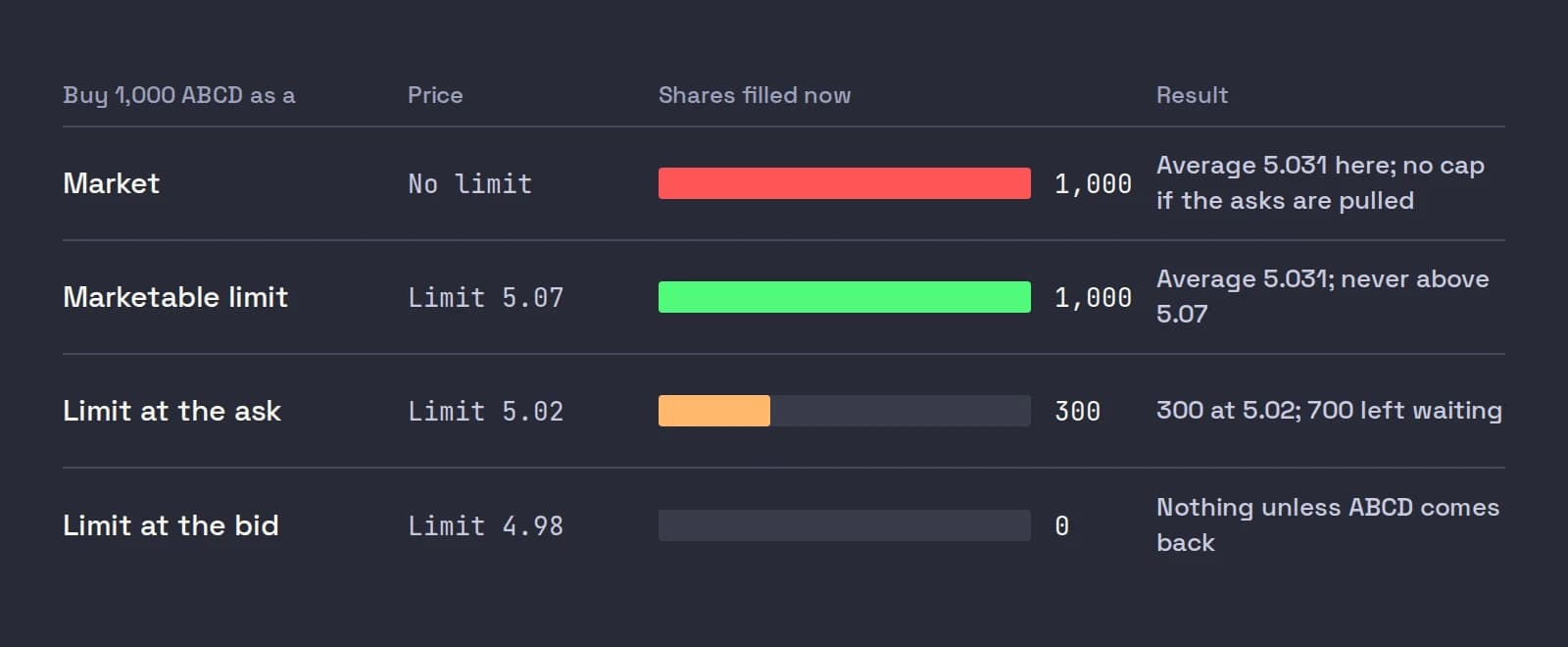
The pattern holds for exits. A sell limit at the bid minus 5 cents gets you out of a fading stock now with a known floor. A sell limit at the ask offers your shares and waits.
Stop orders and stop-limits
A stop order waits until price reaches your stop, then "becomes a market order." So everything above about market orders applies at the worst moment: when the stock is falling through your level. A stop at 4.88 on a stock that prints 4.90 then 4.70 sells at 4.70 or wherever the bids are.
A stop-limit adds a limit price. When the stop is hit, it becomes a limit order at your limit. That caps how low you sell, but if price gaps through the limit the order rests unfilled while the stock keeps falling. The trade-off between the two is the subject of our post on stop-limit vs stop-market.
Two IBKR details matter for a pre-market trader:
- A plain stop does not work outside regular hours. IBKR staff answered this directly under the Trading Outside RTH lesson: "Stop Limit orders can be set to work Outside RTH, but plain Stop orders do not work outside regular trading hours."
- IBKR may hold stops on its own servers. Its order types page says it simulates certain order types, stops included, where an exchange does not offer them, and lists data filters and market halts among the reasons a simulated order may not execute.
If you trade before 09:30, read why your pre-market stop loss did not trigger before you rely on one. Our view: a stop-limit with a wide limit, 15 to 30 cents under the stop on a $3 to $10 stock, is the best broker-side option, and it is still not a guarantee.
Trailing stops and bracket orders
A trailing stop moves its trigger up as price rises, a set amount or percent below the high, and never moves down. It is a stop, so it becomes a market order when hit, with the same pre-market limits; the trailing stop-limit version can work outside RTH. On a thin small cap, one print a few cents higher drags the trigger up, and the next normal pullback hits it. We prefer to trail by structure, such as the low of the last 1-minute candle, rather than by a fixed number of cents.
A bracket is an entry with a take-profit limit and a stop attached, linked so that when one exit fills the other is cancelled. It saves typing in TWS, but each leg keeps its own rules: the stop leg is still a stop, and in the pre-market it needs to be a stop-limit with outside RTH set.
Time in force: DAY, GTC, IOC and outside RTH
The time in force says how long an order may work. For day trading, the setting is almost always DAY. The others:
| Time in force | What it does at IBKR | When a scalper uses it |
|---|---|---|
| DAY | Works until the end of the day's session | Every entry and exit |
| GTC (good-til-canceled) | Works until filled or cancelled, but IBKR cancels it at the end of the calendar quarter after the one you placed it in, after a split or large dividend, or if you do not log in for 90 days (IBKR order types) | Almost never: you should be flat at the end of the day |
| IOC (immediate or cancel) | Fills what it can at once and cancels the rest | When you want no resting remainder |
| FOK (fill or kill) | All of it at once, or nothing | Rarely useful on thin books |
| Outside RTH | Not a time in force but a flag: lets the order trigger or fill before 09:30 and after 16:00 | Every order if you trade the pre-market |
The outside RTH flag is the one that catches people. In TWS it lives in Global Configuration > Presets > Stock > Timing as Allow order to be activated, triggered or filled outside of regular trading hours (if available). Without it, a pre-market order is accepted and then sits until the open.
The sessions also limit which order types you can use at all:
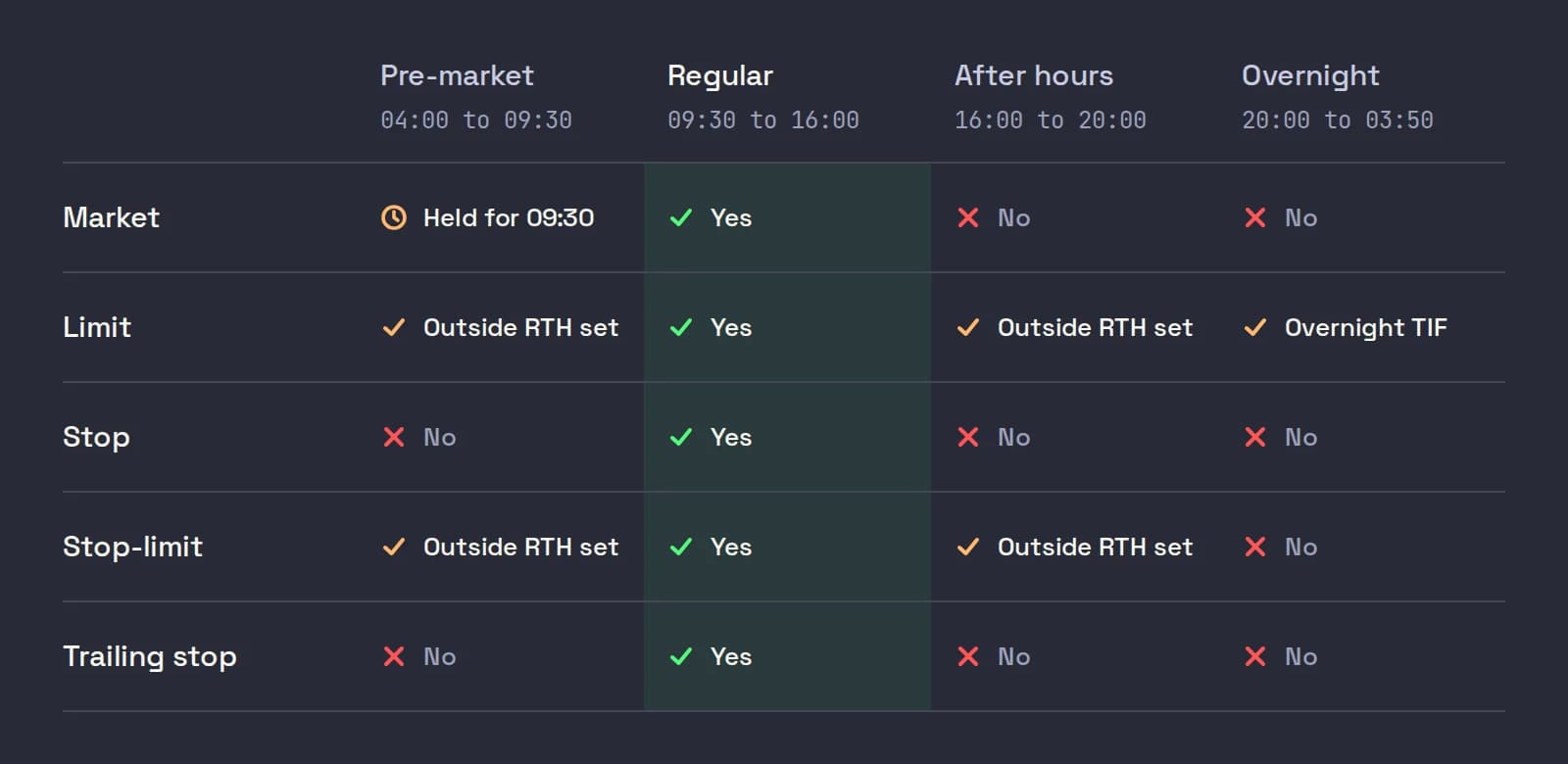
IBKR also runs an overnight session, from 20:00 to 03:50 ET Sunday night through Friday morning, in over 10,000 US stocks and ETFs (IBKR overnight trading). It takes only DAY limit orders (and IBKR's Adaptive algo) that expire at 03:50 if unfilled. The session times and settings are in our guide to IBKR extended hours trading.
Routing: SmartRouting or direct
The order type says what to do; the route says where. IBKR Pro sends orders through SmartRouting by default, which picks among exchanges, its own ATS and dark pools and keeps re-routing the unfilled part. In June 2026, according to the same 606 report, Nasdaq received 27.88% of IBKR's non-directed orders in non-S&P 500 stocks, NYSE Arca 17.11% and Cboe EDGX 14.80%. You can also send an order straight to one exchange.
For a scalper taking liquidity, SMART is almost always the right answer, and direct routing through an API program costs more per share. The details and the numbers are in IBKR SmartRouting vs direct routing.
What goes wrong after you press the key
The order type decides most of what happens next, but four problems come up so often that each has its own post:
- Partial fills. A limit order that runs out of shares at its price leaves a remainder working. Why it happens, how commissions apply to the pieces, and what to do with the rest.
- Slippage in day trading. The gap between the price you meant and the price you got, how to measure it from your fills, and how to cut it.
- LULD trading halts. What happens to your working orders and your stop when a stock pauses, and how it reopens.
- IBKR order rejected. The common rejection messages, from buying power to outside RTH and trading permissions, and the fix for each.
If an order is accepted but simply does not fill, our guide on an order that did not fill walks through the usual causes.
The order kit we would set up
If you trade small caps with TWS alone, this is the setup we would start from:
- Default order type LMT, time in force DAY, outside RTH ticked in your stock presets.
- Buy key: limit at the ask plus 5 cents (10 on fast stocks over $10), transmit instantly.
- Sell keys: limit at the bid minus 5 cents for the full position and for half; a sell at the ask for resting scale-outs.
- Protection: a stop-limit with a wide limit and outside RTH, placed the moment you are filled, or a stop held by your trading software.
- No market orders, no plain stops, no GTC for intraday trades.
Practise it on a paper login first. Your live and paper logins can hold different presets, so check both.
Where Scalpel fits
Scalpel is a keyboard-first desktop cockpit that connects to your own IBKR account through TWS or IB Gateway. It makes these order type choices for you, in the way this post recommends, and sends every LIVE order through IBKR SmartRouting.
- Every buy is a marketable limit: the ask plus your Buy offset, 10 cents by default, sized by one of four presets. It fills up to that cap and works any remainder as a partial (entries and fills).
- Every sell is a limit too: Full, 1/2 and 1/4 sell at the bid minus your Sell offset; 1/2 Ask and 1/2 Mid rest an offer at the ask or the midpoint (the order bar).
- Stops are held by the app, not the broker. When price trades through your stop, Scalpel sends a sell limit 5 cents under the last trade with the outside-RTH flag set, so the exit works at 06:00 as at 11:00, and re-prices it if the market runs away (how stops work). The trade-off: the stops only work while Scalpel is running and connected, and no fill is guaranteed.
- Outside regular hours is handled: exits always go out allowed to fill outside RTH, and Extended-hours fills decides whether your LIVE buys may. Orders are blocked outside 04:00 to 20:00 ET, so there is no overnight session (pre-market stops).
Our two-minute section video shows a marketable limit entry, a scale-out and a flatten, all from the keyboard:
Scalpel is long only, so there are no short-side order types to think about, and it does not trade futures, options or anything automatically. If you need GTC orders, algos or overnight trading, TWS is the better tool.
Every post on orders and execution
This guide is the hub for our orders and execution series. Each post takes one question further:
- Marketable limit orders: how far through the ask to price, a worked fill, and the TWS preset.
- Market vs limit orders on small caps: what a market order really costs on a thin book, in dollars and in R.
- IBKR SmartRouting vs direct routing: how SMART picks a venue, the 606 report, and when direct routing is worth it.
- IBKR extended hours trading: pre-market, after-hours and overnight sessions, and which orders each one takes.
- Partial fills: why they happen and how to manage the shares you did and did not get.
- Slippage in day trading: measuring it from your fills and cutting it.
- LULD trading halts: your orders and your stop through a pause.
- Why IBKR rejected your order: the messages and the fixes.
Trading carries a significant risk of loss. Nothing here is financial advice.
Questions
- What is the best order type for day trading?
- For small-cap scalping, a marketable limit: a limit order priced a few cents through the ask to buy or the bid to sell. It fills at once like a market order when the shares are there, but it never pays more than your limit, and exchanges accept it before and after regular hours.
- Should day traders use market orders?
- Rarely on small caps. A market order guarantees a fill but not the price, so on a thin book it can fill well above the ask. IBKR also treats market orders sent before the open as market-on-open orders, so they do not trade in the pre-market.
- What is the difference between a limit, market and stop order?
- A market order fills right away at whatever price is available. A limit order fills only at your price or better. A stop order waits until price reaches your stop and then becomes a market order; a stop-limit becomes a limit order instead.
- Do stop orders work in the pre-market?
- A plain stop does not work outside regular hours at IBKR. A stop-limit can, if you set it to work outside regular trading hours, but price can gap through its limit and leave it unfilled.
- What time in force should day traders use?
- DAY for almost everything, with outside RTH allowed if you trade the pre-market or after hours. GTC orders stay open for weeks, which is not what an intraday trader wants, and IOC is useful only when you want no remainder left working.
- What is a marketable limit order?
- A limit order priced at or through the other side of the book: a buy limit at or above the best ask, or a sell limit at or below the best bid. It fills immediately against the shares available up to your limit, and the rest keeps working.
Related guides
Guide 4.4Entries: marketable limits, offsets and partial fillsHow a Scalpel buy is priced and filled: the marketable limit, the buy offset, partial fills, and why a buy is refused when the market is closed or halted.Guide 4.6The order bar and orders panelEvery button on the order bar under the chart, the method dropdown, offset and stop steppers, and the Positions and Orders tabs with net P&L and fees.Guide 5.1How Scalpel's stops workWhy Scalpel holds your stops in the app, not on the book: pre-market rules, the working stop, catastrophe net and take-profit, and what if Scalpel closes.
Keep reading
- Marketable limit order: the order type scalpers actually useA marketable limit order fills at once like a market order but caps your price. How it fills, how far through the ask to price it, and the TWS setup.
- Market order vs limit order in day trading: the small-cap costMarket order vs limit order in day trading small caps: what slippage costs in R on a thin book, why IBKR holds pre-market market orders, and what to use.
- IBKR SmartRouting vs direct routing for day tradersDoes IBKR give direct market access? How SmartRouting picks venues, why fills differ by venue, what direct routing costs and when day traders should use it.
Practice in SIM, against the live book.A lifetime license, every update included, with a 7-day refund guarantee.Ask in DiscordGet Scalpel