IBKR extended hours: pre-market, after-hours and overnight trading
By Scalpel Team. , updated . 8 min read.
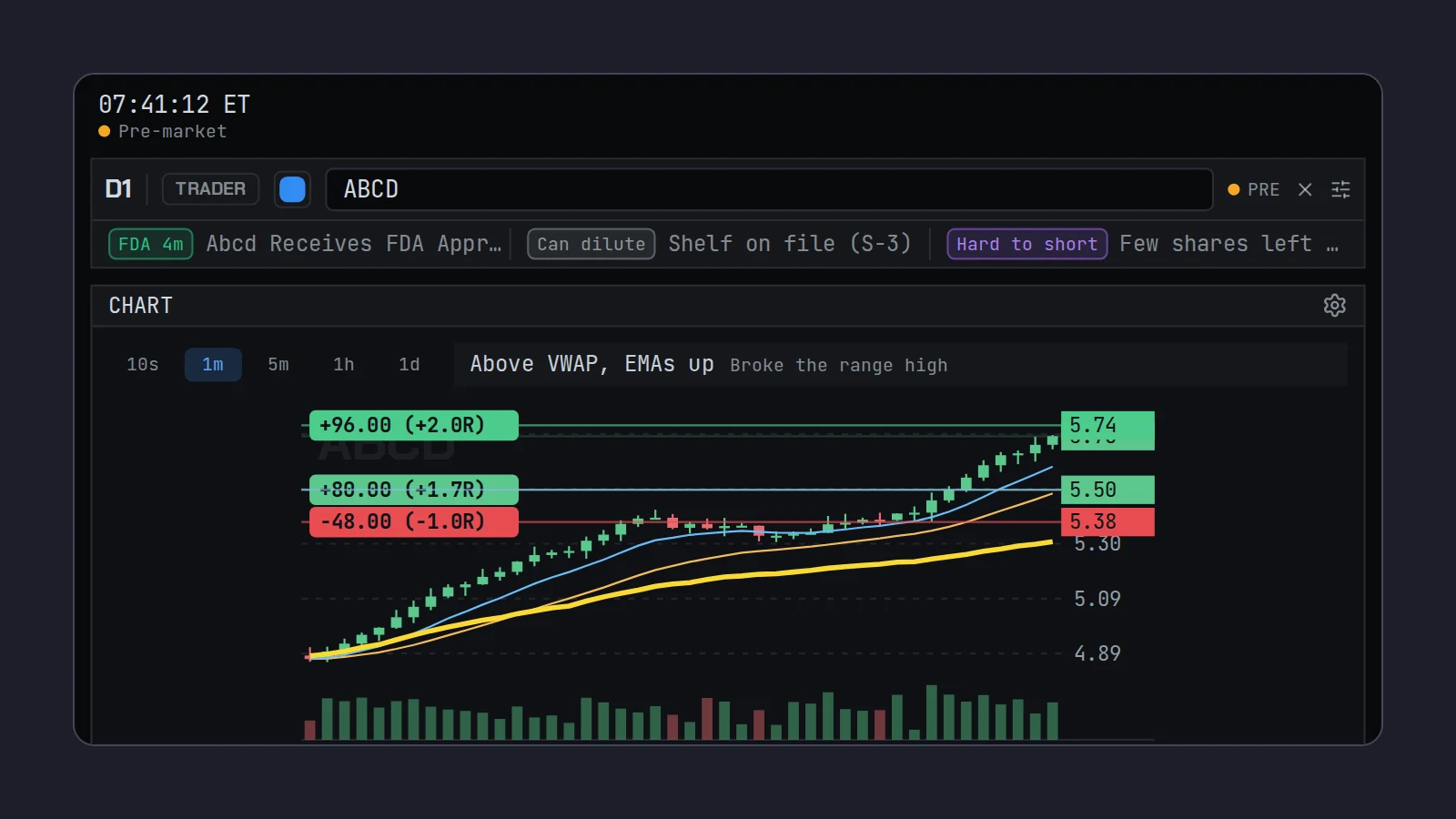
In short
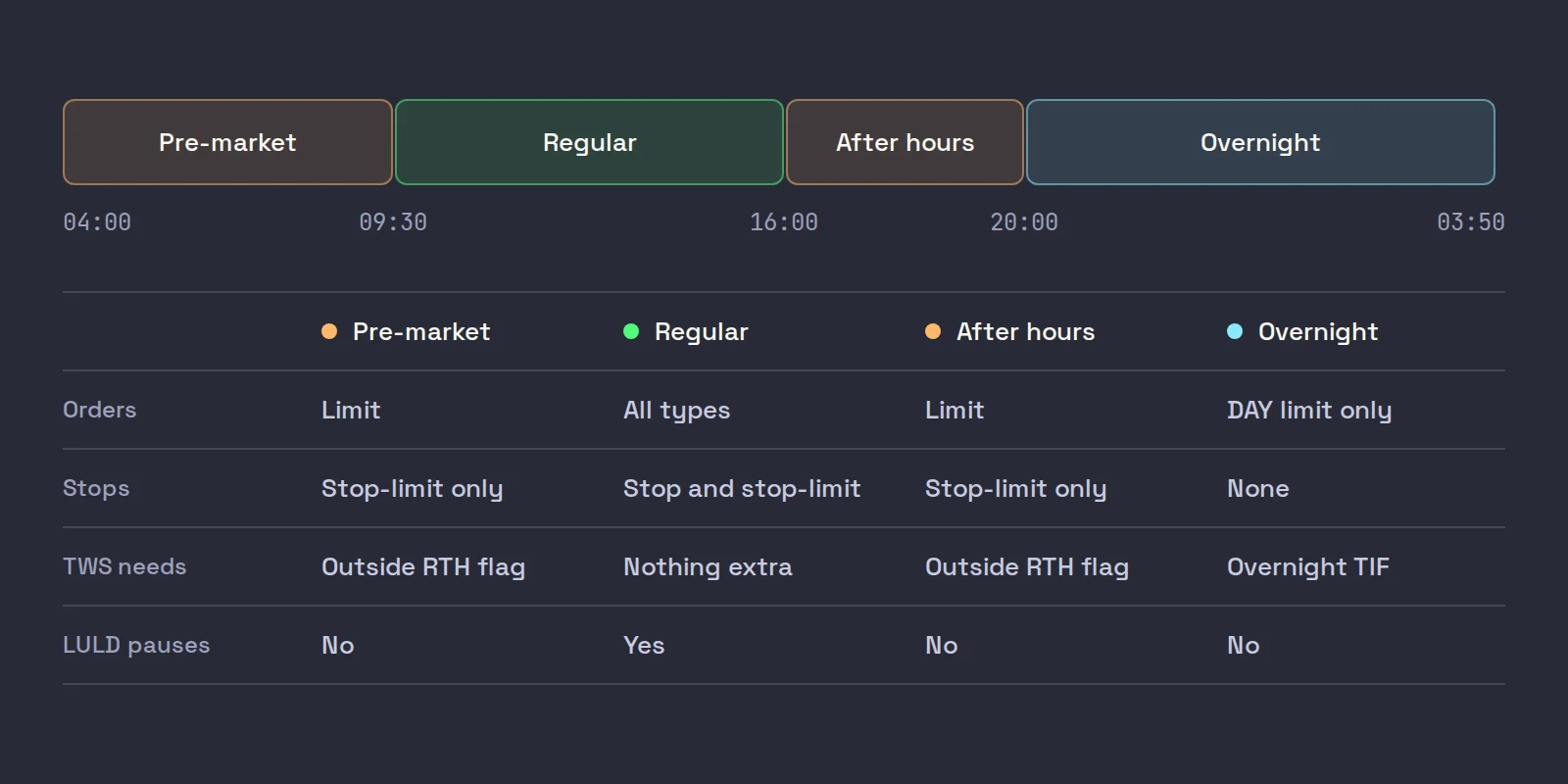
IBKR extended hours for US stocks run in three sessions around the 09:30 to 16:00 ET regular day: the pre-market from 04:00 to 09:30, after hours from 16:00 to 20:00, and IBKR's own overnight session from 20:00 to 03:50, Sunday night through Friday morning. Outside regular hours, use limit orders and tick Allow order to be activated, triggered or filled outside of regular trading hours in TWS, or the order waits for the open. Market orders and plain stops do not trade in these sessions; overnight takes DAY limit orders only, through the Overnight time in force.
IBKR extended hours are where small-cap momentum starts: a stock with news at 07:00 ET can double before most of the market is awake. Interactive Brokers gives you access to the whole window, and to an overnight session most brokers do not offer, but each session has its own rules about which orders it takes, and the defaults in TWS are set for regular hours.
This post covers the session times, the settings that make your orders work in each, what changes about liquidity and risk, and the mistakes we see most. Hours, fees and rules checked on October 22, 2026, from IBKR's and Nasdaq's own pages. Scalpel is independent and not affiliated with or endorsed by Interactive Brokers.
IBKR extended hours: the session times
All times are New York time.
| Session | Hours (ET) | Orders accepted | Where it trades |
|---|---|---|---|
| Pre-market | 04:00 to 09:30 | Limit orders; stop-limits with outside RTH set | Exchanges and ATSs, via SmartRouting |
| Regular hours | 09:30 to 16:00 | Everything, including market and stop orders | Exchanges, ATSs and dark pools |
| After hours | 16:00 to 20:00 | Limit orders; stop-limits with outside RTH set | Exchanges and ATSs, via SmartRouting |
| Overnight | 20:00 to 03:50 | DAY limit orders and IBKR's Adaptive algo only | IBKR's Overnight destination |
The exchange hours come from Nasdaq's published system hours: system hours 4:00 a.m. to 8:00 p.m., market hours 9:30 a.m. to 4:00 p.m. IBKR's overnight trading page gives 8:00 p.m. to 3:50 a.m. ET for US stocks and ETFs, with the first session starting Sunday at 8:00 p.m. and the last ending Friday at 3:50 a.m., and a 10-minute break from 03:50 to 04:00 before the pre-market opens.
Two date details trip people up. Trades executed between 20:00 and midnight carry the next trading day's date, IBKR says. And after-hours trades from 16:00 to 20:00 keep the same trade date as the regular session, according to IBKR staff answering under its outside RTH lesson.
Interactive Brokers premarket hours: how to make orders work
The pre-market is open from 04:00, but an order from a default TWS setup will not trade in it. Two things have to be true:
- The order is a limit order. Exchanges run limit-only sessions outside regular hours, and IBKR's commission page states that "Market orders placed prior to regular trading hours will be treated as Market OnOpen orders" (IBKR commissions). A market buy at 07:30 waits for the 09:30 opening auction.
- The order is allowed outside regular hours. Without the outside RTH flag, IBKR accepts the order and holds it until 09:30.
Open the stock presets
In TWS, open Global Configuration (File in Mosaic, Edit in Classic), choose Presets on the left and click Stock.
Tick the outside regular hours box
Under Timing, tick Allow order to be activated, triggered or filled outside of regular trading hours (if available), then click Apply and OK. Every new stock order now carries the flag.
Make the default order a limit
Under the primary order settings, set the order type to LMT and the limit price to the Ask plus a small offset for buys. A marketable limit order is the fast order that works in every extended session.
Check it on the next order
Open the Time in Force drop-down on an order: Fill Outside RTH should be ticked. The order confirmation shows Outside Regular Trading Hours: True. An order already sent without the flag cannot be changed; cancel it and send a new one.
IBKR's lesson walks through exactly these screens, including where to see a stock's regular and total trading hours under Financial Instrument Information > Description:
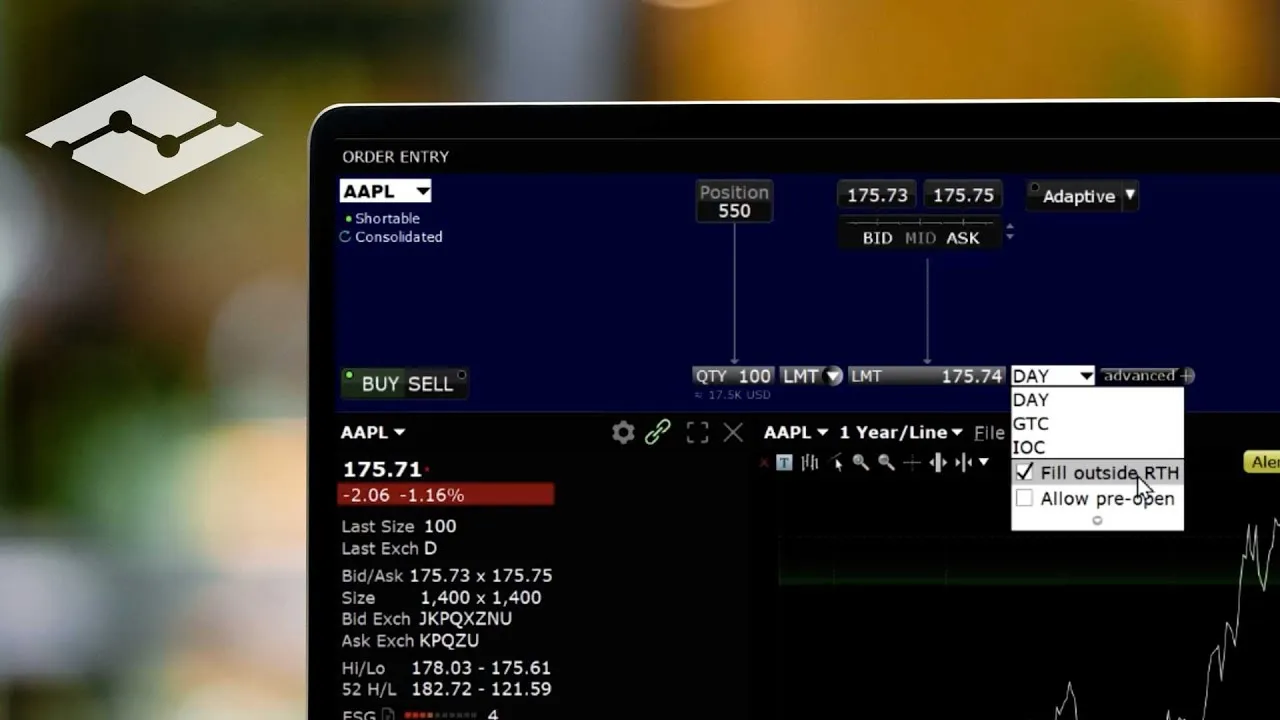
Not every product supports the flag. IBKR's lesson notes that if outside RTH is not available for a product, the preset is simply not applied, so check the confirmation on anything unusual.
Interactive Brokers after hours trading
After hours, 16:00 to 20:00 ET, works the same way as the pre-market: limit orders with the outside RTH flag. For a momentum trader the after-hours session is mostly about earnings and late news. Two things differ from the morning:
- Liquidity can fade fast. A book that was busy at 16:05 on an earnings headline can be close to empty by 19:30. Check the depth before you size, not just the last price.
- Orders do not carry over on their own. A DAY order sent after hours expires at the end of that session. If you want it working overnight and into the next day, you need the overnight time in force below.
IBKR overnight trading
IBKR's overnight session covers over 10,000 US stocks and ETFs from 20:00 to 03:50 ET, and every client with US stock trading permission has access automatically. IBKR also says overnight US stock market data is free with trading permission. It is a different market from the pre-market, and IBKR's own lessons are blunt about the limits.
Order types. IBKR's overnight limit order lesson says "only Limit and Adaptive order types are currently supported in Overnight Trading", and that GTC orders are not supported. IBKR staff put it more simply on the outside RTH lesson: "Only Day Limit orders are allowed in the US overnight trading session."
Time in force. In TWS you pick it from the Time in Force drop-down:
- Overnight: active from 20:00 to 03:50 only, then cancelled if unfilled. A yellow crescent moon icon marks it.
- Overnight + Day: IBKR describes its SMART + OVERNIGHT order as keeping the order working from the overnight session through 20:00 the next day, smart-routed through each session.
Where it trades. In the order's Advanced destination list, IBKR's overnight lesson for TWS names two destinations that permit overnight trading, IBEOS and Overnight, and says TWS selects the overnight destination for you when you choose the overnight time in force. IBKR lists the IBEOS fee on Tiered as $0.0010 a share to take liquidity and nothing to add it (IBEOS fees). IBKR also says it partnered with the liquidity provider Blue Ocean for overnight quotes.
Our view. Overnight is useful for reacting to news when you cannot wait for 04:00, or for exiting a position after a late headline. It is not a scalping session. One trader in the comments under IBKR's overnight lesson reports fills of a few shares against quotes showing 100, each paying a full minimum commission. If you trade it, use small size and limits you would be happy to be filled at.
What changes outside regular hours
The price chart looks the same at 07:00 as at 11:00. The market under it is not.
- Thinner books, wider spreads. IBKR's overnight lesson says it restricts clients to limit orders "due to the less liquid conditions in thin markets outside of regular trading hours." In the pre-market, a gapper with 300 shares on each level is normal, so the same offset buys fewer shares before it hits your limit. Size down.
- No LULD pauses. The Limit Up-Limit Down plan "applies during regular trading hours of 9:30 am ET - 4:00 pm ET." Before the open, there are no LULD bands and no five-minute pauses: a stock can move 20% in a minute and keep going. The bands and pauses start at 09:30; what happens to your orders then is in our post on LULD trading halts.
- Stops are different. A plain stop becomes a market order, so it does not work outside RTH. IBKR staff on the outside RTH lesson: "Stop Limit orders can be set to work Outside RTH, but plain Stop orders do not work outside regular trading hours." A stop-limit can be jumped when price gaps through its limit. Our post on why a pre-market stop loss did not trigger walks through it with numbers.
- Costs. On IBKR Pro, the per-share rates do not change by session, but an order that stays open overnight counts as a new order for commission minimums. On IBKR Lite, outside-RTH trades in US listed stocks are commission-free only while they stay at or under 10% of your monthly US stock volume, and overnight trades are charged at Fixed rates (IBKR commissions).
Common extended hours mistakes on IBKR
| What happens | Why | Fix |
|---|---|---|
| A pre-market buy is accepted but never fills | Outside RTH not ticked, so it waits for 09:30 | Tick the flag in presets; cancel and resend |
| A market order fills at the open, far from where you pressed | Pre-market market orders are treated as market-on-open | Use a limit |
| Your stop did nothing at 07:50 | Plain stops do not work outside RTH | Stop-limit with outside RTH, or a stop your software holds |
| An after-hours order is gone the next morning | DAY orders expire at the end of the session | Resend, or use Overnight + Day |
| Overnight order rejected | Market, stop or GTC sent to the overnight session | DAY limit with the Overnight time in force |
If IBKR rejects an extended-hours order with a message, our post on why IBKR rejected your order lists the common ones and their fixes. The wider picture of which order types work in which session is in our guide to day trading order types, and the case against market orders before the open is made with numbers in market vs limit orders on small caps.
Where Scalpel fits
Scalpel is built first for the pre-market. It connects to your own IBKR account through TWS or IB Gateway, and it handles the extended-hours rules for you:
- Every order is a limit. Buys go out at the ask plus your Buy offset, sells at the bid minus your Sell offset, so every order is valid in the pre-market and after hours (entries and fills).
- Extended-hours fills in Settings > Trading (on by default) decides whether your LIVE buys may fill outside regular hours. Exits always may: stops, targets, sells and Flatten All are all sent with the outside-RTH flag (settings: trading).
- Stops work before the open. Scalpel holds your stop in the app; when price trades through it, it sends a sell limit 5 cents under the last trade with the outside-RTH flag, and re-prices it if the market runs away (pre-market stops).
- Trading hours are 04:00 to 20:00 ET. Outside them, and at weekends and on holidays, the order buttons grey out; on early-close days after hours ends at 17:00. Scalpel does not trade IBKR's overnight session. If you need overnight orders, use TWS for them.
Our section video on stops shows how the app-held stop works, including before the open:
The trade-off is plain: Scalpel's stops only work while it is running and connected, and no fill is guaranteed, in the pre-market least of all. For the morning itself, our pre-market routine and pre-market scanning guides cover the hours from 04:00 to the open, and how to find pre-market gappers covers what to look for.
Trading carries a significant risk of loss. Nothing here is financial advice.
Questions
- What are Interactive Brokers' extended trading hours?
- For US stocks, the pre-market runs from 04:00 to 09:30 ET and after hours from 16:00 to 20:00 ET. IBKR also runs an overnight session from 20:00 to 03:50 ET, Sunday night through Friday morning, in over 10,000 US stocks and ETFs.
- How do I trade pre-market on IBKR?
- Use a limit order and allow it to fill outside regular trading hours: in TWS, tick the outside regular trading hours box under Global Configuration, Presets, Stock, Timing, or tick Fill Outside RTH in the order's Time in Force drop-down.
- Can I use market orders in IBKR extended hours?
- No. IBKR treats market orders placed before regular trading hours as market-on-open orders, so they wait for 09:30 ET. Extended sessions take limit orders, and the overnight session takes DAY limit orders only.
- Do stop losses work after hours on IBKR?
- Plain stop orders do not work outside regular trading hours. A stop-limit can, if it is set to work outside RTH, but price can gap through its limit and leave it unfilled.
- Is IBKR overnight trading free?
- Overnight data is free with US stock trading permission. Trades pay normal IBKR Pro commissions; IBKR Lite accounts are charged Fixed rates for overnight trades.
Related guides
Guide 5.5Stops in the pre-market: why they cannot sit on the bookUS exchanges take only limit orders before 09:30, so a plain stop cannot guard a pre-market trade. How Scalpel's app stops fill the gap, and their limits.Guide 14.2A pre-market routine with ScalpelA step-by-step routine from 04:00 ET to the open: connect, scan for gappers, check dilution and borrow, load your desks and set your risk before the bell.Guide 8.3Scan the pre-marketScan pre-market movers from 04:00 ET in Scalpel: what the gainers, volume spike and gap scans show before the open, gap and go, and what changes at 09:30.
Keep reading
- Day trading order types: what scalpers actually useDay trading order types: market, limit, marketable limit, stop, stop-limit and time in force, with a worked example and what scalpers really use on IBKR.
- Marketable limit order: the order type scalpers actually useA marketable limit order fills at once like a market order but caps your price. How it fills, how far through the ask to price it, and the TWS setup.
- Market order vs limit order in day trading: the small-cap costMarket order vs limit order in day trading small caps: what slippage costs in R on a thin book, why IBKR holds pre-market market orders, and what to use.
Practice in SIM, against the live book.A lifetime license, every update included, with a 7-day refund guarantee.Ask in DiscordGet Scalpel