Why IBKR rejected your order: the common messages and fixes
By Scalpel Team. , updated . 8 min read.
In short
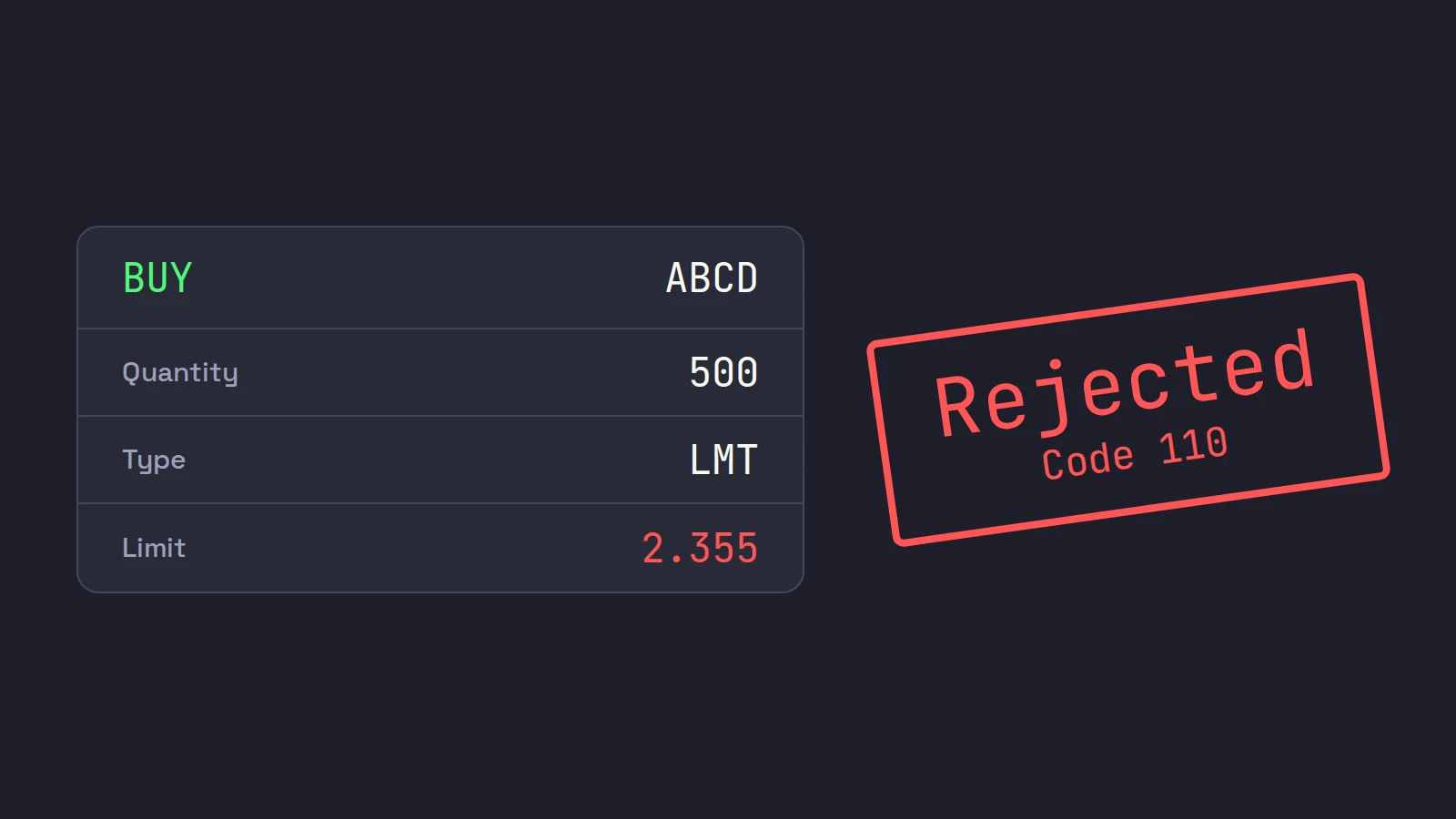
An IBKR order rejected message always says why, and nearly every rejection is one of a handful of causes: not enough buying power or margin, a limit price too far through the market, an order too large, a price with too many decimals, your own TWS precautionary settings, an order type not allowed outside regular hours, a sell that would go short, or a missing trading permission. Find the message below, fix that one thing, and resend. A rejected order never reached the market, so nothing was bought or sold.
A rejection always feels like it comes at the worst moment, because it does: the moments you trade fastest are the moments you are most likely to send something the broker will not accept. The good news is that IBKR almost always tells you which rule you hit. The bad news is that it says so in broker language, sometimes in capital letters, sometimes as a numbered code.
This guide translates the common Interactive Brokers order rejected messages, one per heading, with the cause and the fix in TWS. It is part of our order types for day trading series. Rules, codes and settings checked on October 22, 2026. Scalpel is independent and not affiliated with or endorsed by Interactive Brokers.
Where to read the reason
In TWS, the rejection appears as a message with IBKR's reason, and the order stops working. If you trade through the API (or an app built on it), the same reason arrives as an error code. IBKR's API reference lists the ones you will meet most (TWS API message codes):
| Code | IBKR's text | What it means |
|---|---|---|
| 201 | Order rejected - Reason: | IBKR's servers refused the order; the reason follows |
| 202 | Order cancelled - Reason: | An order that was active was cancelled, for example by a price check |
| 110 | The price does not conform to the minimum price variation for this contract | Too many decimals |
| 163 | The price specified would violate the percentage constraint specified in the default order settings | Your own TWS precautionary settings |
| 404 | Shares for this order are not immediately available for short sale | The sell is bigger than your position |
| 354 | Not subscribed to requested market data | No live data for that stock (a data error, not an order rejection) |
An order can also end up Inactive. IBKR's API documentation lists the reasons: the order "is invalid or triggered an error," including "a regulatory size reject," or it is "blocked by TWS due to a precautionary setting and appears there in an untransmitted state" (TWS API order status).
Order rejected: insufficient buying power at IBKR
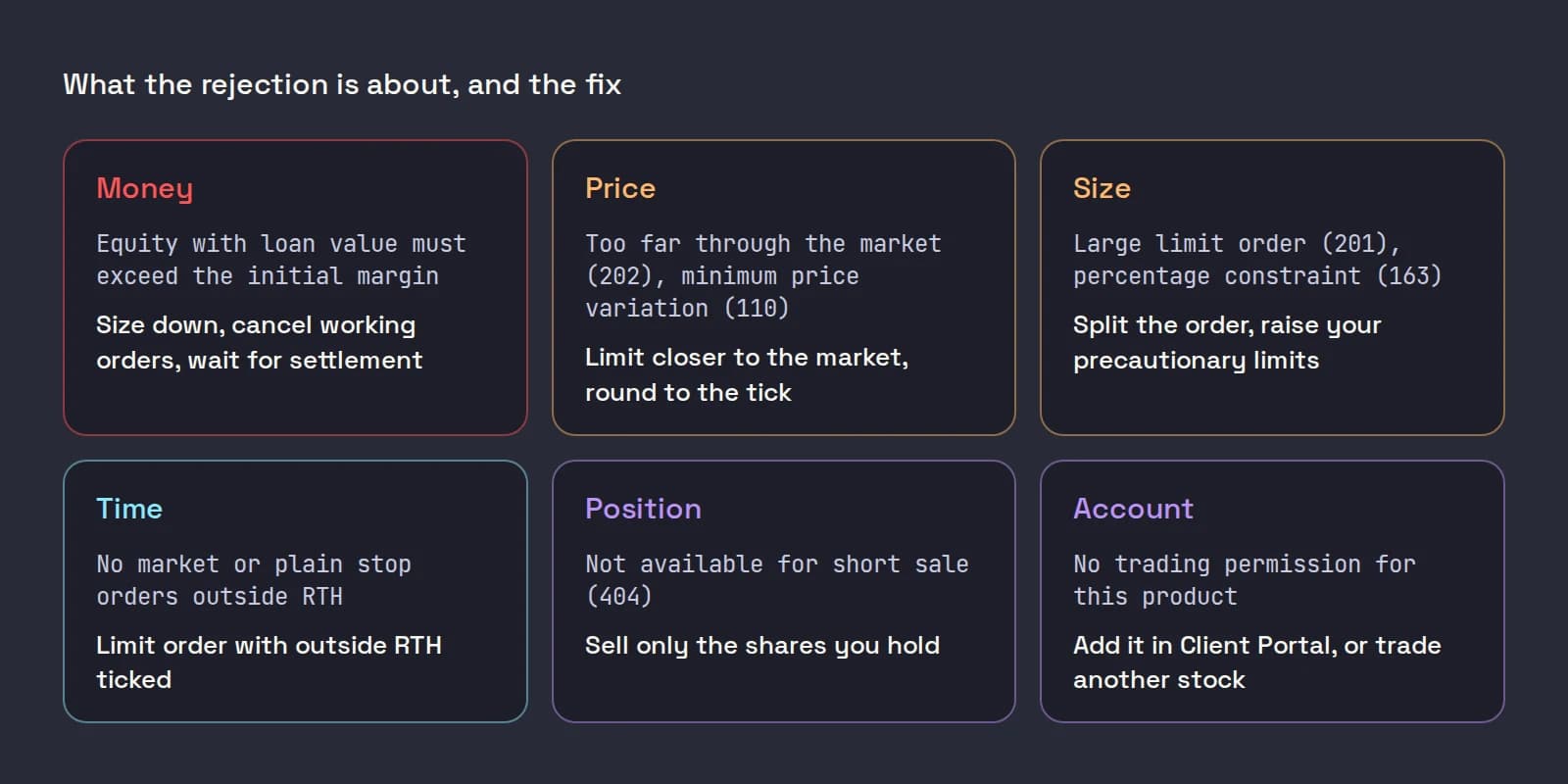
The message. Traders commonly report this one in capitals: the order is not accepted because your equity with loan value must exceed the initial margin the new position needs, with both numbers filled in.
The cause. The order would need more margin, or more cash, than the account has free right now. In a margin account, open positions and working orders already use some of it. In a cash account, only settled cash counts. US stock trades settle one business day after the trade under the SEC's T+1 rule, in force since May 28, 2024 (SEC press release 2023-29), so the proceeds of this morning's sale cannot pay for another buy until tomorrow.
Day trading rules. FINRA replaced the pattern day trader rule with intraday margin requirements effective June 4, 2026, but firms may phase the change in until October 20, 2027 (FINRA Regulatory Notice 26-10), so your account may still be under the old rules for now. Either way, IBKR rejects the trade that would break whichever rule applies to you. See the PDT rule change on IBKR for what changed.
The fix. Size down, cancel working orders you do not need, or wait for settlement in a cash account. If your size routinely bumps the limit, size by risk, not by buying power, and see the small account setup.
"Too far through the market": price checks
The message. IBKR's documentation gives the wording: "we cannot accept your order at the limit price #.## you selected because it is too far through the market. Please submit your order using a limit price that is closer to the current market price" (IBKR API order placement considerations). Through the API it arrives as a cancel with error 202.
The cause. IBKR applies price checks under its obligations as a broker. A buy limit far above the ask, or a sell limit far below the bid, looks like an error to those checks. IBKR also says it may reject an order that does not execute at once if its limit is "more than allowed distance from the current reference price."
The fix. Bring the limit closer. This bites hardest on cheap stocks, because offsets in cents are huge in percent: 30 cents over the ask is 1.5% of a $20 stock and 20% of a $1.50 one. Scale your hotkey offset to the price.
Large size rejects
The message. "In accordance with our regulatory obligations as a broker, we cannot accept Large Limit Orders for #### shares of ABCD that you have submitted. Please submit a smaller order," sometimes with a suggested maximum (error 201, same IBKR page).
The fix. Split the order, or use the smaller size it suggests. On thin small caps the limit can be lower than you expect.
The price does not conform to the minimum price variation
The cause. Your limit has more decimals than the stock allows. Under Regulation NMS Rule 612, orders in stocks priced at $1.00 or more cannot be priced finer than a penny, and stocks under $1.00 trade in increments of $0.0001 (17 CFR 242.612). The SEC adopted a half-penny increment for some tightly quoted stocks in 2024, but on June 11, 2026 it extended relief from compliance until the first business day of November 2027 (SEC Chairman's statement).
The fix. A buy at 2.355 is refused; 2.35 or 2.36 is fine. Under $1.00, 0.8125 is valid. If a hotkey offset or a percentage-based price produces fractions, round it.
Precautionary settings (code 163)
The cause. These are your own limits, not IBKR's. In Global Configuration > Presets > Stock, the precautionary settings (Size Limit, Total Value Limit, Percentage and Number of Ticks) check every order. In TWS a breach shows a warning you can Override and Transmit; an API order gets error 163 or sits untransmitted. IBKR's own lesson on presets walks through both the order defaults and these limits:
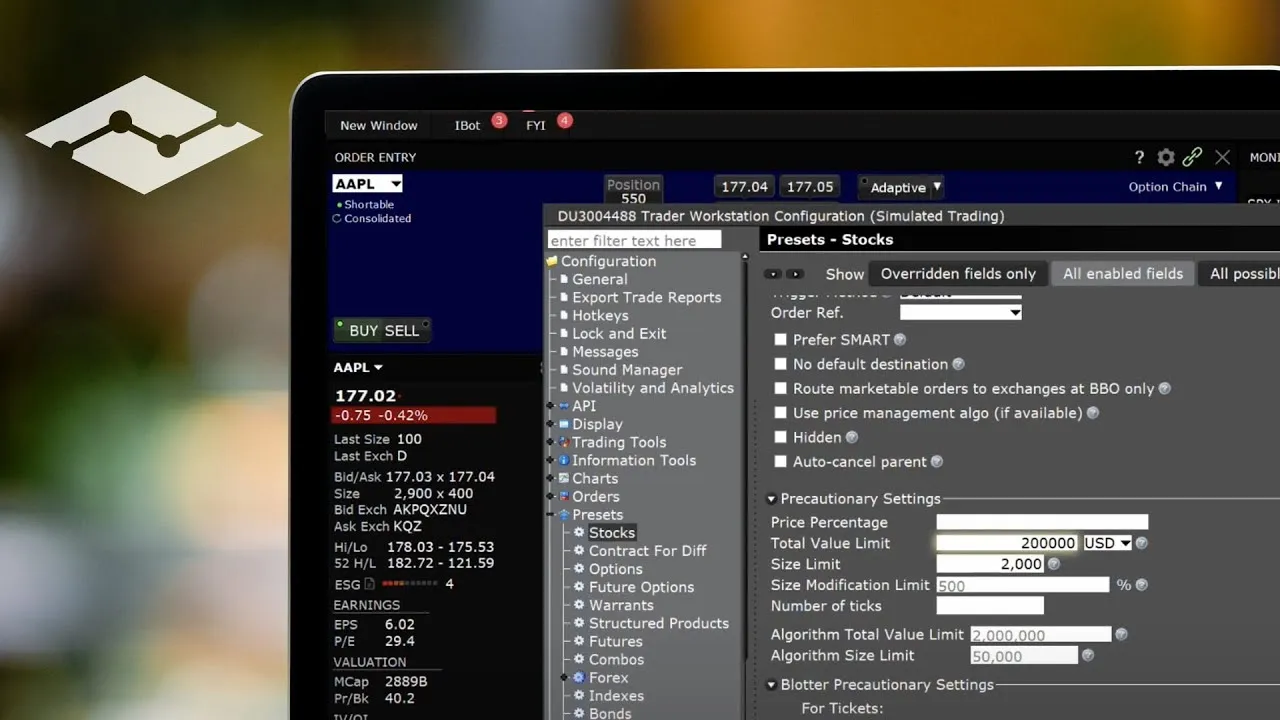
The fix. Set the limits just above your largest normal order, so they still catch a fat-fingered extra zero. Entering zero turns a check off, which is the wrong fix. API traders also have a separate API > Precautions page; if you bypass checks there, put caps in your app instead (enable the TWS API).
IBKR order rejected outside RTH
The cause. Outside regular trading hours, the exchanges accept limit orders only. IBKR says so directly on IBKR Campus: "It is not possible to submit market orders outside of RTH, including a stop loss," and stop-limit orders can be set to work outside RTH but "plain Stop orders do not." In the overnight session, from 20:00 to 03:50 ET, "Only Day Limit orders are allowed" (IBKR Campus: trading outside RTH).
What it looks like. Sometimes a refusal, more often an order that is accepted but simply waits for 09:30 because it was not allowed to fill outside regular hours. Both feel the same at 07:30 ET.
The fix. Use a limit order, tick Allow order to be activated, triggered, or filled outside of regular trading hours in Global Configuration > Presets > Stock under Timing, and protect pre-market positions without plain stops (IBKR extended hours).
A sell that would go short
The message. "Shares for this order are not immediately available for short sale" (code 404), and IBKR holds the order while it tries to locate shares.
The cause. You sold more than you own, usually a second sell press, a stop sized for the full order after a partial fill, or a scale-out key with a fixed size. Anything above your position is a short sale. Short sales also need shares to borrow, and after a 10% drop the SEC's short sale circuit breaker limits them further: see short sale restriction.
The fix. Sell only what you hold. Check the position before a second sell, and use a close-position action for the last shares.
Trading permissions and restricted stocks
The cause. Your account has no permission for that product or market, or IBKR restricts the stock. OTC and very low-priced stocks are the usual cases.
The fix. Add the permission in Client Portal's trading permissions settings, or trade a different stock.
No market data
Error 354 is about quotes, not orders, but it causes rejections indirectly: a hotkey priced off the ask has nothing to price from when you have no live data for the stock. Check your subscriptions in IBKR market data for day trading. And if every API order fails while quotes work, Read-Only API is probably still ticked in Global Configuration > API > Settings.
Where Scalpel fits
Scalpel is a keyboard-first desktop cockpit for your own IBKR account, connected through TWS or IB Gateway. It sends every LIVE order as a limit order, every sell flagged for extended hours, so its keys never send the market orders or plain stops that IBKR refuses outside regular hours. Sells are capped to the shares you hold, so it cannot send a short (long only).
When IBKR does refuse an order, Scalpel shows a red toast with IBKR's own reason and code, such as ABCD rejected: ... (IB 201), says "Rejected.", and marks the order Rejected in the desk's Orders tab. Any other wording is Scalpel's own check, refused before anything reaches IBKR: your fat-finger cap, max position, daily loss limit, a halted stock, or no book to price from (fix a rejected order, fat-finger and position caps).
Our troubleshooting video covers rejected orders alongside connection, data, fill and closed-market problems:
Where TWS is the better choice: if your rejections are about products Scalpel does not trade (options, futures, short sales), TWS is where you fix and trade them. Scalpel's stops are app-monitored, not resting orders at IBKR, so they only work while Scalpel runs with a live feed.
Trading carries a significant risk of loss. Nothing here is financial advice.
Questions
- Why was my Interactive Brokers order rejected?
- Read IBKR's reason in the message. The usual causes are not enough buying power or margin, a limit price too far from the market, an order too large, a price with too many decimals, your own precautionary settings, an order type not allowed outside regular hours, a sell larger than your position, or a missing trading permission.
- What does insufficient buying power mean on IBKR?
- The order needs more margin or settled cash than the account has free. Working orders and open positions use buying power, and in a cash account sale proceeds settle one business day later, so size down, cancel unneeded orders, or wait for settlement.
- Why does IBKR reject my order outside regular trading hours?
- Outside regular hours only limit orders are accepted. Market orders and plain stop orders are not allowed, and in the overnight session only day limit orders work. Use a limit order with the outside regular trading hours box ticked.
- What does 'too far through the market' mean?
- IBKR's price checks refused a limit price far beyond the current market, such as a buy limit well above the ask. Send the order with a limit closer to the current price.
- What does error 110 mean in TWS?
- The price does not conform to the minimum price variation. Stocks at $1.00 or more trade in whole cents and stocks under $1.00 in increments of $0.0001, so round your limit price.
- Did a rejected order buy or sell anything?
- No. A rejected order never reached the market, so your position is unchanged. Fix the cause before you press again, because resending the same order repeats the same rejection.
Related guides
Guide 13.5A LIVE order was rejectedA LIVE order came back rejected: read IBKR's reason in the toast, then check Read-Only API, trading permissions, buying power and Scalpel's own caps.Guide 14.4Settings for a small accountSettings that suit a small account: risk-based presets, tight caps, a daily loss limit you will respect, the right commission plan, and what to watch for.Guide 1.5Enable the API in TWS and IB GatewayTurn on Enable ActiveX and Socket Clients in TWS or IB Gateway, set the socket port, allow 127.0.0.1 and switch off read-only API so Scalpel can trade.
Keep reading
- Day trading order types: what scalpers actually useDay trading order types: market, limit, marketable limit, stop, stop-limit and time in force, with a worked example and what scalpers really use on IBKR.
- Marketable limit order: the order type scalpers actually useA marketable limit order fills at once like a market order but caps your price. How it fills, how far through the ask to price it, and the TWS setup.
- Market order vs limit order in day trading: the small-cap costMarket order vs limit order in day trading small caps: what slippage costs in R on a thin book, why IBKR holds pre-market market orders, and what to use.
Practice in SIM, against the live book.A lifetime license, every update included, with a 7-day refund guarantee.Ask in DiscordGet Scalpel