Stop-limit vs stop-market orders: which one protects you
By Scalpel Team. , updated . 9 min read.
In short
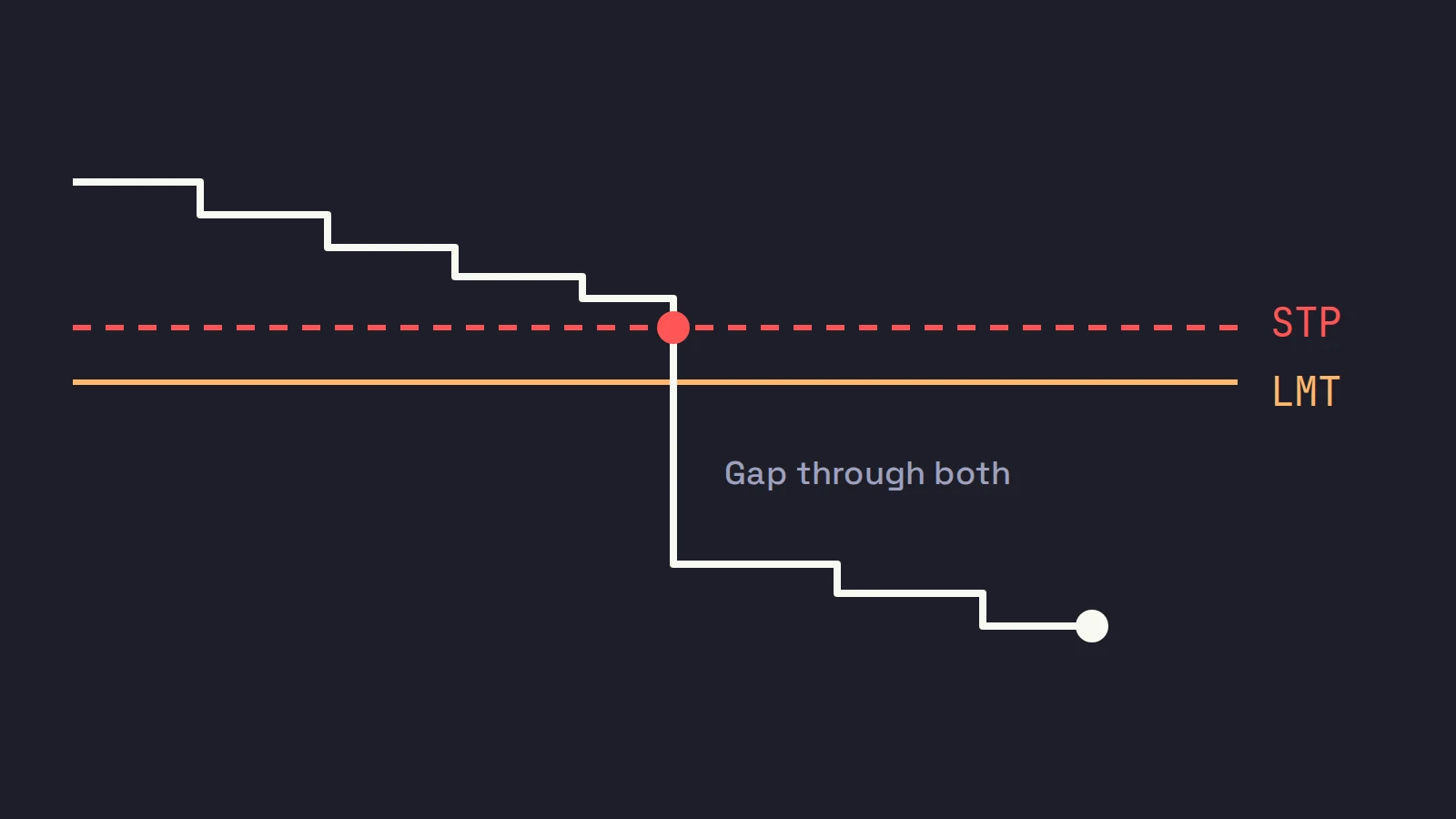
Stop limit vs stop market is a choice between getting a fill and getting a price. A stop-market order (a plain stop) becomes a market order when price reaches your stop: it will almost always fill, but the fill can be far below the stop. A stop-limit order becomes a limit order: it never fills worse than your limit, but if price gaps past the limit it does not fill at all and you are still in the trade. For a day trader protecting a long in regular hours, a plain stop or a stop-limit with a wide limit is the safer exit; before 09:30 ET only the stop-limit works. Neither one guarantees your loss.
Every stop order has two parts: a trigger price and the order it sends when the trigger is hit. The only difference between a stop-market and a stop-limit is that second order. That one difference decides whether you get out in a fast drop, and at what price.
Interactive Brokers' own course on order types sums up the choice in one line: "In general, orders guarantee a fill or guarantee a price, but not both" (IBKR Campus: stop and stop limit orders). This post works through what that means on a small cap, with the same position in an orderly drop, a gap, a halt and the pre-market. It is part of our pillar on day trading risk management. Scalpel is independent and not affiliated with or endorsed by Interactive Brokers.
Stop limit vs stop market: the definitions
The SEC's investor bulletin on stop, stop-limit and trailing stop orders defines them this way:
- Stop order (also called a stop-loss order): "When the stop price is reached, a stop order becomes a market order." The bulletin adds that the stop price "is not the guaranteed execution price" and the fill "can deviate significantly from the stop price."
- Stop-limit order: "Once the stop price is reached, a stop-limit order becomes a limit order that will be executed at a specified price (or better)." And: it "may not be executed if the stock's price moves away from the specified limit price."
The two prices of a stop-limit do not have to match. The bulletin's own example is a sell stop-limit with a stop of $3.00 and a limit of $2.50: it becomes live when the market reaches $3.00, and can then fill anywhere from $3.00 down to $2.50, but not below. Our glossary has the short versions: stop order and stop-limit order.
| Stop-market (STP) | Stop-limit (STP LMT) | |
|---|---|---|
| Sends when triggered | A market order | A limit order at your limit price |
| Will it fill? | Almost always, while the stock trades | Only if there are bids at or above your limit |
| At what price? | Whatever the book offers | Your limit or better |
| Risk you keep | A bad fill | No fill at all |
| Works before 09:30 ET | No: market orders are not accepted | Yes, with outside RTH set |
Stop loss vs stop limit: the same question
People often ask "stop loss or stop limit?" A stop-loss is not a third order type. It is what you use the stop for. Either order can be your stop-loss; the question is which one you want carrying it.
The same trade, four ways
You hold 600 WXYZ from 8.20 with a stop at 7.95: 25 cents of risk, $150, your 1R. Compare a stop-market at 7.95 with a stop-limit at 7.95, limit 7.90.
1. An orderly drop
Prints step down: 7.97, 7.96, 7.95. The bids are 300 at 7.95 and 400 at 7.94.
- Stop-market: triggers on the 7.95 print and sells 300 at 7.95 and 300 at 7.94, average 7.945. The loss is $153, about 1.02R.
- Stop-limit: triggers on the same print and sends a sell limit at 7.90, which is marketable against those bids. Same fill, same loss.
In normal trading the two orders behave the same. The difference only shows when the book thins out.
2. A gap through a thin book
A seller sweeps the bids. The tape prints 7.98, then 7.81, with nothing in between. The bids left are 200 at 7.80, 300 at 7.76, 500 at 7.70 and 800 at 7.62.
- Stop-market: triggers on the 7.81 print and sells into the book: 200 at 7.80, 300 at 7.76 and 100 at 7.70. Average 7.7633, a loss of $262, about 1.75R. Painful, but you are out.
- Stop-limit at 7.90: triggers on the same print and sends a sell limit at 7.90. The best bid is 7.80, so the order sits above the market, unfilled. If WXYZ is 7.40 ten minutes later and you sell there, the loss is $480: 3.2R, and only if you were watching.
- Stop-limit at 7.70: a 25 cent gap between stop and limit. The same print sends a sell limit at 7.70, which takes the same three levels as the market order: average 7.7633, $262. The wide limit fills like a market order here, but it would still refuse to sell below 7.70 if the bids vanished entirely.
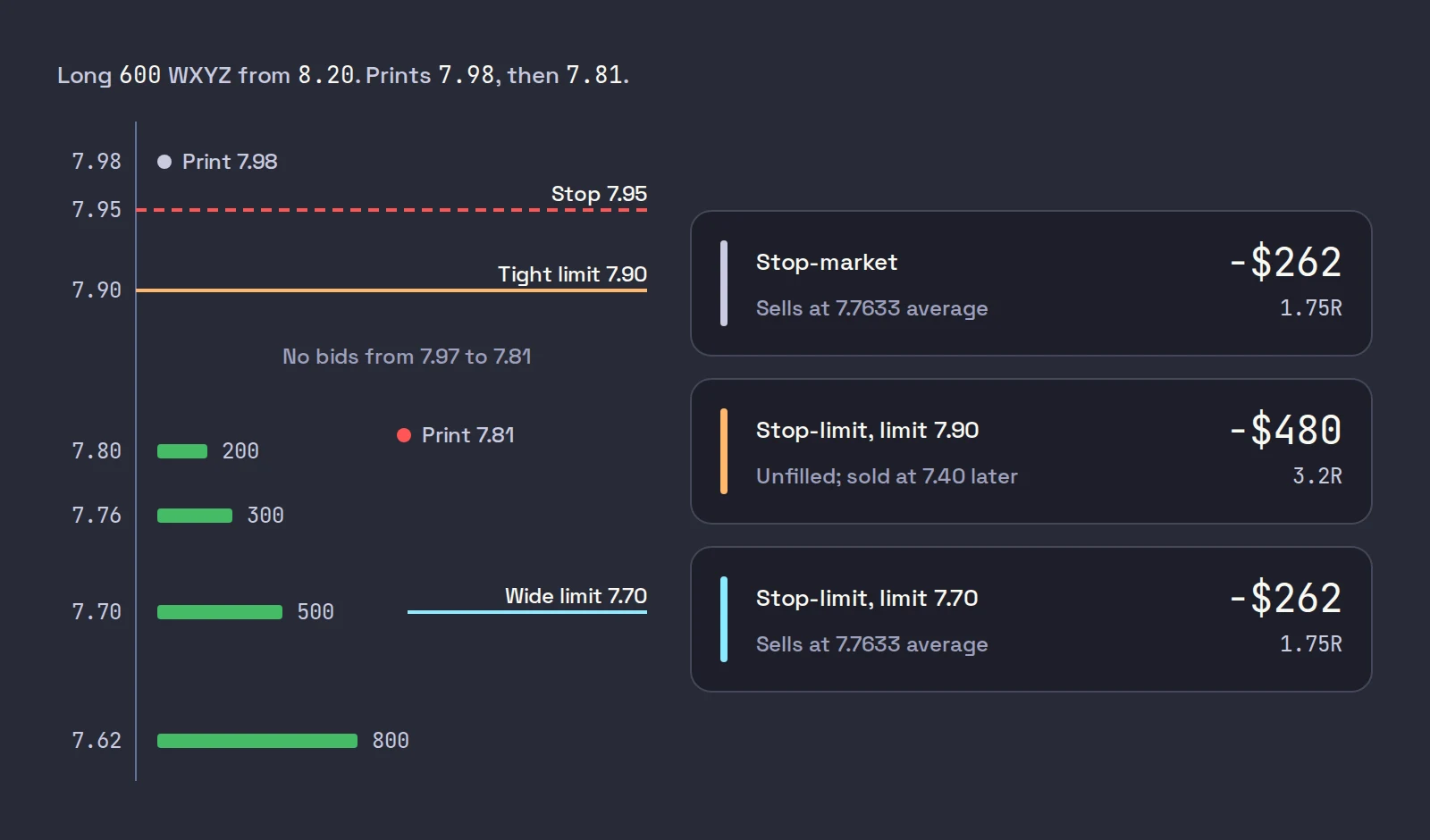
That is the trade-off in one example. The tight stop-limit protected a price you never got, and cost you twice as much. The plain stop and the wide stop-limit both got you out, at a bad price.
3. A halt
Small caps halt often under the Limit Up-Limit Down plan. A Tier 2 stock priced above $3.00 has a 10% price band, and one between $0.75 and $3.00 has a 20% band; if the price sits at the band for 15 seconds, trading pauses for five minutes (FINRA: guardrails for market volatility).
Say WXYZ spikes to 9.00 and halts limit up, then reopens at 7.60, under your stop, without trading anywhere in between. Neither order can fire during the pause. At the reopen:
- Stop-market: triggers on the first print, 7.60 or wherever it is, and sells into whatever bids exist. A loss of about $360 at 7.60, 2.4R, possibly more.
- Stop-limit, either limit: both 7.90 and 7.70 are above the market. Unfilled.
No order you can place protects a position through a halt. LULD trading halts covers what happens to resting orders in detail.
4. Before the open
From 04:00 to 09:30 ET, exchanges take limit orders only. A plain stop has nothing it can send, so at most brokers it simply waits for the open. A stop-limit can work if you allow it to trigger outside regular trading hours, which in TWS is the Allow order to be activated, triggered or filled outside of regular trading hours setting, but pre-market books are thin, so the gap problem from case 2 is the normal case. Why your stop loss did not trigger in the pre-market walks through it with the IBKR settings.
How bad can a stop-market fill get?
Usually a few cents. On extreme days, much worse. The joint CFTC and SEC staff report on May 6, 2010 found that over 20,000 trades across more than 300 securities executed at prices more than 60% away from their values just moments before. It also describes retail stop-loss and market orders that were converted to limit orders and re-priced lower and lower, until they reached unrealistically low bids. Those trades were later broken, but you cannot plan on that.
That is the case for the stop-limit: it puts a floor under the worst fill. The case against it is case 2 above, which happens far more often on small caps than a flash crash does.
Which one protects you?
Our view, for a long-only day trader in US small caps:
| Situation | What we would use | Why |
|---|---|---|
| Regular hours, liquid stock, normal spread | Stop-market, or a stop-limit with a wide limit | Getting out matters more than a few cents |
| Regular hours, thin small cap | Stop-limit with a limit 15 to 30 cents (or a few percent) under the stop | Fills through most gaps, but caps a catastrophic print |
| Pre-market or after hours | Stop-limit with outside RTH set and a wide limit, tested in paper first | The only stop that can work there |
| Through a halt | Nothing protects you | Size for it, or do not hold into one |
| Holding while away from the screen | A broker-side order of either kind | Anything that needs you or your computer watching fails here |
The common mistake is the tight stop-limit: a stop at 7.95 and a limit at 7.94 or 7.93. It feels precise. In practice it is the order most likely to leave you holding a falling stock.
How IBKR triggers and handles stops
Three details from Interactive Brokers' order types page matter for both orders:
- Simulated orders. IBKR may hold stop and stop-limit orders on its own system and send them to the exchange only when triggered. Your stop is not on the exchange's book until then.
- Data filters. IBKR warns that simulated orders depend on market data and may ignore last-sale prints outside the bid and ask, which can affect when a stop triggers.
- Trigger methods. You can choose how a stop is triggered: on last price, on the bid or ask, or doubled versions that need two prints in a row. The SEC bulletin notes that firms differ here too: "Some brokerage firms use only last-sale prices to trigger a stop order, while others use quotation prices."
How to place each one in TWS
IBKR's lesson shows both in the Mosaic order entry panel. This video from Interactive Brokers walks through creating a stop and a stop-limit, and where they appear in the Activity panel:
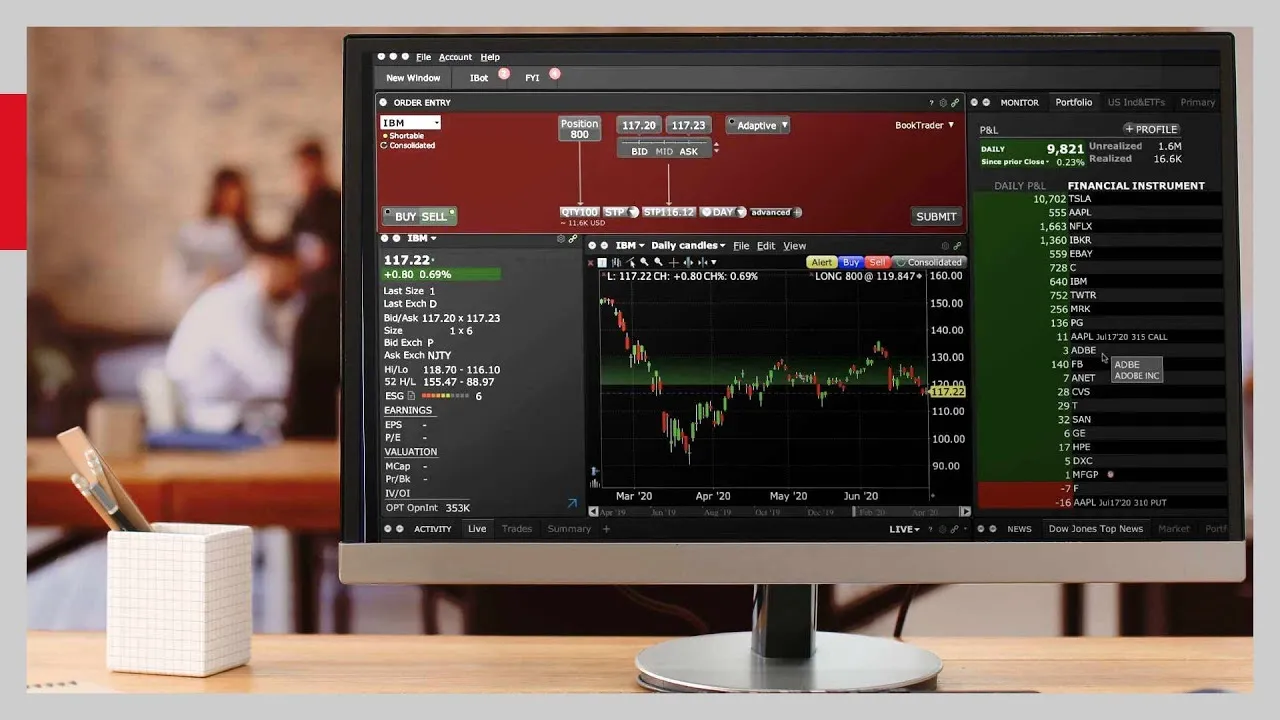
Select the position and choose Sell
Pick the stock, click Sell, and set the quantity to the shares you hold.
Pick the order type
In the Order Type drop-down, choose STP for a plain stop or STP LMT for a stop-limit.
Set the prices
For STP, enter the stop price below the market. For STP LMT, enter the stop price and, in the extra limit field, a limit price below it. On a small cap, leave a real gap between them: 15 to 30 cents, more on a pricier stock.
Check time in force and outside RTH
Leave DAY or choose GTC. If the stop must work before 09:30 or after 16:00, it has to be STP LMT with outside regular trading hours allowed.
Submit and confirm
Review the preview and transmit. The order shows on the Orders tab in the Activity panel.
To put the stop on at the same time as the entry, use a bracket order on IBKR. For where the stop price itself should go, see stop loss placement, and for orders that follow the price up, trailing stops. The full set of order types is in order types for day trading.
Where Scalpel fits
Scalpel does not use either order for its stops. It keeps the stop in the app, watches every trade print, and when price trades at or through your stop it sends a marketable limit sell: in LIVE, priced 5 cents under the last trade and flagged for extended hours, so it is accepted at 07:52 the same as at 11:00 (how stops work).
It sits between the two orders above. Like a stop-limit, the exit has a limit, so it will not sell at any price. Unlike a fixed stop-limit, it is priced off the trade that broke your stop, not a number set in advance, and if price trades under the limit, or the exit sits unfilled for 5 seconds, Scalpel cancels it and sends a new one under the latest trade, at 5 cents or about 1% under it, whichever is lower, up to 5 times (pre-market stops). This short video shows the stops and targets:
The limits, plainly. The stop only works while Scalpel is running and connected with a live feed and the symbol on a desk; a broker-side stop keeps working with your computer off. A halt still stops it, as it stops every order. And no fill is guaranteed: after 5 re-prices Scalpel leaves the last order working and tells you to check it in TWS.
Trading carries a significant risk of loss. Nothing here is financial advice.
Questions
- What is the difference between a stop limit and a stop market order?
- Both trigger at your stop price. A stop-market then sends a market order, which fills at whatever price the book offers. A stop-limit sends a limit order, which never fills worse than your limit but may not fill at all if price gaps past it.
- Is a stop limit or stop market better for day trading?
- In regular hours, a plain stop or a stop-limit with a wide limit, so you get out in a gap. Before 09:30 ET only a stop-limit can work, because market orders are not accepted. A tight stop-limit is the order most likely to leave you holding a falling stock.
- Can a stop-limit order not execute?
- Yes. If price falls through both your stop and your limit before the order fills, the limit order sits above the market unfilled, and you still hold the shares.
- Does a stop loss guarantee my exit price?
- No. A stop-market guarantees an attempt to fill, not the price, and the fill can be well under the stop in a gap or after a halt. A stop-limit guarantees the worst price, not the fill.
- Do stop orders work during a trading halt?
- No. Nothing trades during a halt, so no stop can fire. When the stock reopens, a stop-market sells at the reopening prices, which can be far below the stop, and a stop-limit with a limit above the market does not fill.
Related guides
Guide 5.1How Scalpel's stops workWhy Scalpel holds your stops in the app, not on the book: pre-market rules, the working stop, catastrophe net and take-profit, and what if Scalpel closes.Guide 5.5Stops in the pre-market: why they cannot sit on the bookUS exchanges take only limit orders before 09:30, so a plain stop cannot guard a pre-market trade. How Scalpel's app stops fill the gap, and their limits.Guide 15.1Day trading glossaryPlain definitions of the day trading and Scalpel terms used in these guides, from Level 2, VWAP and R multiples to float, borrow, dilution and LULD halts.
Keep reading
- Day trading risk management: the rules that keep you tradingDay trading risk management in five rules: fixed risk per trade, sizing from the stop, a daily loss limit, exposure caps and the math of drawdowns.
- Why your stop loss did not trigger in the pre-market on IBKRIBKR stop loss pre-market: why a plain stop does nothing before 09:30, how a stop-limit gets jumped in a thin book, and the TWS settings that help.
- Position sizing for day trading: size every trade by riskPosition sizing for day trading: shares = dollar risk / stop distance. Worked examples, caps from buying power and liquidity, and fees in the size.
Practice in SIM, against the live book.A lifetime license, every update included, with a 7-day refund guarantee.Ask in DiscordGet Scalpel