Trailing stops for day trading: cents, percent or structure
By Scalpel Team. , updated . 8 min read.
In short
A trailing stop follows the price up by a set distance and never moves down, so it locks in more of a winner the further it runs. Day traders trail by a fixed number of cents, a percent, a multiple of ATR, or the chart's structure, such as each new higher low or the low of each finished candle. The rule that matters most: the trail must be wider than the stock's normal pullback, or the first ordinary dip takes you out. Start trailing once the trade is working, not at the entry.
A trailing stop answers the question every winning trade asks: when do I get out? A fixed target sells at a number you picked before the move. A trailing stop lets the stock decide, and sells only when it pulls back by more than you allowed. That is the right tool for momentum stocks that sometimes run much further than anyone expects, and the wrong one if it is set tighter than the stock's normal rhythm.
This post covers the four ways to trail, the same trade run through each of them, how to set one in TWS, and how much each gives back. It is part of our pillar on day trading risk management. Scalpel is independent and not affiliated with or endorsed by Interactive Brokers.
How a trailing stop works
The SEC's investor bulletin on stop, stop-limit and trailing stop orders defines it as a stop or stop-limit order whose stop price is "a defined percentage or dollar amount" away from the market. As the price moves in your favor, the stop "trails" it; if it moves against you, the stop "remains fixed."
The bulletin's own example: you buy at $20, the stock rises to $22, and you set a sell trailing stop $1 below the market. It peaks at $24, so the stop sits at $23, and the shares are sold when the stock falls back to $23, "though the execution price may deviate from $23."
Two details from Interactive Brokers' order types page matter for how the exit fills:
- A plain trailing stop sends a market order when the stop price is hit.
- A trailing stop limit recalculates both the stop and a limit price as the market rises, using a trailing amount and a limit offset, and sends a limit order when the stop is hit. Like any stop-limit, it can be skipped in a gap.
Trailing stop vs stop loss
They do different jobs. Your initial stop loss sits under the level that proves the trade wrong and defines 1R (where to put your stop loss). A trailing stop takes over once the trade is working, and its job is to keep a winner from turning into a loser.
Whether trailing helps at all depends on the stock. Kathryn Kaminski and Andrew Lo showed that under a random walk, simple stop-loss rules "always decrease a strategy's expected return," but "in the presence of momentum, stop-loss rules can add value." In monthly U.S. equity data from 1950 to 2004, certain rules added 50 to 100 basis points per month during stop-out periods (SIFR working paper 63, 2008; published in the Journal of Financial Markets, 2014). Their data are monthly portfolios, not 1-minute small caps, but the logic carries: a trail pays when moves persist, and costs you in a choppy, mean-reverting stock.
The other reason to trail is behavioral. Terrance Odean's study of 10,000 brokerage accounts found that a stock up in value was more than 50 percent more likely to be sold on a given day than one that was down (Journal of Finance, 1998). People cut winners early. A trail you set in advance takes that decision out of the moment.
Four trailing stop methods for day trading
| Trail by | The stop sits | Good for | The catch |
|---|---|---|---|
| Fixed cents | A set amount under the highest price, e.g. 20 cents | Stocks in one price range you know well | Too tight on a $15 stock, too loose on a $2 one |
| Percent | A set percent under the high, e.g. 3% | Mixed price ranges; widens as price rises | Ignores how jumpy this stock is today |
| ATR | A multiple of the average true range under the high | Matching the trail to the stock's current volatility | Needs candle history; lags when volatility changes fast |
| Structure | Under each new higher low, or the low of each finished candle | Clean trends, where the chart shows where buyers are | Moves in steps, not ticks; can give back a lot at the end |
ATR stops and ATR position sizing covers the volatility version in detail.
The same trade, five trails
You buy 400 ABCD at 5.50 with a stop at 5.38: 12 cents, $48, your 1R. The stock runs in waves on the 1-minute chart:
| Candle | High | Low |
|---|---|---|
| 1 | 5.58 | 5.49 |
| 2 | 5.64 | 5.55 |
| 3 | 5.70 | 5.60 |
| 4 | 5.68 | 5.61 |
| 5 | 5.77 | 5.66 |
| 6 | 5.84 | 5.74 |
| 7 | 5.82 | 5.70 |
| 8 | 5.98 | 5.82 |
| 9 | 6.10 | 5.96 |
| 10 | 6.06 | 5.95 |
| 11 | 5.97 | 5.80 |
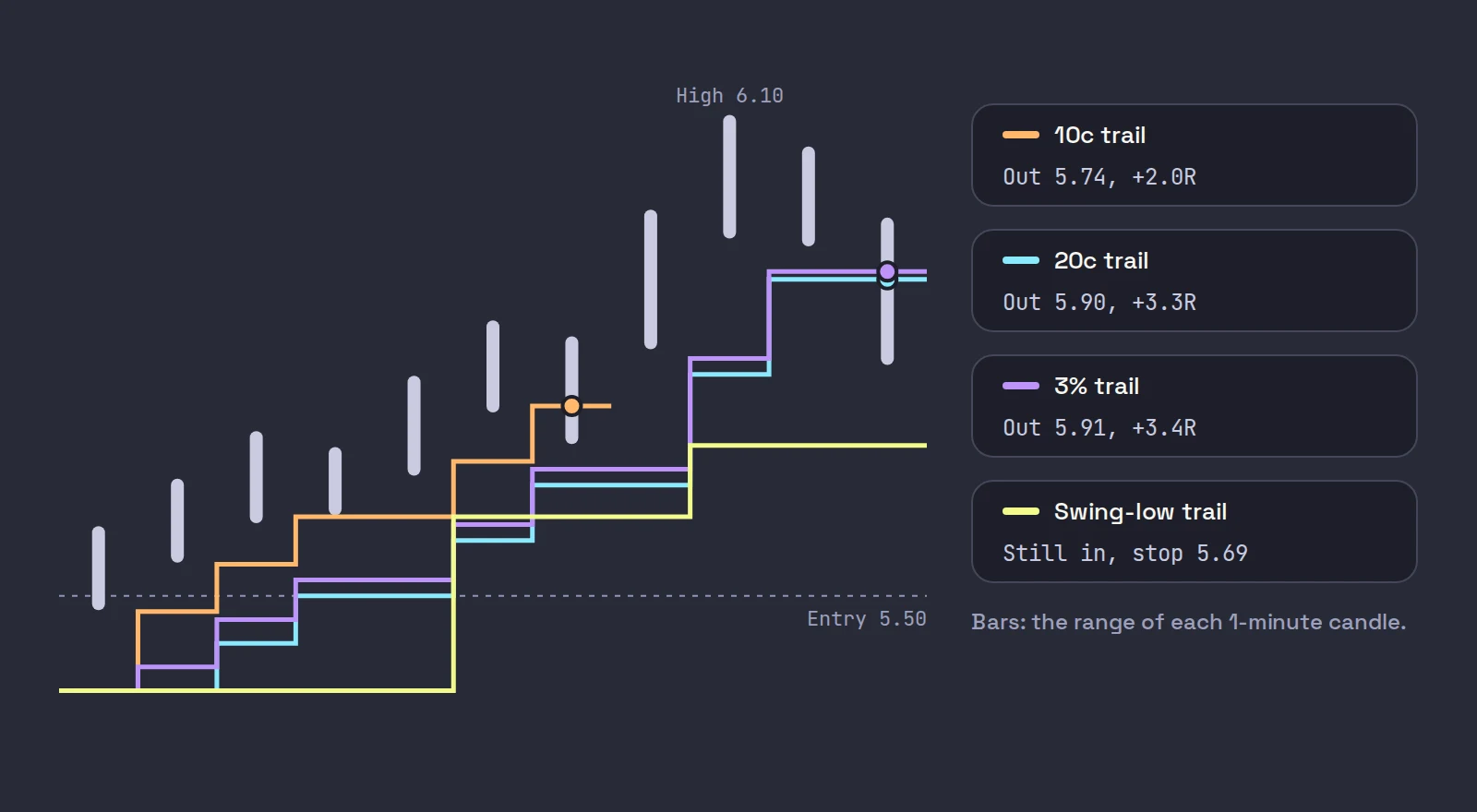
The two pullbacks are 9 cents (5.70 to 5.61) and 14 cents (5.84 to 5.70). The top is 6.10, 60 cents over the entry, or +5R at the high. Here is where each trail gets you out, before fees and slippage:
| Trail | Exit | Result | When |
|---|---|---|---|
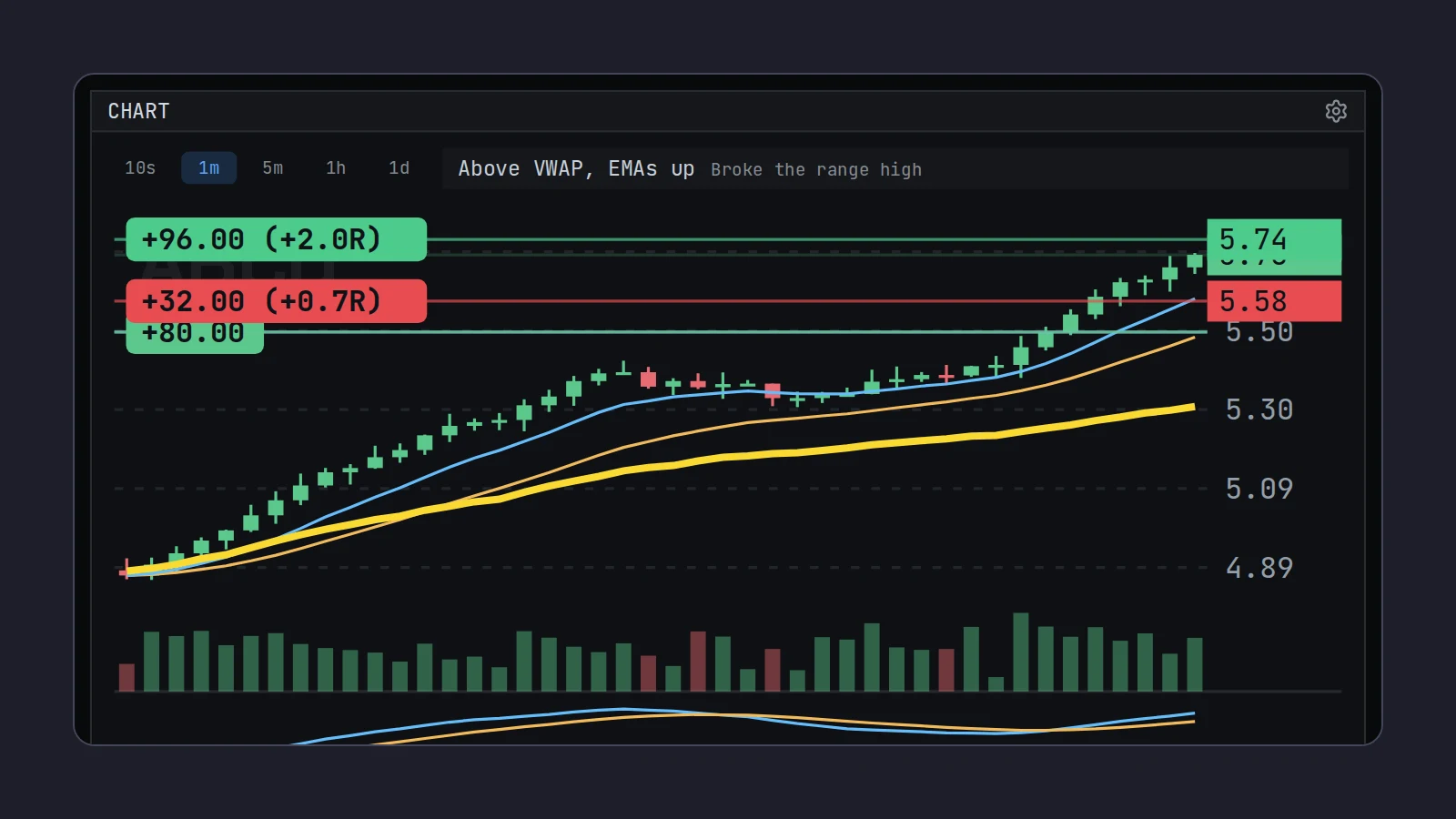
| 10 cents under the high | 5.74 | +$96, +2.0R | Candle 7: the 14 cent pullback |
| Low of each finished 1-minute candle, minus a cent | 5.73 | +$92, +1.9R | Candle 7 |
| 20 cents under the high | 5.90 | +$160, +3.3R | Candle 11 |
| 3% under the high | 5.91 | +$164, +3.4R | Candle 11 |
| Under the last higher swing low (5.70, minus a cent) | Still in at 5.80, stop 5.69 | Open, +$120 at 5.80 | Not yet |
What it shows:
- The tight trails were shaken out by an ordinary pullback. A 10 cent trail on a stock pulling back 14 cents cannot survive. The candle-low trail did the same: on a fast 1-minute chart, one red candle with a lower low is enough.
- The wider trails caught most of the run and gave back 19 or 20 cents from the high.
- The structure trail gives the stock the most room and gives back the most if the top is in. If 5.80 holds and the stock makes a new high, it was right. If not, it exits at 5.69, well under the others.
There is no best trail in general. There is a trail that fits this stock's pullbacks today. Measure the last two or three pullbacks and set the trail wider than them.
How much a trailing stop gives back
Every trail gives back at least its own distance from the high, plus slippage on the exit. On the 20 cent trail above, that is 20 cents of the 60 cent move, a third of the open gain, and on a fast drop the fill can be lower still. A trail is a trade of give-back for staying in. Two ways to soften it:
- Scale out, then trail. Sell half at a planned target, often +1R to +2R, and trail the rest. You bank part of the move and give the trail only half the shares.
- Tighten in steps. Start wide, then tighten once the stock is extended far above VWAP or its moving averages, where pullbacks tend to be sharper.
When to start trailing
Not at the entry. In the first minute of a trade, normal noise is often bigger than any sensible trail, and your initial stop already defines the risk. A common sequence:
- Enter with the initial stop under the level (stop loss placement).
- At +1R, move the stop to entry, so the trade cannot become a loser before slippage (when to move your stop to break-even).
- From about +1.5R, start trailing.
If you also use a fixed target, set the trail to start below it, or the target closes the trade before the trail ever moves.
How to set a trailing stop in TWS
This lesson from Interactive Brokers shows the trailing stop order in the Mosaic order entry panel, including the Trail box and how the first stop price is set:
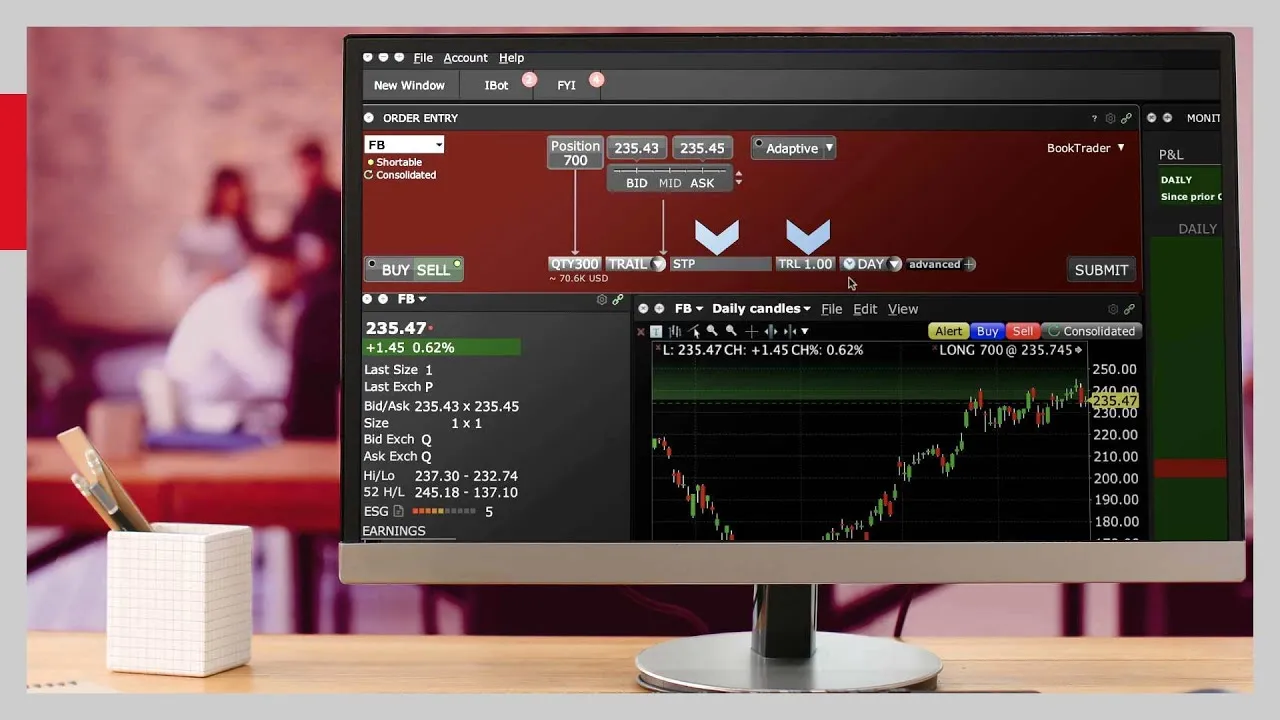
Select the position and choose Sell
Pick the stock in Mosaic's order entry panel, click Sell and set the quantity to the shares you hold.
Pick TRAIL
In the Order Type drop-down, choose TRAIL. The price box changes to show the stop, and a Trail box appears next to it.
Set the trail amount
Enter the trail as a dollar amount or a percent of the price. If you leave the stop price blank, IBKR sets it to the last traded price minus the trail amount.
Use a trailing stop limit outside regular hours
A plain trailing stop sends a market order, so it does not work before 09:30 or after 16:00 ET. If you need one there, use TRAIL LIMIT with a limit offset and allow outside regular trading hours, and expect the same gap risk as any stop-limit.
Submit, then watch it in the Activity panel
Transmit the order. The stop price on the Orders tab rises as the market rises and stays put when it falls.
A broker-side trail only moves by a fixed amount or percent. Structure trails, such as under each higher low, have to be moved by hand in TWS. Halts also pause every trail: under the Limit Up-Limit Down plan, a stock stuck at its band for 15 seconds pauses for five minutes (FINRA: guardrails for market volatility), and it can reopen well under your trail.
Where Scalpel fits
Scalpel trails the stop in the app, so it can do the structure trail a broker order cannot. Press Shift+T (or Trail on the order bar) and the working stop follows each new high; press again to stop. In Settings > Stops > Trail by you choose how:
- Same as my stop (the default): the distance you entered with, 1R, under the high.
- Cents: a fixed distance, 20 cents by default.
- Percent: a percent under the high, 3% by default.
- 1-min candle lows: one tick under the low of each finished 1-minute candle.
Breakeven at (R) and Start trailing at (R) make the sequence above automatic, both off by default; set trailing to start below Take profit (R), because the target is checked first (breakeven and trailing stops). This short video shows stops and targets on the chart:
The trail only ever raises the stop; you can still drag it on the chart. And like every Scalpel stop it is app-monitored, not an order resting at IBKR: when price trades through it, Scalpel sends a sell limit 5 cents under the last trade, flagged for extended hours, and re-prices it if the market runs away. It only works while Scalpel runs with a live feed, and no fill is guaranteed (how stops work).
Trading carries a significant risk of loss. Nothing here is financial advice.
Questions
- What is a good trailing stop for day trading?
- One wider than the stock's normal pullback. Measure the last two or three pullbacks on the chart you trade from and set the trail beyond them, in cents, percent or ATR, or trail under each new higher low.
- Is a trailing stop better than a fixed stop loss?
- They do different jobs. The fixed stop defines your risk at entry. The trailing stop takes over once the trade is working and keeps a winner from becoming a loser. Most day traders use both.
- Should I use a percentage or a dollar trailing stop?
- Percent adapts to the stock's price, cents are easier to reason about on stocks you know. Either works if it is wider than the stock's normal pullback. A trail set in ATR adapts to how jumpy the stock is today.
- Does a trailing stop work in the pre-market on IBKR?
- A plain trailing stop sends a market order, so it does not. A trailing stop limit with outside regular trading hours allowed can work, with the same risk as any stop-limit: price can gap through its limit.
- When should I start trailing my stop?
- Once the trade is working, often from about +1.5R, after the stop has moved to break-even at +1R. Trailing from the entry tends to stop you out on normal early noise.
Related guides
Guide 5.3Breakeven and trailing stopsMove the stop to breakeven with one key, trail it by your stop, cents, percent or 1-minute candle lows, and make both start by themselves at a set R.Guide 5.1How Scalpel's stops workWhy Scalpel holds your stops in the app, not on the book: pre-market rules, the working stop, catastrophe net and take-profit, and what if Scalpel closes.Guide 5.2Move your stop and target on the chartDrag the stop or take-profit line (or its axis tag) on Scalpel's chart, add a target with the + TP handle, reset with a double-click, and know the limits.
Keep reading
- Day trading risk management: the rules that keep you tradingDay trading risk management in five rules: fixed risk per trade, sizing from the stop, a daily loss limit, exposure caps and the math of drawdowns.
- Why your stop loss did not trigger in the pre-market on IBKRIBKR stop loss pre-market: why a plain stop does nothing before 09:30, how a stop-limit gets jumped in a thin book, and the TWS settings that help.
- Position sizing for day trading: size every trade by riskPosition sizing for day trading: shares = dollar risk / stop distance. Worked examples, caps from buying power and liquidity, and fees in the size.
Practice in SIM, against the live book.A lifetime license, every update included, with a 7-day refund guarantee.Ask in DiscordGet Scalpel