IBKR bracket orders: stop and target in one order
By Scalpel Team. , updated . 7 min read.
In short
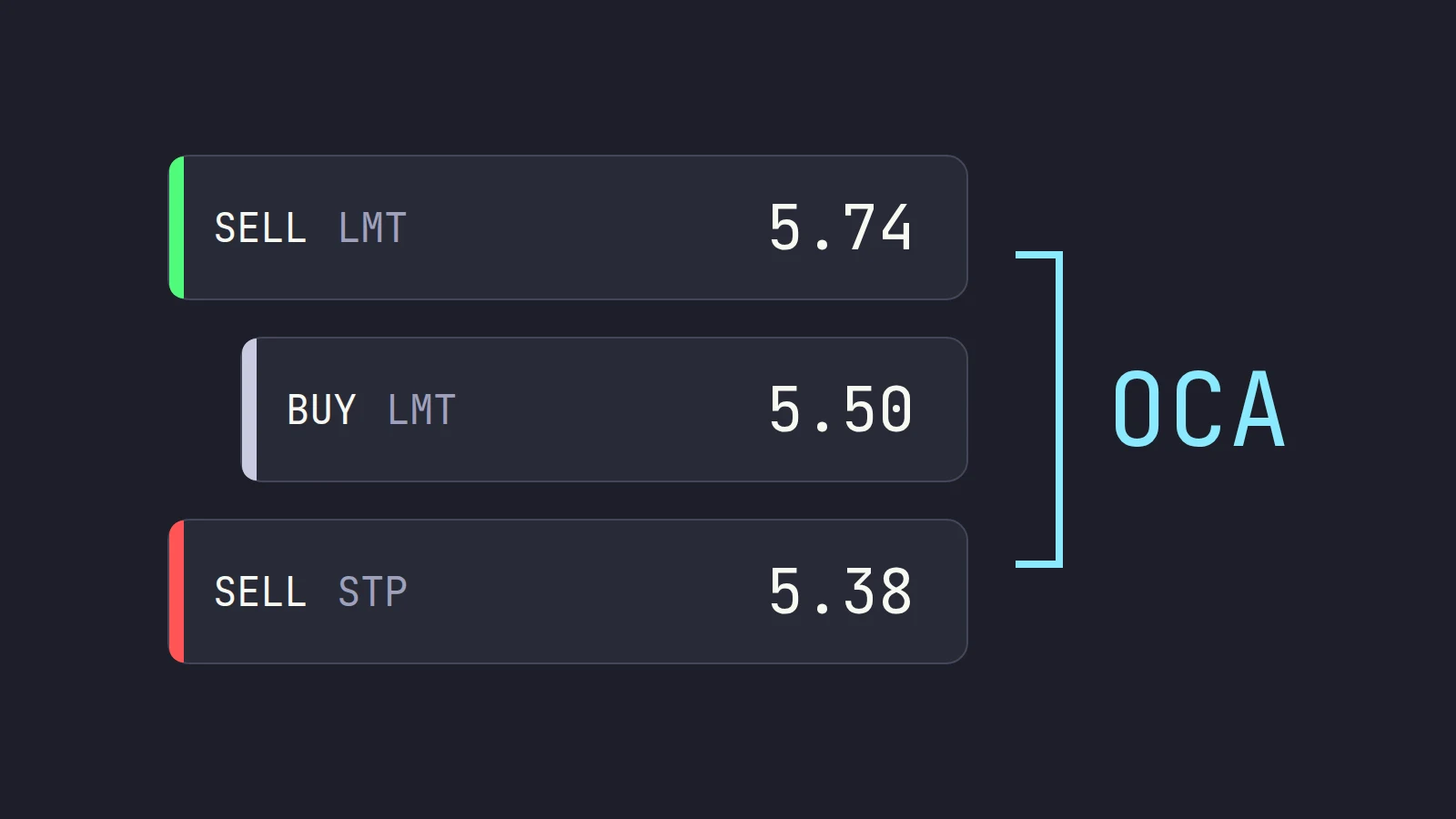
An IBKR bracket order is three linked orders: your entry (the parent), a sell limit above it to take profit, and a sell stop below it to cap the loss. The two exits only go live once the entry fills, and they are one-cancels-all: when one fills, IBKR cancels the other. In TWS Mosaic, build the entry in Order Entry, click Advanced, then Attach, and tick Bracket. The catch for pre-market traders: the stop leg is a stop order, and IBKR stop orders only trigger in regular trading hours.
A bracket order is the closest thing TWS has to "set it and forget it": one ticket that enters, protects and takes profit. It is a good tool for regular-hours trades you cannot watch every second. It is a poor tool for the pre-market, for reasons that are easy to miss until the morning it matters. This post covers how to place an IBKR bracket order step by step, how the OCA link behaves, how to attach a bracket to a position you already hold, and where its limits are. Every TWS step was checked against IBKR's own guides on October 22, 2026.
Scalpel is independent and not affiliated with or endorsed by Interactive Brokers.
What an Interactive Brokers bracket order is
IBKR describes a bracket as an order "bracketed" by two opposite-side orders: "A BUY order is bracketed by a high-side sell limit order and a low-side sell stop order" (IBKR: bracket orders). For a long trade:
| Leg | Order | Role | Becomes active |
|---|---|---|---|
| Parent | BUY, usually LMT | Your entry | When you transmit |
| Profit-taker | SELL LMT above entry | Takes the gain | When the parent fills |
| Stop loss | SELL STP below entry | Caps the loss | When the parent fills |
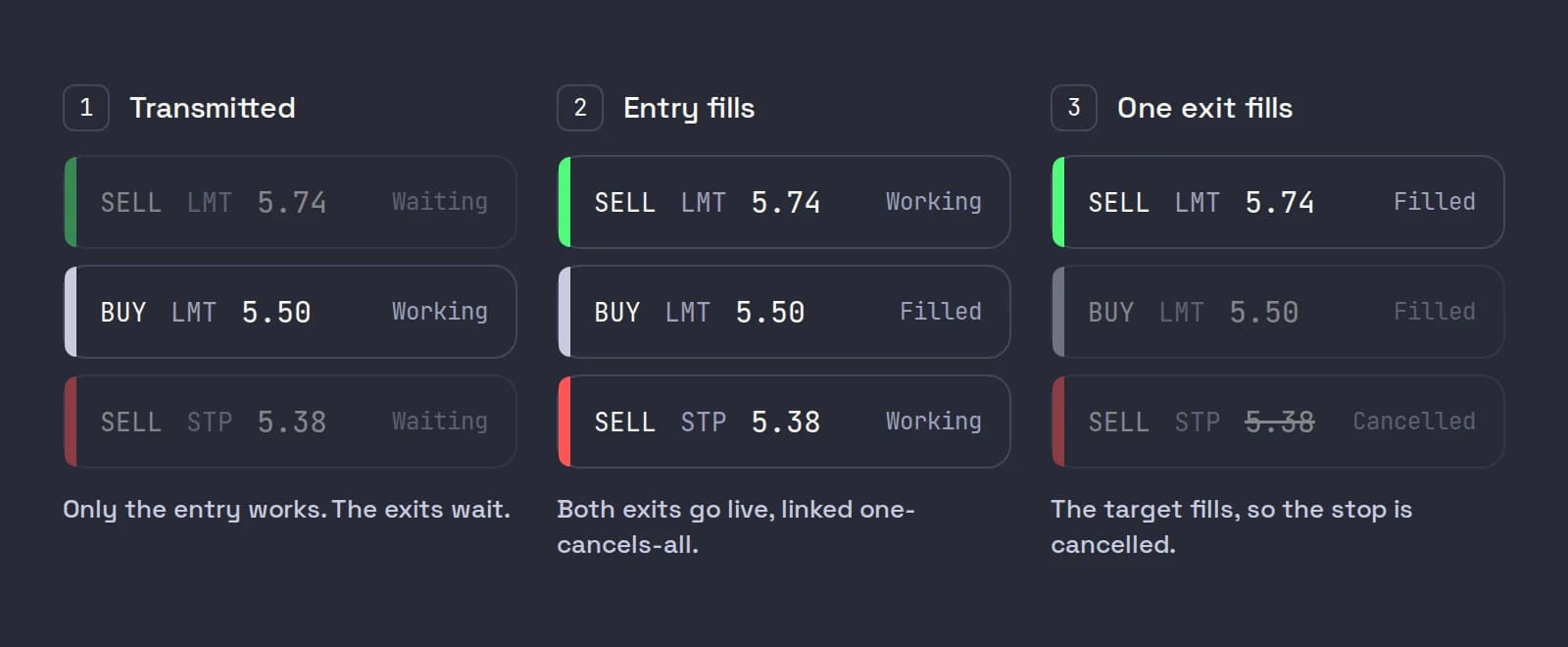
The two exits match the parent's quantity. IBKR's lesson on bracket orders for TWS Mosaic puts the key rule plainly: the two child orders "become active when the parent order executes, but only one of them can be triggered, and if it does, the other is immediately cancelled."
How to place a TWS bracket order (Mosaic)
Our example: buy 400 ABCD at 5.50, stop at 5.38 (12 cents, $48 of risk), target at 5.74 (24 cents, a 1:2 risk reward ratio).
Build the entry in Order Entry
Select ABCD in the Mosaic Order Entry panel and click Buy. Enter the Quantity (400), pick LMT in Order Type, set the limit price (5.50) and the time in force. Do not submit yet.
Open Advanced, then Attach
Click Advanced to the right of the time in force field to show more order options, then click Attach to reveal the bracket choices.
Tick Bracket
Check Bracket. The Profit Taker and Stop Loss boxes tick themselves, and the panel shows +Bracket.
Set the two exit prices
Enter the profit-taker limit price (5.74) and the stop price (5.38). Each leg has its own time in force; change them if you need to. IBKR's default offset for both legs is 1.00 from the price, which is useless on a $5 stock, so always check these two numbers.
Submit, check the confirmation and transmit
Click Submit. The Order Confirmation window lists all three orders. If they match what you meant, click Transmit. The two exits wait in your orders until the entry fills.
IBKR's own walkthrough of the same steps is short and clear; watch it once if you have never built one.
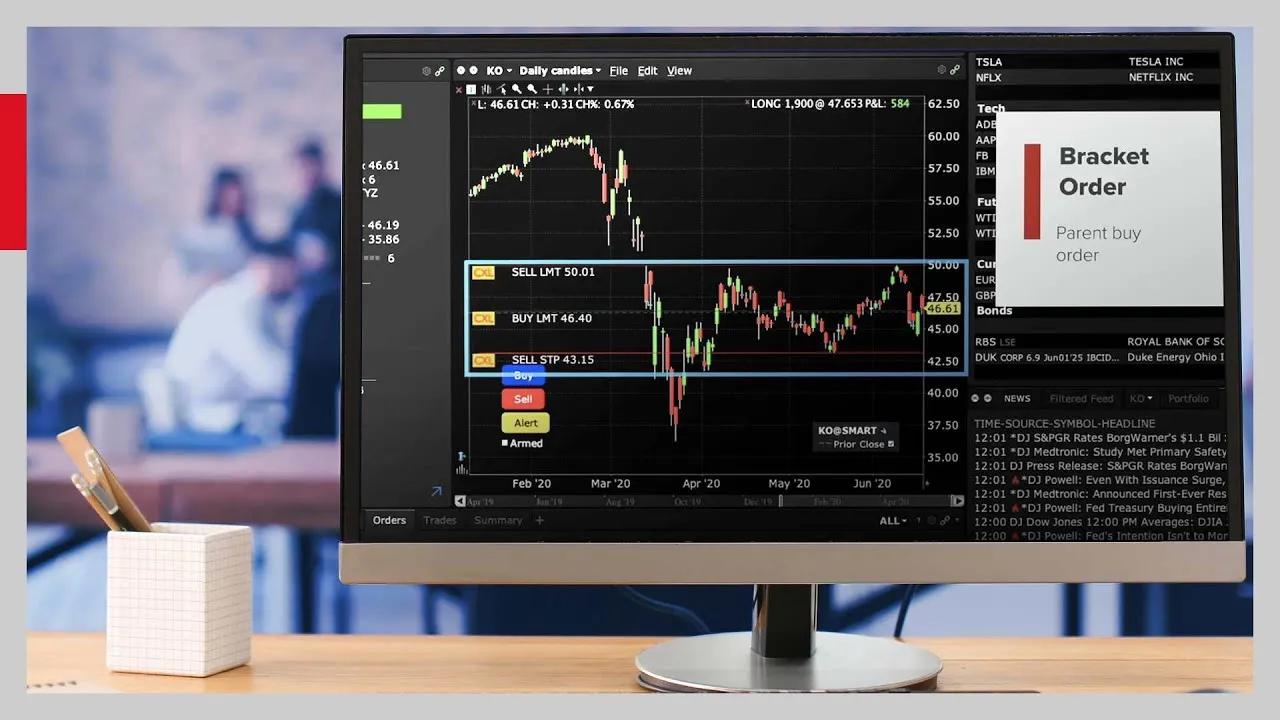
In Classic TWS the route is different: create the buy order line, then right-click the order row and choose Attach > Bracket Order. Enter the limit price on the attached sell limit and the trigger in the Aux. Price field of the attached stop, then transmit.
For a position you already hold, use the Exit Strategy tool. In Mosaic, go to the Monitor panel (Classic: the Portfolio tab), right-click the position and choose Trade > Create Target/Stop Exit Bracket. Enter the target and stop, then click Preview Orders to check and transmit (IBKR: exit strategy).
Set your default bracket offsets
If you bracket every trade, set the defaults once instead of fixing two prices per order. In Global Configuration > Presets > Stock, the order preset has Target Order (Profit-taker) Settings and Attached Stop Order Settings (IBKR: order preset values):
| Preset field | What it does | A scalping setting |
|---|---|---|
| Target Order Type | The profit-taker's type; None creates no target | LMT |
| Target Limit Price | Relative to the parent, by an amount or percent | Parent + 0.24 (your 2R) |
| Apply offset to parent | Measures from the actual fill, not the order price | Ticked |
| Attached stop Order Type | The stop leg's type; None creates no stop | STP, or STP LMT for outside RTH (below) |
| Stop Price | Relative to the parent | Parent - 0.12 (your 1R) |
| Stop-limit Price | Only for stop-limit legs | 10 to 20 cents under the stop |
IBKR notes you enter these as if the parent were a buy; for a sell parent the values flip.
OCA order behavior on IBKR
The two exits are linked as a one-cancels-all (OCA) group. IBKR's TWS order types guide sets out the rules worth knowing:
- One fills, the others cancel. Once an order in the group fills, the linked orders are cancelled.
- Partial fills shrink the rest. If one order partially fills, the remaining orders are reduced in proportion. Sell 150 of 400 at the target, and the stop shrinks to 250.
- You cancel one, you cancel all. Cancelling an order yourself before it executes cancels the rest of the group.
- A system cancel does not. If one order is rejected or cancelled by the system, the others are not automatically cancelled. Check your orders after any rejection.
- No guarantee of speed. IBKR warns that because OCA handling is automated, "there is no guarantee that requested cancellations and modifications will reach the specific exchange before an order has been executed." In a fast market both legs can, rarely, fill.
API users have three OCA types to choose from: 1 cancels the rest "with block," 2 reduces them in proportion with block, and 3 reduces them with no block. "With block" adds overfill protection: only one order in the group is routed at a time (IBKR: OCA types). In the API, a bracket is sent with Transmit false on the parent and the first child, and true on the last child, so nothing fills before the whole bracket arrives.
Brackets, outside RTH and the pre-market
This is where most bracket problems start. The two exit legs are different order types, and they behave differently outside regular trading hours (RTH, 09:30 to 16:00 ET):
| Leg | Before 09:30 with outside RTH ticked | Before 09:30 without it |
|---|---|---|
| Profit-taker (LMT) | Can fill in the pre-market | Waits for the open |
| Stop loss (STP) | Waits for the open | Waits for the open |
| Stop loss (STP LMT) | Can trigger and fill, if outside RTH is ticked on that leg | Waits for the open |
The reason is IBKR's stop rules. On the preset page, with the outside-RTH box unchecked, "stop orders will not trigger outside of regular trading hours." When a trader on IBKR Campus asked whether a bracket's stop could execute outside RTH, IBKR answered that stop orders on stock positions "will only trigger during regular trading hours" and that extended hours is "only available for Limit orders." IBKR's description of its default Last trigger method adds that US stock stops trigger only while the primary exchange is holding regular hours.
So a bracket bought at 07:45 can take profit at 08:10, but its plain stop does nothing until 09:30. If the stock flushes at 08:00, you are unprotected, and at the open the stop becomes a market order wherever the stock is. A stop-limit leg with outside RTH ticked can do better, but in a thin book it can be jumped: price gaps through the limit and the order sits unfilled. We walk through that failure, with the order book, in why your stop loss did not trigger in the pre-market, and compare the two order types in stop-limit vs stop-market.
IBKR bracket order mistakes that catch traders out
- Scaling out. The legs are sized to the whole position. Sell half by hand and the stop and target are still for 400 shares; resize them, or the next fill can sell more than you hold.
- GTC legs expire. IBKR's lesson notes untriggered GTC orders are cancelled "at the end of the calendar quarter following the one in which they were originally entered."
- Moving a leg. Change a working stop or target like any other order, from its row in your orders; you do not need to rebuild the bracket.
- Day orders. A DAY bracket that has not exited by the close is cancelled, leaving you holding overnight with no stop. Check before 16:00.
- Hotkeys. TWS can attach a stop or bracket from a hotkey too; see attaching a stop loss with a TWS hotkey.
Where Scalpel fits
Scalpel does not use brackets, on purpose. Every entry arms three levels in the app: a working stop, a wider catastrophe net under it and a take-profit at 2R by default. None of them rests at IBKR. Scalpel watches every trade itself, and when price trades through a level it sends one exit for the whole position: in LIVE, a sell limit 5 cents under the last trade, flagged for outside regular hours, so the exchange accepts it at 07:52 as at 10:52, and re-priced if the market runs away (how stops work, stops in the pre-market).
Moving a level is a drag on the chart, with no order to modify (drag stops and targets). Scaling out never leaves an oversized exit, because every sell is capped to the shares you hold. The trade-off is real, though: Scalpel's stops only work while Scalpel runs with a live feed, and no exit price is guaranteed. If you need protection while your computer is off, during regular hours, a broker-held bracket is the better tool. More on that design choice in why Scalpel's stops live in the app.
The video above shows Scalpel's stop, net and target on a live chart. For the rest of the risk rules around any exit, see the pillar on day trading risk management.
Trading carries a significant risk of loss. Nothing here is financial advice.
Questions
- How do I place a bracket order in TWS?
- In Mosaic, build the entry in the Order Entry panel, click Advanced, then Attach, and tick Bracket. Enter the profit-taker limit and the stop price, click Submit, check the three orders in the confirmation and click Transmit. In Classic TWS, right-click the order row and choose Attach, Bracket Order.
- Does an IBKR bracket order work in the pre-market?
- Only partly. The profit-taker is a limit order and can fill outside regular hours if that is allowed on the order. A plain stop leg only triggers during regular trading hours, so it does not protect a pre-market position. A stop-limit leg with outside RTH set can trigger, but can be jumped in a thin book.
- What is an OCA order on IBKR?
- A one-cancels-all group: linked orders where a fill on one cancels the others, and a partial fill reduces the others in proportion. A bracket's stop and target are linked this way.
- Can I add a bracket to a position I already hold?
- Yes. Right-click the position in the Monitor panel or Portfolio tab and choose Trade, Create Target/Stop Exit Bracket, enter the prices and click Preview Orders.
- Why are my bracket prices 1.00 away from my entry?
- That is IBKR's default bracket offset. Change it per order, or set your own offsets for stocks in Global Configuration, Presets, under the target and attached stop settings.
Related guides
Guide 5.1How Scalpel's stops workWhy Scalpel holds your stops in the app, not on the book: pre-market rules, the working stop, catastrophe net and take-profit, and what if Scalpel closes.Guide 5.5Stops in the pre-market: why they cannot sit on the bookUS exchanges take only limit orders before 09:30, so a plain stop cannot guard a pre-market trade. How Scalpel's app stops fill the gap, and their limits.Guide 5.2Move your stop and target on the chartDrag the stop or take-profit line (or its axis tag) on Scalpel's chart, add a target with the + TP handle, reset with a double-click, and know the limits.
Keep reading
- Day trading risk management: the rules that keep you tradingDay trading risk management in five rules: fixed risk per trade, sizing from the stop, a daily loss limit, exposure caps and the math of drawdowns.
- Why your stop loss did not trigger in the pre-market on IBKRIBKR stop loss pre-market: why a plain stop does nothing before 09:30, how a stop-limit gets jumped in a thin book, and the TWS settings that help.
- Position sizing for day trading: size every trade by riskPosition sizing for day trading: shares = dollar risk / stop distance. Worked examples, caps from buying power and liquidity, and fees in the size.
Practice in SIM, against the live book.A lifetime license, every update included, with a 7-day refund guarantee.Ask in DiscordGet Scalpel