The best timeframe for scalping: 10-second, 1-minute or 5-minute
By Scalpel Team. , updated . 8 min read.
In short
There is no single best timeframe for scalping, but there is a best match for your trade. Most small-cap scalpers read the trade on the 1-minute chart, time entries and exits on a 10-second chart, and keep a 5-minute chart for the bigger trend. Pick the slowest chart that still shows your entry and your stop as separate candles: if a typical trade lasts two minutes, a 5-minute chart is too slow and a 10-second chart shows the detail.
The timeframe question comes up early for every new day trader, and the answers online are usually a single number stated with confidence. The honest answer depends on how long you hold, how far away your stop is, and how noisy the stock is. This post explains what the 10-second, 1-minute and 5-minute charts each show, why faster charts are noisier, how to pair a fast and a slow chart, and where tick charts fit.
We build a desktop trading cockpit for Interactive Brokers whose charts run from 10 seconds to daily, so we spend a lot of time looking at the same move on different bar sizes. Our opinion is in the last line of each section, with the reasons.
What each timeframe shows
The difference between timeframes is how much trading each candle compresses. In regular hours (09:30 to 16:00 ET, 390 minutes) the count is easy to work out:
| Chart | Bars in regular hours | One candle shows | Best used for |
|---|---|---|---|
| 10-second | 2,340 | A handful of trades, sometimes one | Timing an entry or exit inside a move |
| 1-minute | 390 | The rhythm of the move: pushes and pauses | Reading the setup: flags, pullbacks, breaks |
| 5-minute | 78 | The trend of the session | Context: is the stock trending, fading or chopping? |
The pre-market from 04:00 to 09:30 ET adds another 330 minutes, so 1,980 more 10-second bars. A lot of those are empty or hold a single print on a thin stock, which is the first hint that the fastest chart is not always the most informative.
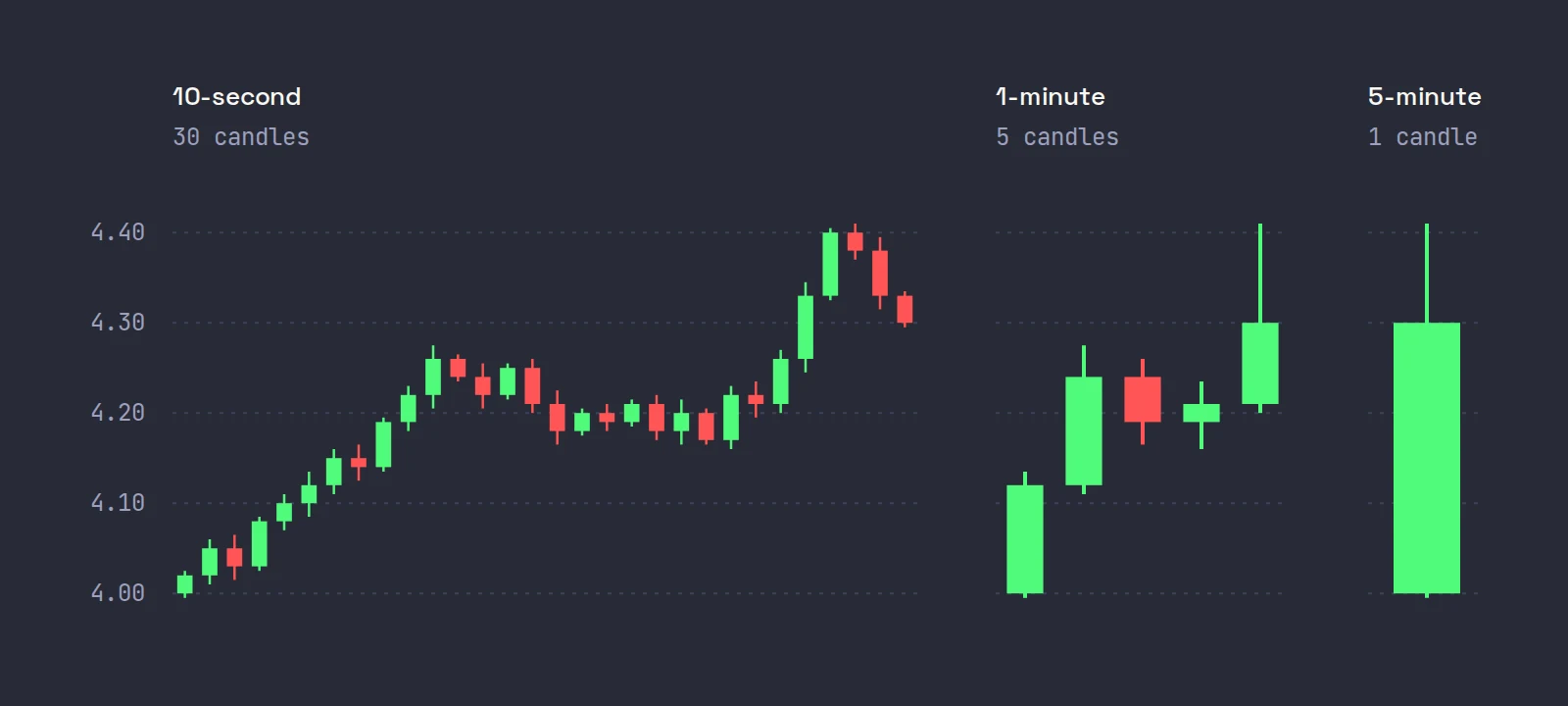
Same five minutes, three charts. The 10-second chart shows every push and dip; the 1-minute chart shows a move up, a two-candle pause and a break; the 5-minute chart shows one green candle with an upper wick where the break faded. None of them is wrong. They answer different questions.
The best timeframe for scalping: match the chart to the trade
Here is the rule of thumb we use: a typical trade should span roughly 5 to 30 candles on the chart you manage it on. Fewer than five, and the chart cannot show you what happened between your entry and your stop. More than 30, and every candle is mostly noise.
Worked example. You scalp ABCD, a $5 stock, with a 10-cent stop, and your trades usually last one to three minutes.
| Chart | Candles in a 2-minute trade | Verdict |
|---|---|---|
| 5-minute | Less than one | Too slow: the whole trade happens inside one candle |
| 1-minute | 2 | Shows the setup, but not the trade itself |
| 10-second | 12 | Shows the entry, the first push and where it stalled |
So for this trader: read the setup on the 1-minute, manage the position on the 10-second, and check the 5-minute once before the trade. A trader holding for 20 to 40 minutes with a 30-cent stop would do the reverse: manage on the 1-minute or 5-minute and ignore the 10-second chart entirely.
The rule also works backwards. If your stop is 3 cents on a stock whose 1-minute candles routinely span 15 cents, no chart will help: the stop is inside one candle's normal range, and you will be stopped out by noise.
Why faster charts are noisier
The 10-second chart is not just a zoomed-in 1-minute chart. Below a certain bar size, a big share of what you see is the mechanics of trading, not changes in what buyers and sellers think the stock is worth.
The main culprit is the bid-ask bounce. Richard Roll showed in 1984 that trades alternating between the bid and the ask make successive price changes negatively correlated even when the underlying value does not move, and turned that into a way to estimate the spread from prices alone (Journal of Finance 39(4)).
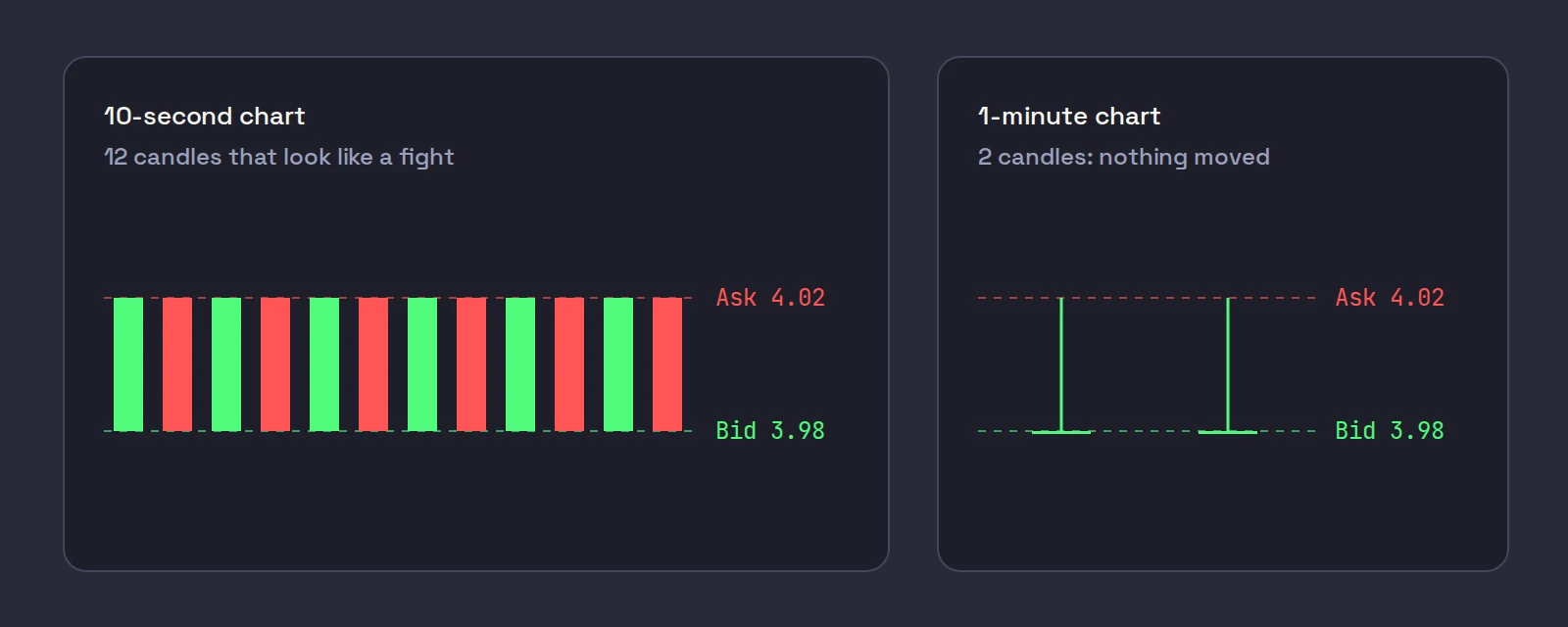
Take WXYZ quoted 3.98 bid and 4.02 ask, a 4-cent spread that is 1% of the price. Nothing changes; buyers and sellers simply take turns. A 10-second chart shows a row of alternating green and red candles, each 4 cents tall: it looks like a fight. A 1-minute chart shows one 4-cent candle with nothing happening, which is the truth. The faster chart is not lying, but it is showing you the spread, not the move. Our post on the bid-ask spread covers what that spread costs you.
Researchers who measure volatility from intraday prices run into the same problem from the other side. Liu, Patton and Sheppard (2015) compared over 400 ways of measuring price variation from high-frequency data, using 11 years of data on 31 assets across five asset classes, and concluded that "it is difficult to significantly beat 5-minute RV" (Journal of Econometrics 187(1), doi:10.1016/j.jeconom.2015.02.008). That is a study about measuring volatility, not about trading, but it is a good reminder that sampling more often does not automatically mean seeing more.
And on whether any timeframe gives an edge by itself: Marshall, Cahan and Cahan (2008) note that surveyed traders put more weight on technical analysis the shorter their horizon, then tested 7,846 popular technical trading rules on intraday US equity data and found none profitable once data snooping was taken into account (Journal of Empirical Finance 15(2)). A timeframe is a lens. It does not make a strategy work.
The 10 second chart: timing, not trend
Use the 10 second chart to see things the 1-minute chart hides: the exact moment a breakout level gives way, a quick flush and reclaim inside one minute, or the first sign that a push has stalled. On a fast small cap, a whole micro pullback can form and resolve inside one 1-minute candle.
Do not use it to decide the trend, and be careful reading candle patterns on it. Most 10-second "patterns" are the spread bouncing. Treat it as a magnified view of the 1-minute chart, not a separate opinion.
1 minute chart scalping: the default
The 1-minute chart is the working chart for most small-cap momentum traders, and it is where most of the named setups live: the bull flag, the micro pullback, the flat top breakout and the high of day break. It is fast enough to show a 2-minute trade and slow enough that a single print does not change the candle.
If you only run one chart, make it this one, with VWAP and the 9 and 20 EMAs on it. Our post on the 9 and 20 EMA explains why those two lengths suit this timeframe, and on candlestick patterns for day trading what single candles are and are not worth on it.
The 5 minute chart for day trading: context
The 5 minute chart tells you which way the session is leaning. Is the stock making higher highs and higher lows every five minutes, or has it rolled over under VWAP? A 1-minute bull flag inside a 5-minute downtrend is a weaker trade than the same flag in a 5-minute uptrend.
Check it before the trade and when a trade surprises you. Then leave it alone. For traders who hold longer, the 5-minute chart can be the working chart and the 1-minute becomes the timing chart; our post on scalping vs day trading covers where that line falls.
Pairing a fast and a slow chart
The common setup is two charts of the same stock side by side: a fast one for timing and a slower one for context. Two practical rules:
- One chart decides, one chart times. Decide the trade on the slower chart and use the faster chart only to choose the moment. Switching between them looking for a reason to trade is how you end up taking a trade neither chart supports.
- Same indicators on both. VWAP and the same EMAs on both charts, so a level means the same thing in both places.
In TWS you can open two charts of the same stock and set each one's bar size under Edit, then Chart Parameters, and the Customize Menu link there defines custom intervals (IBKR: chart parameters). Put both charts in the same color link group in Mosaic so a new symbol loads in both.
IBKR's lesson on TWS charts walks through opening a chart and changing its time period, the two steps you repeat for each chart in the pair.
Tick charts, and what IBKR's data allows
A tick chart draws a new candle every N trades instead of every N seconds, so it speeds up when the stock is busy and slows down when it is quiet. Some traders like that, because a quiet pre-market does not fill the chart with empty candles. Whether you can use one depends on your charting platform; check its documentation.
If you build your own tools on the IBKR API, the limits matter:
- The API's historical bar sizes are all time-based, from 1 secs through 1 month, including 5, 10, 15 and 30 seconds (TWS API: historical bars).
- Live bars from reqRealTimeBars come every five seconds and "can only be used with a bar size of 5 seconds" (TWS API: real time bars).
- Bars of 30 seconds or less older than six months are not available, and making more than 60 historical data requests within any ten-minute period is a pacing violation (TWS API: historical data limitations).
So a 10-second chart can only look back about six months on IBKR data, which is plenty for day trading and not enough to study a pattern over years.
Where Scalpel fits
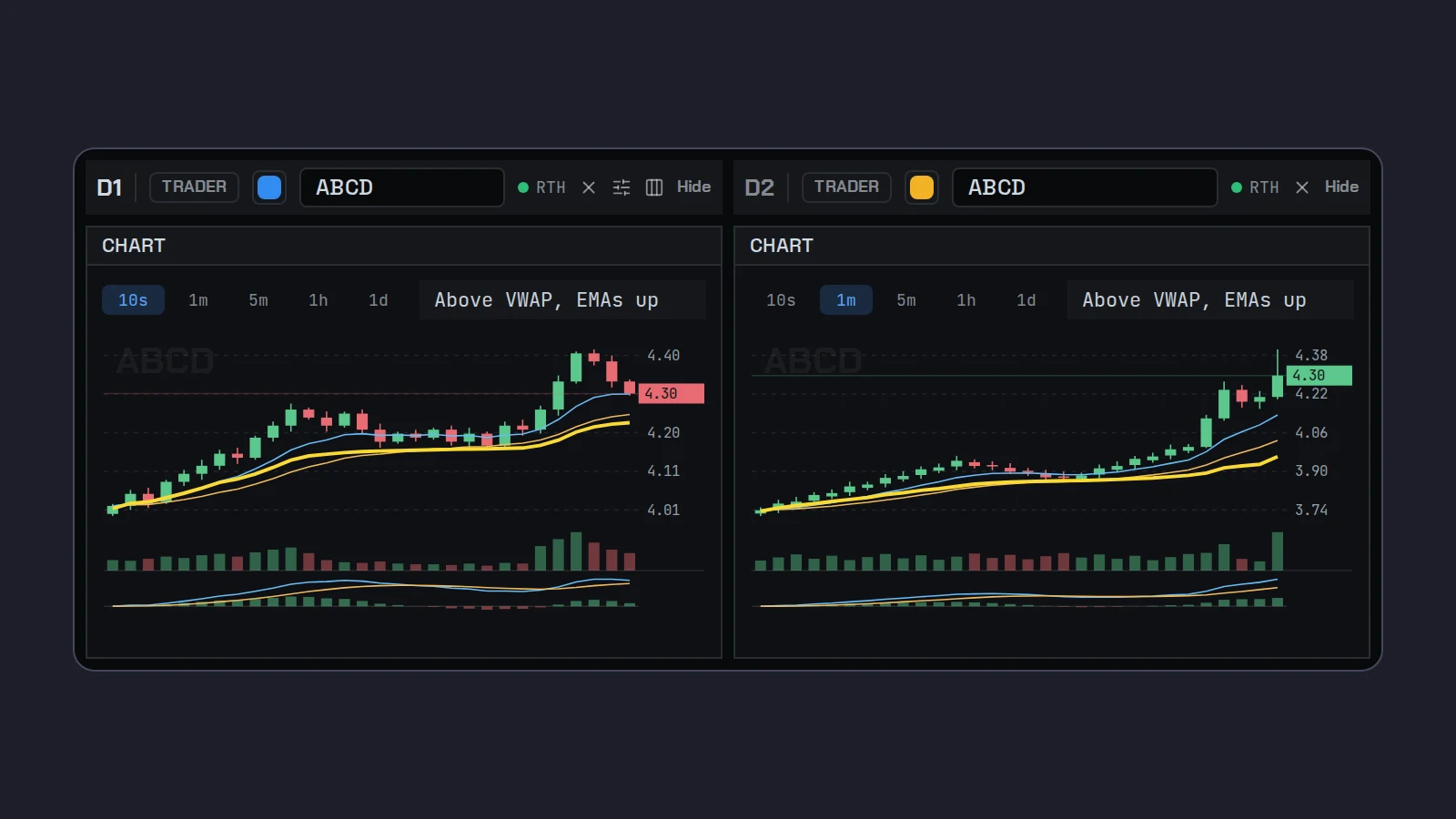
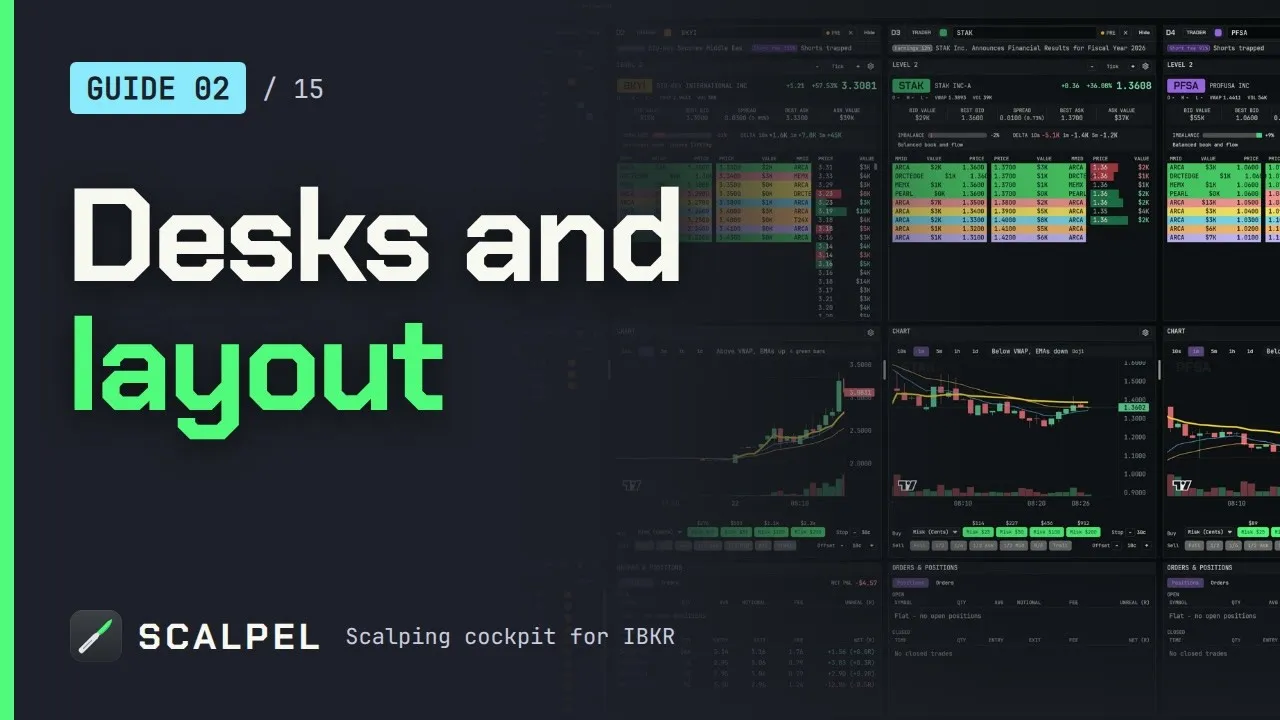
Scalpel is a keyboard-first desktop cockpit for your own IBKR account, with up to six desks, each with its own Level 2, tape and chart. The chart's 10s, 1m, 5m, 1h and 1d buttons switch timeframes, and each desk keeps its own, so you can load the same stock on two desks and run one on 10s and the other on 1m (chart basics, load symbols and desks). New desks open on the Default timeframe from the chart cog, which is 1m unless you change it (panel settings).
Some things do not change with the chart you are looking at. The bull trap exit warning always reads closed 1-minute bars, the Risk (Low) stop goes under the low of the last 20 one-minute candles, and the ATR stop is measured on the ATR timeframe in Settings, Stops (1m by default). Your stop does not move because you switched the chart to 10 seconds (read line and read bar). Scalpel has no tick charts. If you run desks across several screens, multi-monitor setup covers the layouts.
This video shows how desks, panels and timeframes are laid out:
For indicators and the rest of the chart, see the best chart setup for day trading. Scalpel is independent and not affiliated with or endorsed by Interactive Brokers. Sources checked on October 22, 2026.
Trading carries a significant risk of loss. Nothing here is financial advice.
Questions
- What is the best timeframe for scalping?
- Most small-cap scalpers read the setup on a 1-minute chart and time entries on a 10-second chart, with a 5-minute chart for context. The best match is the slowest chart on which a typical trade still spans several candles.
- Is the 1 minute chart good for scalping?
- Yes. It is the working chart for most momentum scalpers: fast enough to show a 2-minute trade, slow enough that single prints do not change the picture. Most named setups such as the bull flag and micro pullback are read on it.
- Should I use a 10 second chart?
- Use it for timing, not for deciding the trend. On a stock with a wide spread, much of what a 10-second chart shows is trades bouncing between the bid and the ask rather than real price movement.
- Is the 5 minute chart good for day trading?
- It is the best chart for context: whether the session is trending, fading or chopping. Traders who hold for 20 minutes or more often use it as their working chart, with the 1-minute for timing.
- Are tick charts better than time charts for scalping?
- Neither is better in general. A tick chart draws a candle every N trades, so it adapts to activity, while a time chart shows how fast things happen. The IBKR API's bars are time-based, and support for tick charts depends on your charting platform.
- How far back can I see 10-second bars on IBKR?
- About six months. Interactive Brokers does not provide bars of 30 seconds or less older than six months; 1-minute and longer bars go back years.
Related guides
Guide 3.5The chart: timeframes, VWAP, EMAs, MACD and deltaScalpel's chart on IBKR data, no TradingView subscription: 10s to daily bars, scroll-back history, VWAP from 04:00 ET, EMA 9 and 20, MACD and delta.Guide 2.3Panel settings: Level 2, tape and chartEvery option behind the Level 2 and chart cogs: rows, colouring, dollar values, the tape column, trade bubbles, gridlines and the warning switches.Guide 2.4Set up Scalpel for one, two or three screensLayouts that work on a laptop, one wide monitor or a multi-screen desk: how many desks to run, UI scale and zoom shortcuts, and where TWS fits.
Keep reading
- The best chart setup for day trading: timeframes and indicatorsThe best chart setup for day trading: 1 and 5-minute candles, volume, VWAP, the 9 and 20 EMA and key levels, plus what research says about indicators.
- VWAP for day trading: what it is and how traders use itVWAP for day trading explained: the formula with a worked example, why 04:00 and 09:30 anchors differ, how institutions use it, and how traders read it.
- The 9 and 20 EMA for day trading: formula, lag and how to use themThe 9 and 20 EMA for day trading: the formula worked with real numbers, how much each bar counts, how traders use the pair, and what the research found.
Practice in SIM, against the live book.A lifetime license, every update included, with a 7-day refund guarantee.Ask in DiscordGet Scalpel