Client-side stop loss: why Scalpel's stops live in the app
By Scalpel Team. , updated . 9 min read.
In short
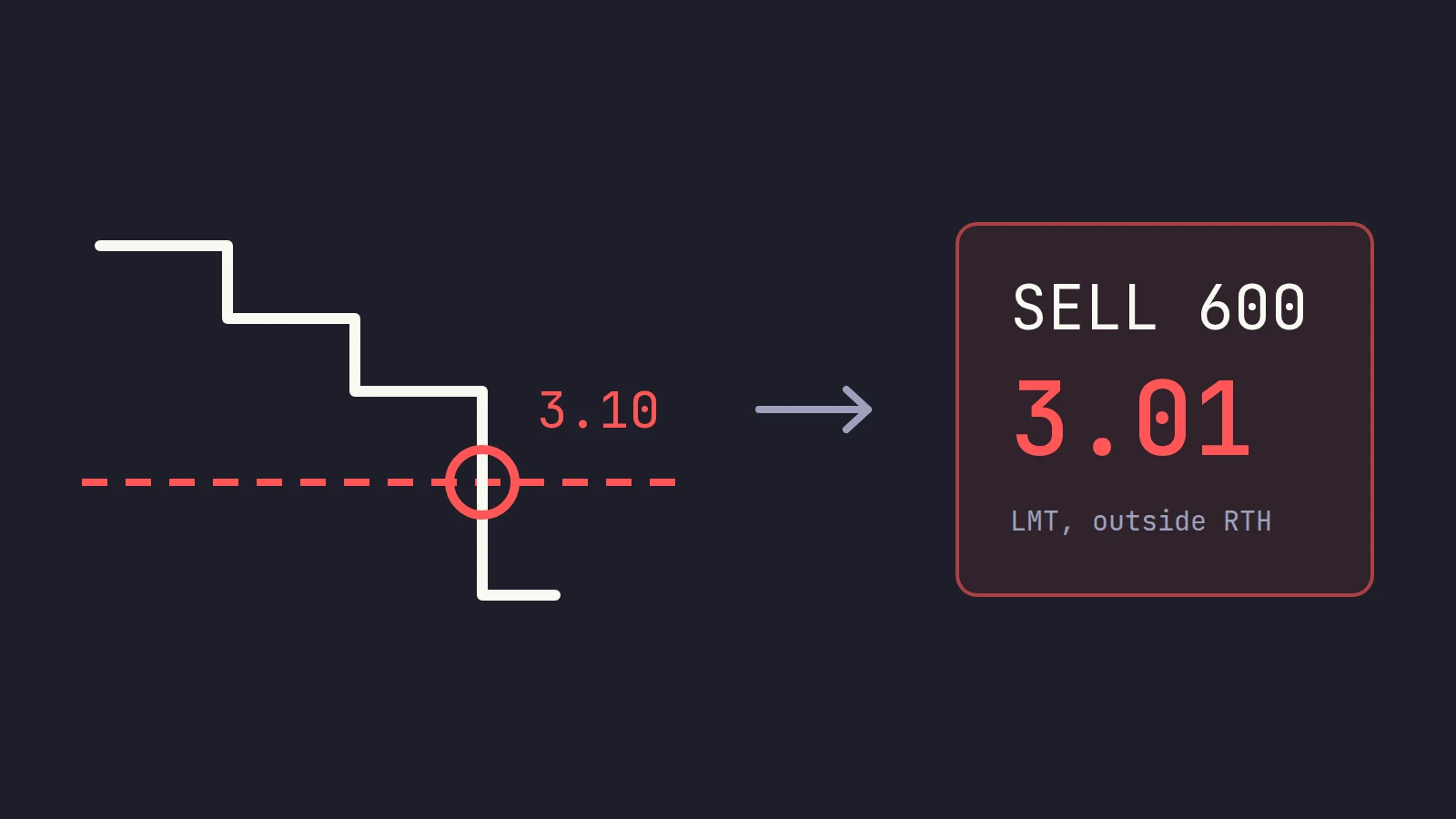
A client-side stop loss is a stop your trading app holds instead of your broker: the app watches the price, and when price trades through your level it sends a real exit order. Scalpel's stops work this way because Scalpel is built for the pre-market, when US exchanges take limit orders only, so a plain stop cannot fire and a stop-limit can be jumped. The cost is real: a client-side stop only works while Scalpel is running, connected to IBKR and streaming that symbol, and no exit price is ever guaranteed.
Every Scalpel position carries a working stop, a wider catastrophe net and a take-profit, and none of them is an order at Interactive Brokers. That is a design decision worth questioning: a client side stop loss moves a safety job from the broker's servers to the trader's computer. This post is why we made that trade, how the stop works inside the app, and every way we know it can fail, with what we do about each. Scalpel is independent and not affiliated with or endorsed by Interactive Brokers.
Broker vs platform stop loss: where a stop can live
A stop is a rule, "if price trades here, get me out", and something has to watch the price to apply it. There are two places that watcher can sit for an IBKR trader.
| Broker stop (held by IBKR) | Client-side stop (held by the app) | |
|---|---|---|
| Who watches the price | IBKR's systems | Your trading app, on your computer |
| What it sends when hit | A market order (stop) or a limit at your price (stop-limit) | Whatever the app is built to send |
| Works with your computer off | Yes | No |
| Works before 09:30 ET | A plain stop does not; a stop-limit can be set to | Yes, if the app sends a limit order |
| Can move itself (trail a candle low, breakeven by key) | Only the order types the broker offers | Whatever the app implements |
| Visible as an order at the broker | Yes | No |
The SEC's investor site defines the ordinary version plainly: when the stop price is reached, your stop order becomes a market order, and its advantage is that "you don't have to monitor how a stock is performing". A client-side stop gives up exactly that advantage. Something must be running and watching. We decided that was worth it for one reason: the hours we built Scalpel for.
The problem: a stop loss outside regular hours
Scalpel is built for long-only scalping of US small caps, pre-market first, when gappers make many of their biggest moves on thin books. Three facts about those hours shaped the stop.
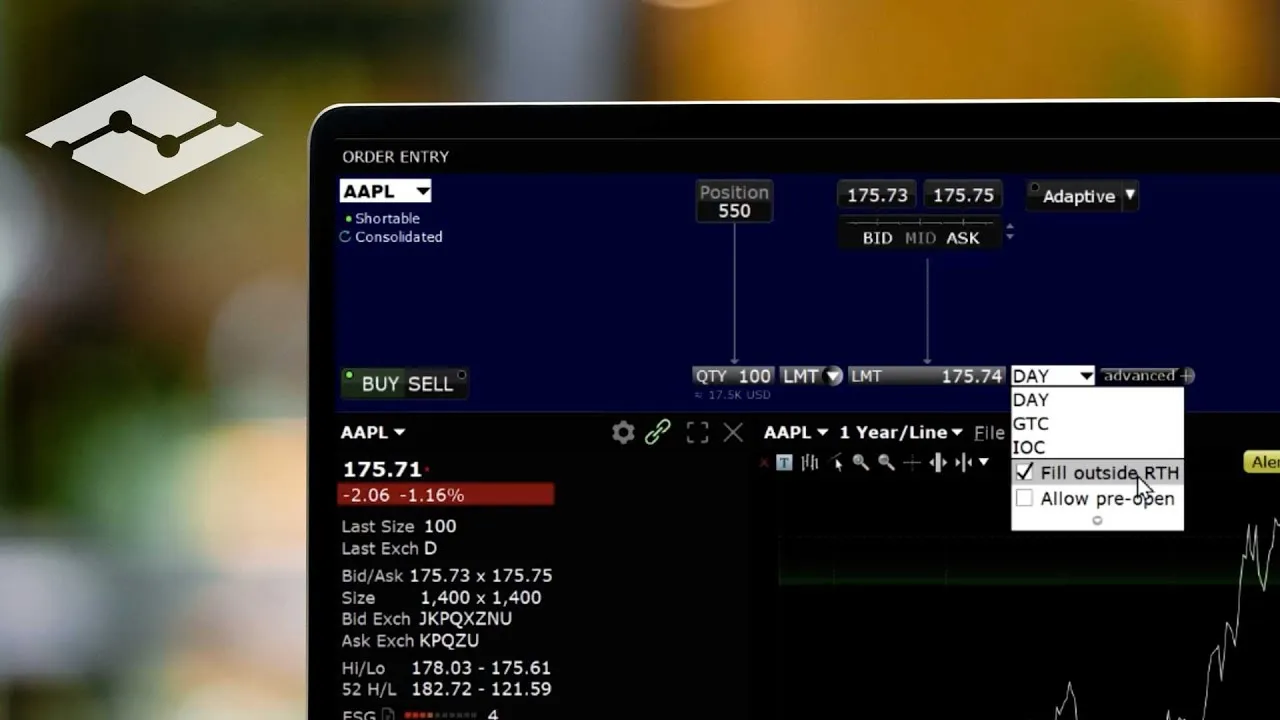
Outside 09:30 to 16:00 ET, orders need a price. The SEC's bulletin on extended-hours trading says many brokerage firms accept only limit orders in those sessions, and warns about thin liquidity. A stop that turns into a market order has nothing it is allowed to send. On IBKR Campus's lesson on trading outside regular hours, the comments are full of traders asking how to protect a pre-market position for exactly this reason. IBKR's short video on the same lesson shows the outside-RTH setting and what it allows.
There are no price bands before the open. FINRA notes that the Limit Up-Limit Down plan, which keeps trades inside a band around the recent price (10% for most stocks above $3.00, 20% from $0.75 to $3.00), applies during regular trading hours from 9:30 a.m. to 4:00 p.m. ET. Before 09:30 nothing stops a small cap from printing far below its last trade, which is when a stop-limit's fixed floor gets jumped and left behind (how a stop-limit gets jumped).
A market order in a collapse takes any price. On May 6, 2010, the joint SEC and CFTC staff report found that over 20,000 trades across more than 300 securities were executed at prices 60% or more away from their prices minutes earlier, and listed retail stop-loss orders among the selling pressure. That was in regular hours, with market orders allowed. It is why Scalpel's exit is always a limit order, priced to fill, never a market order.
Put together, a plain stop at the broker cannot protect a pre-market trade, a stop-limit can be skipped, and a market order is the wrong tool in a thin book. That left the app.
How Scalpel's app monitored stop works
Every entry arms three levels (how stops work): the working stop you trade with, a catastrophe net under it (3 x ATR by default, or twice the stop distance on a risk-sized entry), and a take-profit at 2R. The execution thread checks them on every price update for the symbol: the take-profit first, then the catastrophe net, then the working stop, so a gap through both stops goes out as a catastrophe stop.
When one is hit in LIVE:
- The level is disarmed at once, so a burst of prices cannot fire a second exit.
- Any buy still working on the symbol is cancelled, so a partial entry cannot keep adding shares behind the exit.
- One sell for the whole position goes out: a limit 5 cents under the last trade, flagged to fill outside regular hours, so the exchange takes it at 06:00 as at 11:00. If a sell of yours is already resting, such as a 1/2 Ask, it is cancelled and replaced by this one exit, never stacked on top.
- The exit is worked until you are out. If price trades under its limit once it is half a second old, or it sits unfilled for 5 seconds, Scalpel cancels it, waits for IBKR to confirm, and sends a new sell for the shares still held, at 5 cents or about 1% under the latest trade, whichever is lower. It re-prices up to 5 times, then leaves the last order working and says so (pre-market stops).
Every sell is clamped to the shares you hold, so re-pricing can never put you short. The levels are saved to disk on every change, so after a restart they come back where you left them, dragged, trailed or at breakeven.
A worked example
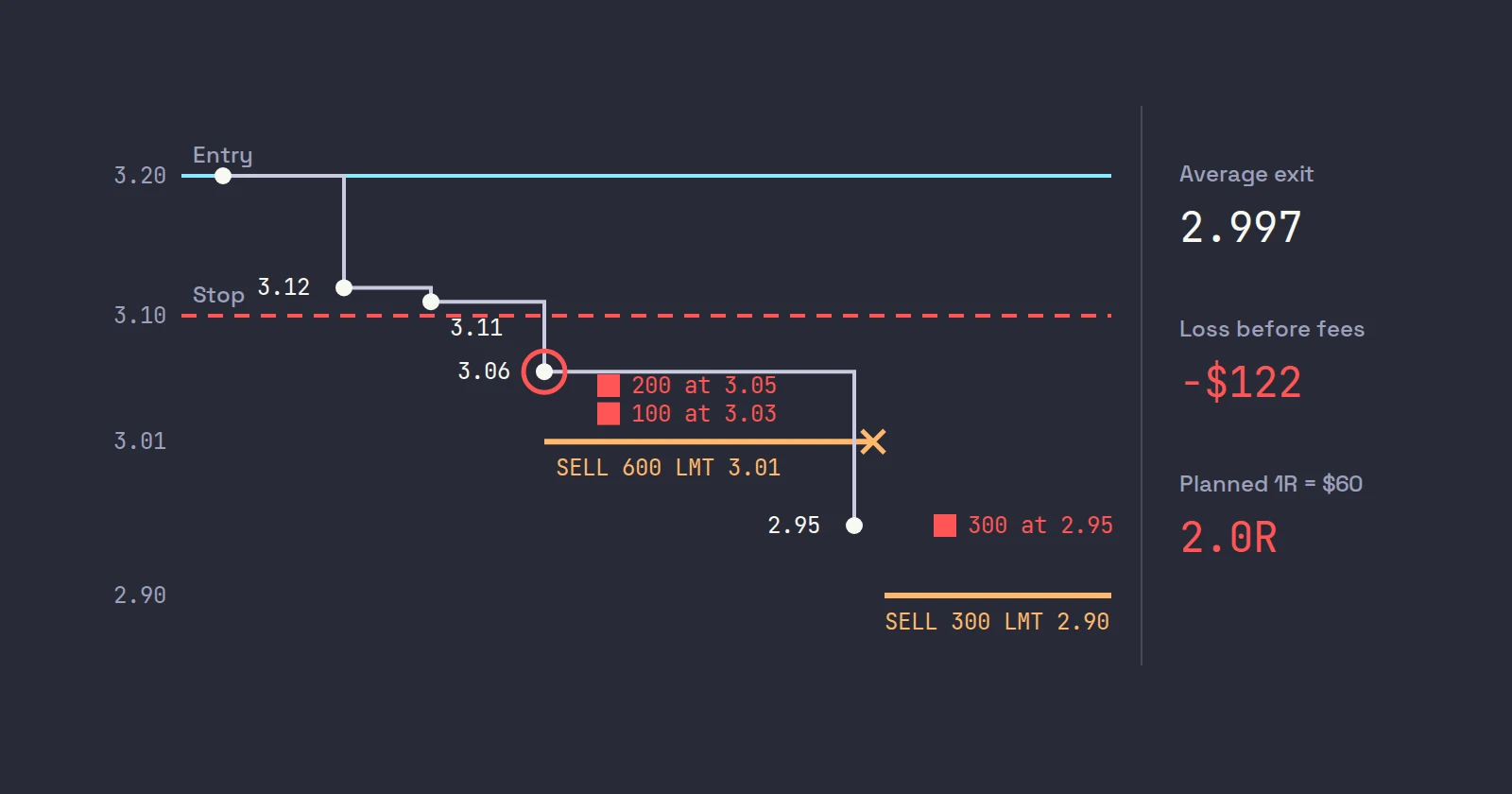
You hold 600 WXYZ from 3.20 at 07:20 ET with a 10-cent working stop at 3.10. Your planned risk, 1R, is $60. The prints go 3.12, 3.11, then 3.06.
- The 3.06 print is through 3.10, so Scalpel sends SELL 600 LMT 3.01.
- The bids are 200 at 3.05 and 100 at 3.03, then nothing until 800 at 2.95. You fill 300 shares, and the rest of your order rests at 3.01 above an empty gap.
- The next print is 2.95, under the 3.01 limit. Half a second later Scalpel cancels the rest and re-prices: 5 cents under 2.95 is 2.90, 1% under is about 2.92, so the lower one, SELL 300 LMT 2.90, goes out and fills at the 2.95 bid.
Average exit: (200 x 3.05 + 100 x 3.03 + 300 x 2.95) / 600 = 1,798 / 600, about 2.997. The loss is $122 before fees, about 2R instead of the 1R you planned. That is the honest shape of a pre-market stop: it got you out, at a worse price than the line on your chart. A stop-limit at 3.10 with a 3.08 limit would have filled nothing and still be resting above the market.
Client-side stop loss failure modes, stated plainly
This is the part a client-side stop has to be honest about. Each row is something that can happen, what Scalpel does, and what you should do.
| What happens | What Scalpel does | What you do |
|---|---|---|
| Scalpel is closed, crashed, or the computer sleeps | Nothing watches the position. LIVE stops are saved; on the next start Scalpel reconciles with your IBKR positions, and the first price that arrives fires the exit if the stop was crossed in the meantime | Close positions before you close Scalpel |
| The link to TWS or IB Gateway drops | No prices arrive, so nothing can fire. You hear "Connection lost." and see an amber toast; each connection reconnects on its own. An order that waited more than 2 seconds through the gap is refused, not sent at an old price | Fix the connection first (fix a disconnect), or manage the position in TWS |
| You hold a symbol that is on no desk | It has no price feed, so its stop is not watched. Scalpel warns: "position held but on no desk, so its stop is not watched. Load it on a desk." and repeats it every few minutes | Keep every held symbol on a desk |
| The book empties under you | The exit fills below your stop, or not at once. Scalpel re-prices up to 5 times, then tells you to check it in TWS | Press Esc: Flatten All replaces the exit with one sell about 1% under the bid (scale out and flatten) |
| A wick between quote updates | The stop checks the last price on IBKR's streaming quote, which IBKR's API documentation says is a snapshot taken every 250 ms for stocks. A print through your stop and back inside one snapshot may never be seen | Nothing to do: it cuts both ways, and a single stray print rarely fires your stop |
| A bad tick | A price more than 25% away from the last good one is treated as a feed glitch and ignored for up to two updates, then accepted. A real 25% collapse in one print reaches your stop a couple of updates late | Size so a late, worse fill is survivable |
| A halt | Nothing trades, so the exit waits like every other order (LULD halts) | Decide in TWS when it reopens |
| You press Ctrl+Q on a working exit | Cancel stops Scalpel working the exit. The stop is already used up, so you hold the shares with no stop | Use Esc to get out, not Ctrl+Q |
What we chose not to ship
Our first architecture notes planned a native protective stop at IBKR under every LIVE position, as a crash net beneath the app's stop. The app that ships places only limit orders, and the catastrophe net lives in the app beside the working stop. As we see the trade-off: a plain broker stop could not fire before 09:30 anyway, which is when the net matters most to us, and a second resting sell for the same shares would sit beside every exit and scale-out the app sends. One owner for the exit is easier to reason about when the market is moving.
We could be wrong for your style. If you hold positions while away from the screen, trade only in regular hours on liquid stocks, or swing trade, a resting stop at IBKR protects you with your computer off, and that beats anything an app can do. The pre-market stop loss post shows how to set one up in TWS alone. If you place your own stop in TWS on a position Scalpel also manages, Scalpel does not manage that order, so test how the two interact in your paper account before you rely on both.
Where Scalpel fits
Scalpel is a keyboard-first cockpit for your own IBKR account, and app-held stops are one consequence of building it for the pre-market. The working stop and take-profit are lines you drag on the chart (drag stops and targets), every level is tuned in Settings > Stops (settings: stops), and the voice says "Stopped out." or "Catastrophe stop." the moment one fires, so you hear it without looking (tape reading by ear). When an exit is being worked, the Orders tab shows each re-price as a cancelled sell and a new working one.
This video walks through the three levels, dragging them, and breakeven and trailing.
The rest of the design, from the threads to the order path, is in building a trading app in Rust, and the API limits behind it are in our pillar post on scalping through the IBKR API. Rules and figures from the SEC, FINRA and IBKR were checked on October 22, 2026.
Trading carries a significant risk of loss. Nothing here is financial advice.
Questions
- What is a client-side stop loss?
- A stop held by your trading software instead of your broker. The app watches the price and sends a real exit order when price trades through your level. It only works while the app is running and connected.
- Is an app-monitored stop safer than a broker stop?
- Neither is safer in every case. A broker stop works with your computer off, but a plain stop cannot fire before 09:30 ET and a stop-limit can be jumped. An app stop can send a priced exit in any session, but it fails if the app is closed or disconnected.
- Can I use a stop loss outside regular trading hours?
- Not a plain stop: it becomes a market order, and extended-hours sessions take limit orders. A stop-limit can be set to work outside regular hours but can be skipped in a gap. An app that sends a marketable limit when price crosses your level is the other route.
- What happens to Scalpel's stops if my internet drops?
- No prices arrive, so nothing can fire until the connection returns. Scalpel tells you the connection was lost and reconnects on its own; if your stop was crossed in the meantime, the first price after reconnecting fires the exit.
- Does Scalpel place any stop order at Interactive Brokers?
- No. It only places limit orders. The working stop, catastrophe net and take-profit are held in the app and fire a limit sell priced under the last trade.
- Why not use a stop-limit with a wide limit instead?
- It is a fair choice, especially if you may be away from the screen. Its floor never moves, so a fast enough drop can still leave it resting above the market. Scalpel re-prices its exit off the latest trade up to five times instead.
Related guides
Guide 5.1How Scalpel's stops workWhy Scalpel holds your stops in the app, not on the book: pre-market rules, the working stop, catastrophe net and take-profit, and what if Scalpel closes.Guide 5.5Stops in the pre-market: why they cannot sit on the bookUS exchanges take only limit orders before 09:30, so a plain stop cannot guard a pre-market trade. How Scalpel's app stops fill the gap, and their limits.Guide 11.3Settings: StopsEvery option on Scalpel's Stops tab: ATR multiples and period, stop floors, take-profit R, the Risk (Cents) stop and trailing, with defaults and ranges.
Keep reading
- Scalping through the IBKR API: what the TWS API can and cannot doIBKR API scalping, from building a trading app on the TWS API: market data lines, Level 2 and tick-by-tick caps, pacing, scanner limits, pre-market stops.
- IBKR API with Python: a working starter for tradersIBKR API Python starter: ibapi vs ib_async, connecting to TWS, a quote stream and a guarded paper order, with code tested against TWS API 10.51.
- TWS API market depth: reqMktDepth and SMART depth in practiceTWS API market depth explained: reqMktDepth, SMART depth, keeping a Level 2 book from updateMktDepthL2, error 317 and 309, with Python code.
Practice in SIM, against the live book.A lifetime license, every update included, with a 7-day refund guarantee.Ask in DiscordGet Scalpel