IBKR trading platforms: day trading software for Interactive Brokers
By Scalpel Team. , updated . 13 min read.
In short
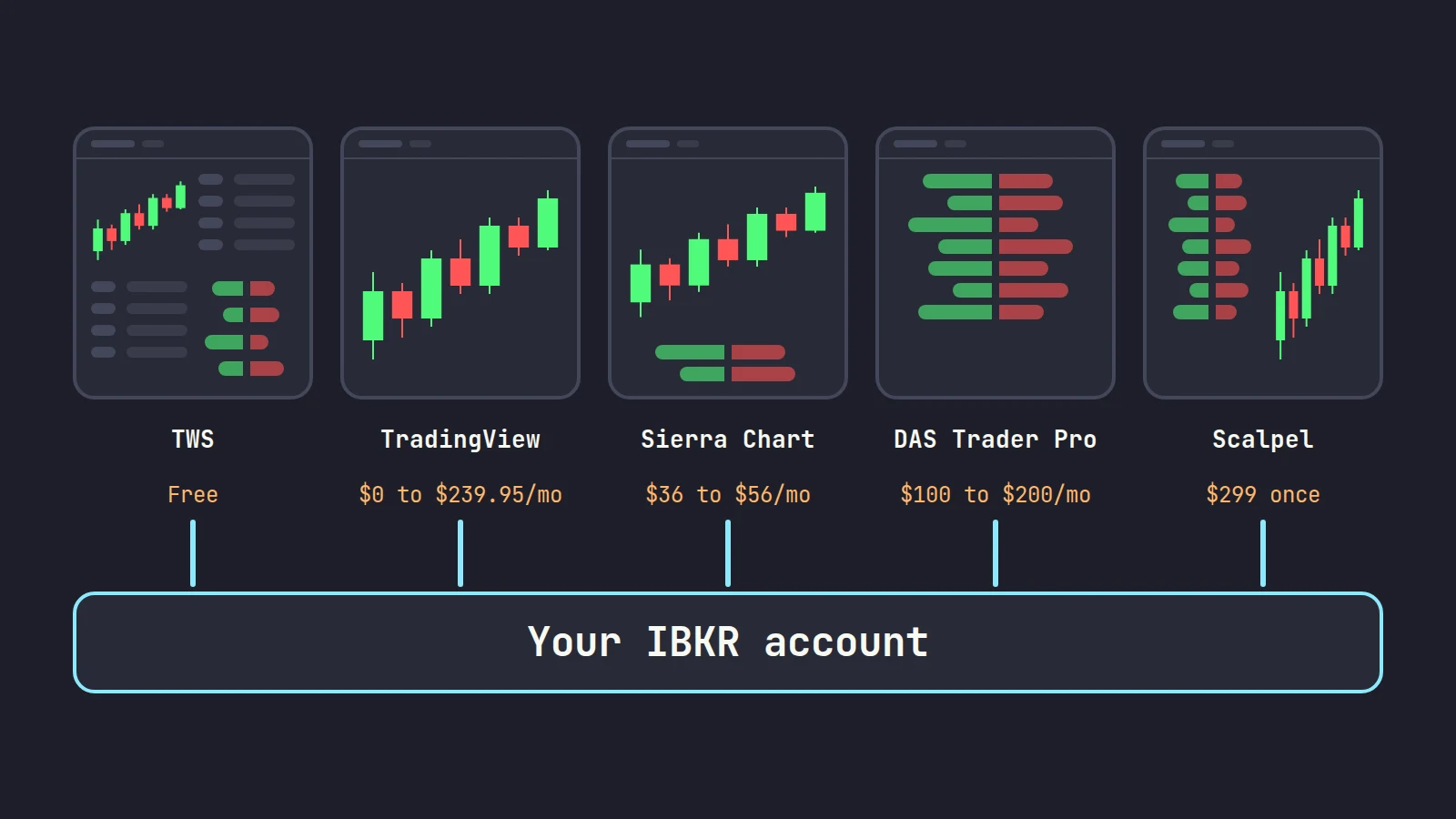
The IBKR trading platforms cost nothing: Trader Workstation (TWS) for active trading, IBKR Desktop as the simpler desktop app, plus Client Portal on the web and IBKR Mobile. Third-party day trading software reaches an Interactive Brokers account in one of three ways: through the TWS API (TWS or IB Gateway must run on your computer), through a FIX link (DAS Trader Pro, Sterling Trader Pro), or through IBKR's web API (TradingView). For most day traders TWS alone is enough; pay for another front end only when it removes a specific problem you have, such as hotkey setup, Level 2 reading, pre-market stops or a scanner.
Interactive Brokers is a broker first. Its own platforms are free and they cover almost everything it trades, but they were not built around any one style of day trading, and many active traders end up looking for day trading software for Interactive Brokers that fits the way they work. The choice is larger than it looks: IBKR's own list of third-party trading software has 50 entries, from charting packages to order-flow tools to full direct-access platforms.
We build a trading cockpit on the TWS API and run it against our own IBKR accounts, so this guide is written from the plumbing up: what each option is, how it connects, what it costs, and who it suits. Prices and product facts were checked on each vendor's own site on October 22, 2026. Scalpel is independent and not affiliated with or endorsed by Interactive Brokers or any other company named here.
IBKR trading platforms: what comes with the account
Every IBKR account gets the same set of free platforms. IBKR's platform comparison page describes TWS as "our most advanced desktop platform" and IBKR Desktop as "built for speed and simplicity". That is a fair summary for a day trader too.
| Platform | What it is | Good for day trading? |
|---|---|---|
| Trader Workstation (TWS) | The full desktop platform: Mosaic layouts, deep hotkeys, BookTrader, scanners, every order type | Yes, after setup work |
| IBKR Desktop | The newer, simpler desktop app, with Level 2 and time and sales | For slower trading; IBKR still calls its hotkeys basic |
| Client Portal | The web platform and account management | For account work, not for fast entries |
| IBKR Mobile and GlobalTrader | The phone apps | For checking positions, not for scalping |
| IB Gateway | TWS without the trading screens, serving the API | Only as the bridge for API software |
TWS is where IBKR's day trading depth lives. Its hotkeys can price off the ask with an offset, size from a preset and transmit at once, and it has a click-to-trade ladder in BookTrader. The cost is setup time: our TWS hotkeys for day trading guide and the TWS layout for scalpers cover what a working setup takes.
IBKR Desktop is easier, and it is IBKR's main push for new clients. For a hotkey scalper it falls short in two ways that matter: the keys are basic for now, and it does not serve the API that third-party software needs. The full comparison is in IBKR Desktop vs TWS.
Scale matters here for one reason: you are not the only one on these screens. IBKR reported 5.576 million client accounts and 4.111 million daily average revenue trades for September 2026. That is a large community, a lot of published help for TWS, and a long list of vendors who have built on top of it.
How third-party platforms connect to Interactive Brokers
This is the part most "best platform for IBKR" lists skip, and it decides what you have to run, what data you pay for, and which account you need. IBKR's list of available integrations names the connection type for each vendor. Of its 50 entries, 40 connect through the TWS API.
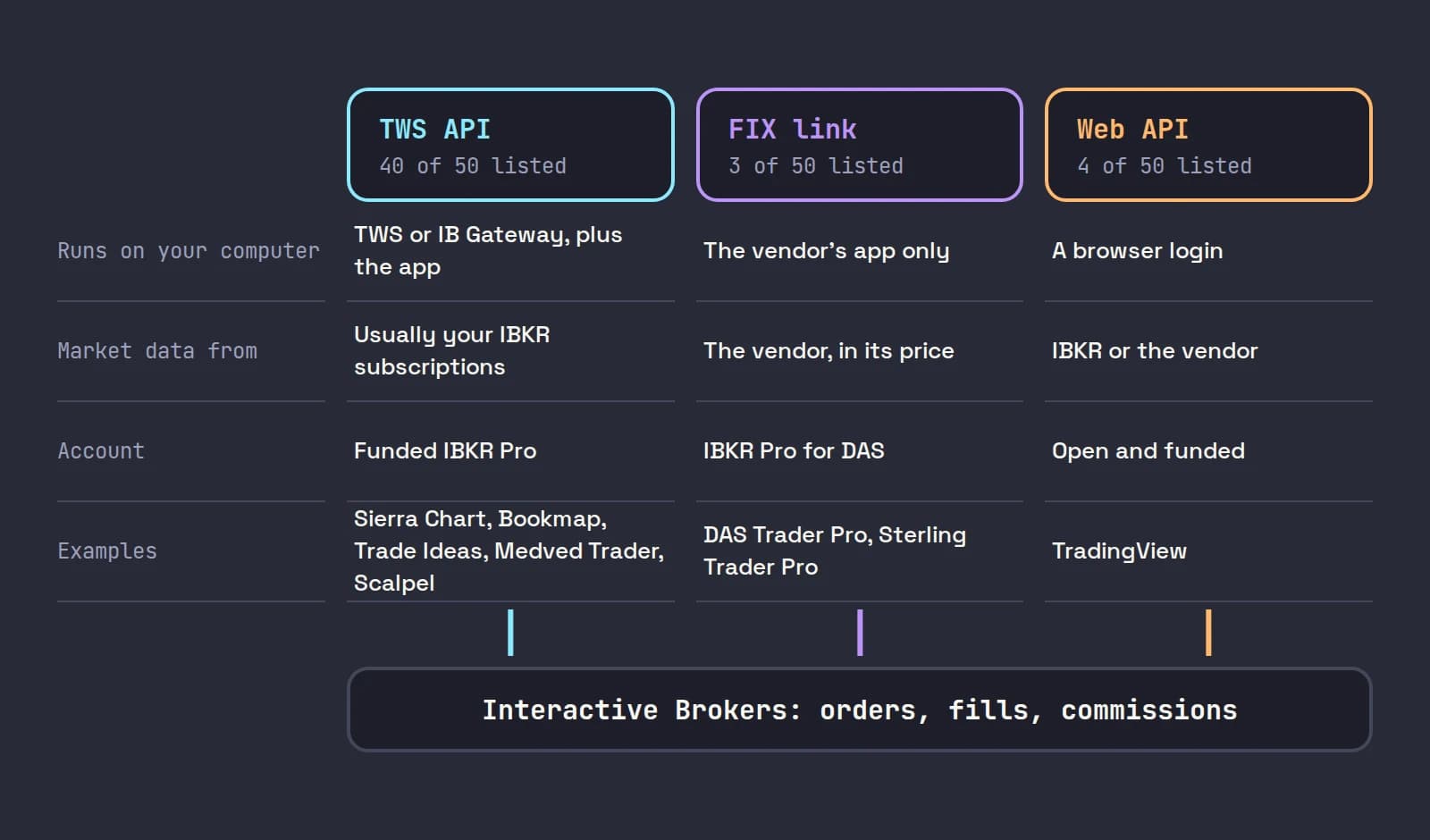
Route 1: the TWS API. The software talks to TWS or IB Gateway running and logged in on your own computer. Market data comes from your IBKR subscriptions; orders go through IBKR like any TWS order. IBKR's third-party FAQ is blunt about two conditions: "to use third-party platforms, you will need to have a funded IBKR PRO account", and the API has an order rate limit of 50 orders per second (IBKR third-party FAQ). The same FAQ notes that IB Gateway "consumes 40% fewer resources" than TWS, which is why most API users run it (IB Gateway vs TWS).
Route 2: a FIX connection. The vendor runs its own servers and sends your orders to IBKR over FIX. Nothing from IBKR runs on your machine, and the data comes from the vendor, not from IBKR. DAS Trader Pro and Sterling Trader Pro work this way. The flip side: you pay the vendor for data, and your IBKR data subscriptions do not feed it.
Route 3: IBKR's web API. TradingView connects through IBKR's Client Portal API with an OAuth login in the browser. No TWS is needed. Your IBKR data can flow into TradingView, and orders go to IBKR.
Two rules apply on every route. First, IBKR allows one trading session per username: TWS, IB Gateway, IBKR Desktop and a TradingView connection all count, so logging into one can close another. A second username, free to add, fixes this, but market data is billed per username. Second, IBKR does not support third-party software itself; problems go to the vendor.
IBKR's own short video explains what the TWS API is and why TWS or IB Gateway has to be running for software that uses it:
Third-party day trading software for Interactive Brokers, compared
These are the third-party options a US stock day trader is most likely to look at, each checked against its own site and IBKR's integration list on October 22, 2026. Prices are the vendor's list prices for a non-professional, billed monthly unless noted, and exclude IBKR commissions and IBKR market data.
| Software | How it connects | Market data from | Price | Built for |
|---|---|---|---|---|
| TradingView | IBKR web API | IBKR or TradingView | Free Basic plan; paid plans $14.95 to $239.95 a month | Charting, with trading from the chart |
| DAS Trader Pro | FIX | DAS | $100 to $200 a month, IBKR Pro only | Direct-access scalping, scripted hotkeys, shorting |
| Sterling Trader Pro | FIX | Sterling | $265 a month plus $30 non-pro data | Professional-style direct access |
| Sierra Chart | TWS API | IBKR | $36, $46 or $56 a month (Integrated packages) | Charting and order flow, highly configurable |
| Bookmap | TWS API | dxFeed (bought separately) | Global+ plan, $199 a month | Order book heatmaps |
| Trade Ideas | TWS API | Trade Ideas | Standard plan, $127 a month or $1,068 a year | Scanning, with in-app trading |
| Medved Trader | TWS API | IBKR | Free limited version; Premium $24.99 a month | A light, all-in-one trading screen |
| Scalpel | TWS API | IBKR | $299 once | Long-only small-cap scalping |
IBKR's list also includes NinjaTrader 8, MultiCharts, MotiveWave, Quantower, Jigsaw, ATAS and others, most of them aimed at futures traders. If one of those is your main tool, check its own IBKR page and the TWS or IB Gateway version it supports before you rely on it.
The options, one by one
TWS alone: free, complete, and slow to set up
TWS is the baseline every other option has to beat. It shorts against IBKR's own borrow inventory, holds bracket orders at the broker while your computer is off, routes to a chosen exchange, and runs on Windows, Mac and Linux. Its weak points for a scalper are the setup (hotkeys tied to order presets, windows linked by color group), sizing in shares rather than risk, and stops that cannot protect a pre-market trade, because outside regular hours exchanges accept limit orders only.
If you are happy with your TWS setup, nothing below is a must. Our Scalpel vs TWS comparison lists exactly what stays in TWS.
DAS Trader Pro and Sterling Trader Pro: direct access over FIX
DAS is the platform many small-cap traders learned on: a fast Level 2 montage, hotkeys that are small scripts, and short locates at brokers that offer them. On IBKR it is a FIX link. You subscribe on DAS's page for Interactive Brokers clients, where non-professional packages run from $100 (Basic) to $200 (Premium Elite) a month, then authorize the link. The page says you must have an IBKR Pro account, not Lite, and that all sales are final. IBKR's DAS connection page confirms that no IBKR software is needed and that DAS supplies the market data.
Sterling Trader Pro, another FIX platform on IBKR's list, lists $265 a month for the software plus $30 for non-professional data on its Interactive Brokers page, $295 in all, charged for the whole month whatever day you start.
These are the right choice if you short, script your hotkeys or want the professional direct-access workflow. Our DAS Trader vs Interactive Brokers page goes through DAS's packages, the year cost and where DAS beats both TWS and Scalpel.
TradingView: the charts most traders already use
TradingView connects to IBKR from its trading panel, and IBKR's market data sharing page says traders who pay for IBKR data "will be able to see the corresponding live market data in TradingView in both the chart and order entry window". Its pricing page lists trading through selected brokers on every plan, including the free one.
It is an excellent charting tool and a workable place to trade from. Its limits for a scalper are the order flow tools and the keys: the trading hotkeys, Shift+B and Shift+S, place an order from a saved preset, and a stop or target can only be attached while the entry is still open. Pine Script strategies cannot trade an IBKR account. All of this, with the market data rules, is in trading through TradingView on Interactive Brokers.
Sierra Chart and Bookmap: charting and order flow
Sierra Chart connects through TWS or IB Gateway, but only on its Integrated packages (10, 11 and 12, at $36, $46 and $56 a month); its Base packages "will not connect to Interactive Brokers" (Sierra Chart packages). Its own Interactive Brokers page is unusually frank: it recommends the IBKR connection for experienced traders only, says IBKR provides very limited intraday history, offers no technical help for it, and recommends Sierra Chart's own data feeds instead.
Bookmap draws the order book as a heatmap over time. Its connectivity guide says placing orders to an IBKR account needs the Global+ or Global Premium package, and that US stock data comes from a separate dxFeed subscription, not from IBKR. Bookmap's pricing page lists Global+ at $199 billed monthly.
Trade Ideas: a scanner that can also place orders
Trade Ideas is a scanner first. Its pricing page lists Interactive Brokers among its broker integrations and in-app trading on the Standard plan ($127 a month, or $1,068 a year). Its connection guide connects through TWS with the API enabled. If your edge is finding the stock, not reading the book, a scanner like this can matter more than a new order screen. Free alternatives are in free stock scanners.
Medved Trader: a light front end on IBKR data
Medved Trader runs on top of TWS or IB Gateway and uses your IBKR data. Its IBKR setup guide says "TWS or IB Gateway must be running in order for MT to get quotes or allow trading via IB" and that a real-time data subscription is required. Its home page lists chart, DOM and Level II trading, a free limited version, and Premium at $24.99 a month or $239.99 a year. It is the cheapest way on this list to put charts, Level 2 and order entry in one window on IBKR data.
Writing your own
The TWS API is open to anyone with an IBKR Pro account. IBKR's requirements list Python 3.11 or later, Java 21 or C++14 among the supported languages. It is a real option for a trader who programs, and a long project for one who does not. Scalping through the TWS API covers what the API can and cannot do for a fast trader.
What a year of each costs: a worked example
Take one non-professional trader on an IBKR Pro account who wants live US quotes and Nasdaq depth for small caps. On IBKR's market data page that is the US Securities Snapshot and Futures Value Bundle ($10 a month, waived in any month with $30 of commissions), the US Equity and Options Add-On Streaming Bundle ($4.50) and NASDAQ TotalView-OpenView ($16.50): up to $31 a month, or $372 a year.
| Setup | Software, year one | IBKR data, year one | Total, year one |
|---|---|---|---|
| TWS alone | $0 | Up to $372 | Up to $372 |
| TradingView Essential, monthly billing | $179.40 | Up to $372 | Up to $551.40 |
| Medved Trader Premium, annual | $239.99 | Up to $372 | Up to $611.99 |
| Scalpel | $299 | Up to $372 | Up to $671 |
| Sierra Chart Package 10 | $432 | Up to $372 | Up to $804 |
| DAS Deluxe User (TotalView included) | $1,800 | $0 | $1,800 |
| Sterling Trader Pro, non-pro | $3,540 | $0 | $3,540 |
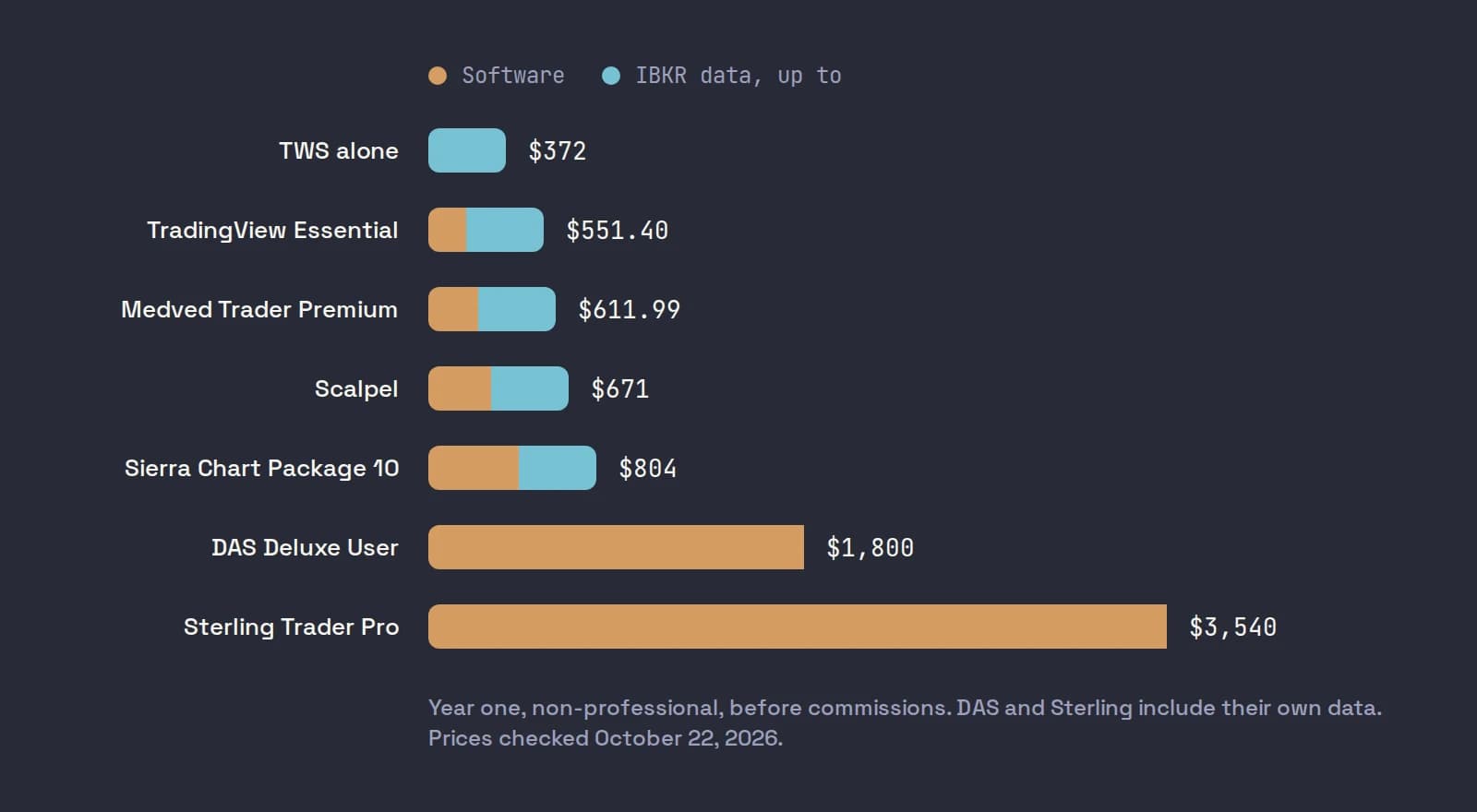
The packages are not equal: DAS's Deluxe also carries OPRA or OTC Level 2, TradingView Essential is a charting plan, and Scalpel's $299 is a one-time payment, so its year two drops to the data alone. Commissions are IBKR's in every case. At IBKR Pro Fixed, $0.005 a share with a $1.00 minimum (IBKR stock commissions), a trader who buys and sells 1,000 shares of ABCD ten times a day pays $100 a day in commissions, which over a year dwarfs every platform fee in the table. Choose the platform on fit, then check your commission plan (IBKR Tiered vs Fixed).
How to choose day trading software for IBKR
Start from what you trade and what currently costs you, not from feature lists.
| If you... | Look at | Why |
|---|---|---|
| Short stocks or need locates | DAS Trader Pro, or TWS | Built for it; Scalpel cannot short |
| Trade options or futures as well | TWS, or a futures platform from IBKR's list | One screen for every product |
| Want stops held at the broker with the computer off | TWS | App-side stops need the app running |
| Mainly need better charts | TradingView or Sierra Chart | Charting is their core |
| Mainly need to find the stock | Trade Ideas, or IBKR's own scanner | The scanner is the edge |
| Scalp long small caps in the pre-market with risk-sized hotkeys | Scalpel, or a well set up TWS | Keyboard-first, built for that style |
| Want to spend nothing | TWS | Nothing else is cheaper |
Two more checks before you pay. If you are on IBKR Lite, every TWS API product and DAS mean switching to Pro first (IBKR Pro vs Lite). And if you trade on a Mac, check each vendor's system requirements before you subscribe: several of these programs are built for Windows first. TWS runs on Windows, Mac and Linux; Scalpel runs on Windows 10 and 11 and on Macs with Apple silicon.
The machine matters too. IBKR's published TWS system requirements start at 8 GB of RAM and recommend 16 GB, and a second program on top of TWS needs its own share. Our day trading computer setup covers specs, monitors and the connection.
The rest of this cluster
Every post in our platforms and tools section takes one of these questions further:
- Trading through TradingView on Interactive Brokers: connecting the two, which data flows where, the order types and keys, and the limits for a scalper.
- A day trading computer setup: CPU, memory, monitors, wired internet, a UPS and a backup connection, sized for TWS plus one more program.
- Interactive Brokers vs Webull for day trading: commissions, routing and payment for order flow, data, Level 2 and the API at each broker.
- Interactive Brokers vs Schwab thinkorswim: TWS against thinkorswim's Active Trader, data costs and API access.
- Choosing a broker for small-cap day trading: a checklist for routing, pre-market access, Level 2, locates and costs at your volume.
- DAS Trader vs Interactive Brokers and Scalpel vs TWS: our two comparison pages, including where each rival is the better pick.
Where Scalpel fits
Scalpel is one of the TWS API options in the table: a keyboard-first desktop cockpit that runs on top of TWS or IB Gateway on the same computer, uses your IBKR data and sends your orders through IBKR's SMART routing (connect Interactive Brokers). It is built for one style: long-only scalping of US small caps, pre-market first.
What it adds to TWS: up to six desks, each with a DAS-style Level 2 montage, the time and sales tape, a chart and an order bar (cockpit tour); four buy presets sized by shares, dollars or risk; a working stop, catastrophe net and take-profit you drag on the chart, which can exit in the pre-market with a limit sell 5 cents under the last trade; a momentum scanner on IBKR's own scanner; and SIM on the live book. It needs no extra data feed (IBKR market data for day trading).
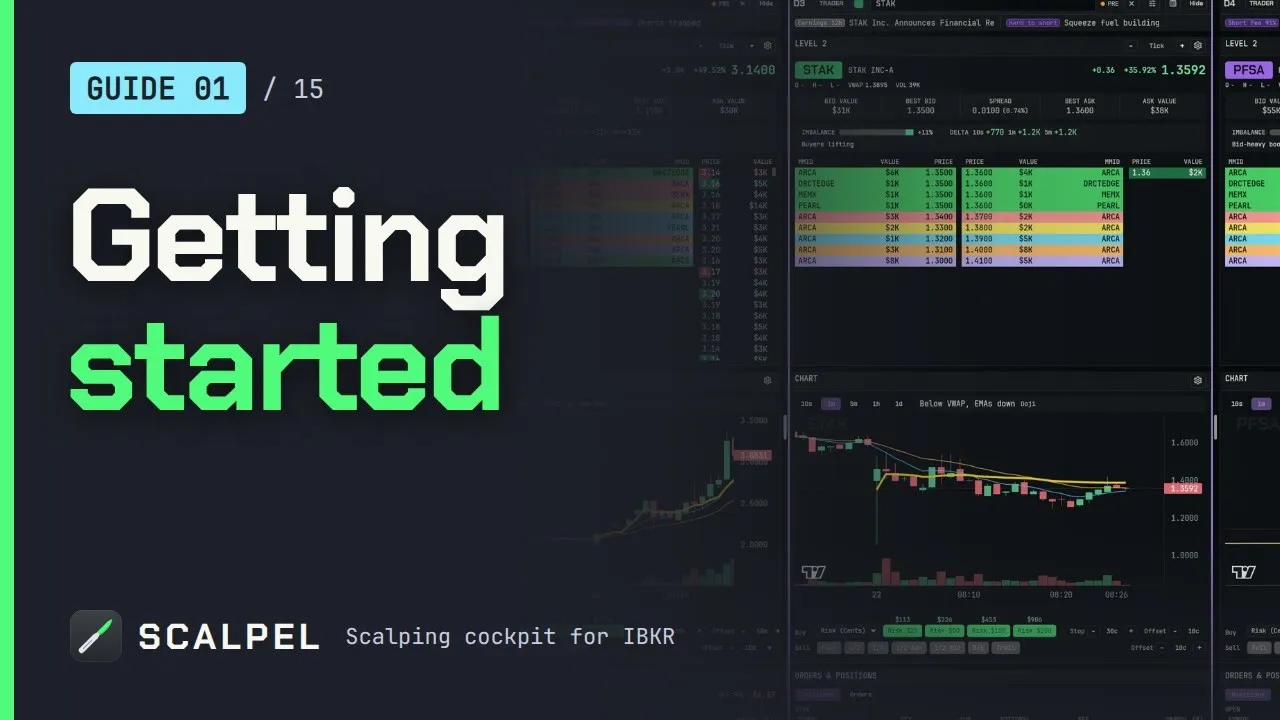
What it does not do: short (every sell is capped to what you hold, see long only), trade options or futures, choose a route, or hold stops at the broker. Its stops are watched by the app and only work while Scalpel runs with a live feed, and no fill is guaranteed. It costs $299 once with a 7-day refund (pricing). Our getting started video shows the connection and a first session in SIM:
Whichever software you pick, the platform does not make the trades work. Fast small-cap day trading is hard, and most people who try it lose money.
Trading carries a significant risk of loss. Nothing here is financial advice.
Questions
- What trading platforms does Interactive Brokers offer?
- Trader Workstation (TWS), IBKR Desktop, Client Portal on the web, IBKR Mobile and GlobalTrader, plus IB Gateway for API software. All are free with an IBKR account; you pay for market data and commissions.
- What is the best platform for day trading on IBKR?
- For most day traders it is TWS, because it is free and has the deepest hotkeys. Pay for another front end only for a specific need: DAS Trader Pro for shorting and scripted hotkeys, TradingView for charts, a scanner such as Trade Ideas, or Scalpel for long-only small-cap scalping.
- Can I use third-party software with Interactive Brokers?
- Yes. IBKR lists 50 third-party trading programs. Most connect through the TWS API, which needs TWS or IB Gateway running on your computer and a funded IBKR Pro account. DAS and Sterling connect over FIX, and TradingView through IBKR's web API.
- Does third-party software work with IBKR Lite?
- Not through the TWS API: IBKR says third-party platforms need a funded IBKR Pro account, and DAS also requires Pro. Switch to Pro before you subscribe to anything that connects this way.
- Do I need to pay for market data twice to use another platform on IBKR?
- It depends on how it connects. TWS API software uses your IBKR subscriptions. FIX platforms such as DAS supply their own data in their price. TradingView can show your IBKR data on a live account, or sell you its own.
- Why does TWS log out when I open another platform?
- IBKR allows one trading session per username, and TWS, IB Gateway, IBKR Desktop and a TradingView connection all count. Add a second username in Client Portal for the second program; it needs its own market data subscriptions.
Related guides
Guide 1.4Connect Scalpel to Interactive BrokersRun TWS or IB Gateway, match the API port and watch Scalpel connect. Which program to use, the ports (7497, 7496, 4001) and what the link banner tells you.Guide 1.5Enable the API in TWS and IB GatewayTurn on Enable ActiveX and Socket Clients in TWS or IB Gateway, set the socket port, allow 127.0.0.1 and switch off read-only API so Scalpel can trade.Guide 1.8A tour of the Scalpel cockpitWhat every part of the Scalpel screen does: the header, VIEW and MODE, account stats, desks, Level 2, chart, order bar, orders panel and the status bar.
Keep reading
- TradingView Interactive Brokers integration: data, orders, limitsTradingView Interactive Brokers integration explained: how to connect, which IBKR data shows in TradingView, orders, hotkeys and the limits for scalpers.
- A day trading computer setup: specs, monitors and internetA day trading computer setup that does not stall: IBKR's TWS specs, how much RAM, monitors and placement, wired internet, a UPS and a backup connection.
- Interactive Brokers vs Webull for day tradingInteractive Brokers vs Webull for day trading: commissions, payment for order flow, Level 2 cost, pre-market hours and hotkeys, checked on each site.
Practice in SIM, against the live book.A lifetime license, every update included, with a 7-day refund guarantee.Ask in DiscordGet Scalpel