TradingView Interactive Brokers integration: data, orders, limits
By Scalpel Team. , updated . 8 min read.
In short
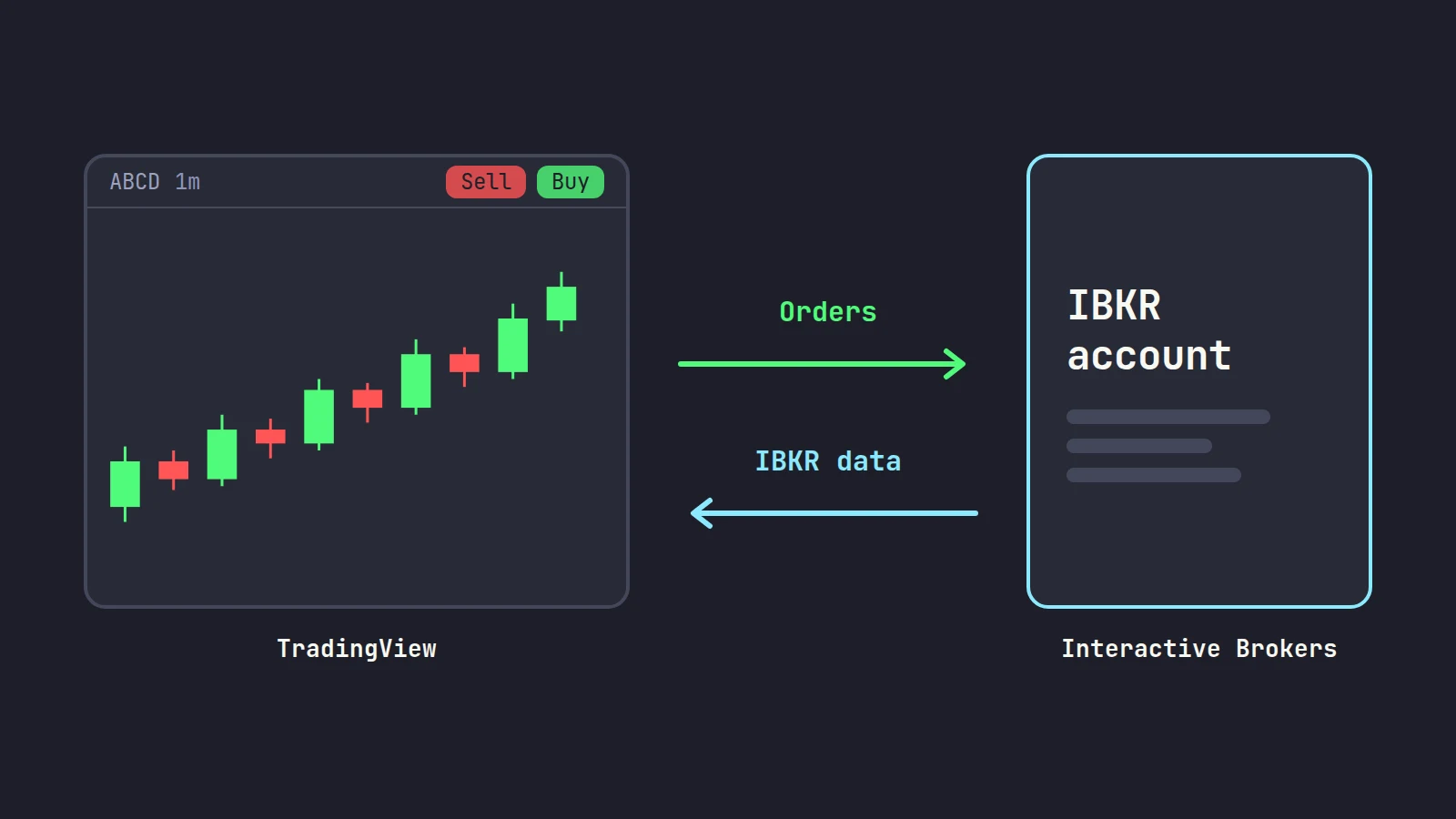
Yes: the TradingView Interactive Brokers integration lets you trade your IBKR account from TradingView's charts. Click Trade in TradingView, pick Interactive Brokers, click Connect and log in with your IBKR username, live or paper. No TWS is needed: TradingView talks to IBKR's web API. On a live account, the IBKR market data you already pay for shows in TradingView's chart and order window, but you must reconnect every 7 days to keep it. It works well for charting and planned entries. For fast scalping, three limits matter: one login per username, a bracket stop or target can only be attached before the entry fills, and the hotkeys place orders from a saved preset.
TradingView is where many traders already do their charting, so trading from the same screen is an obvious wish. The TradingView Interactive Brokers integration makes that possible, and on data it is better than many old forum answers suggest: your IBKR subscriptions can feed TradingView's charts directly. It also has rules that catch people out, mostly around data, logins and stops.
We checked every fact below against TradingView's and Interactive Brokers' own pages on October 22, 2026. Scalpel is independent and not affiliated with or endorsed by TradingView or Interactive Brokers. This post is part of our guide to day trading software for Interactive Brokers.
How to connect IBKR to TradingView
IBKR's TradingView requirements are short. You need an open account at both companies, and the IBKR account must be funded with at least $1. You need trading permissions at IBKR for each product you want to trade. Demo accounts are not officially supported, and a supplemental user on the account needs the "Trading Access" and "TWS" user rights.
Open TradingView's trading panel
Log in to TradingView and open a chart. Click Trade in the top right, or open the Trading Panel tab at the bottom of the chart (it may be minimized).
Choose Interactive Brokers
Click the Interactive Brokers tile, then Connect in the pop-up (IBKR's connection guide).
Pick live or paper and log in
Toggle Live or Paper, then enter your IBKR username and password and approve the two-factor prompt. IB Key, SMS and the Digital Security Card+ work; the older paper code cards do not (supported 2FA methods).
Check the panel
The trading panel now shows your IBKR positions, orders, trade history and balances. To switch to another login, open the account menu in the panel and choose Log out Interactive Brokers.
TradingView IBKR market data: what flows where
This is where most of the confusion sits, and the rules have changed over time, so old forum answers are often wrong.
IBKR data flows into TradingView. IBKR's page on market data sharing says clients who subscribe through IBKR "will be able to see the corresponding live market data in TradingView in both the chart and order entry window / DOM". TradingView's own support article says a live IBKR account with real-time subscriptions does not have to pay for that data again on TradingView. The catches: it applies to live accounts, you get 7 days of access per connection and then have to reconnect, and it covers the exchanges TradingView lists, which include NASDAQ, NYSE, AMEX and OTC.
TradingView data does not flow into IBKR. Data you buy from TradingView shows on TradingView only, not in TWS or Client Portal.
The order window always wants IBKR data. If your chart runs on TradingView's data but you have no IBKR subscription, the order window shows an orange "D" for delayed, because that part is fed by IBKR (IBKR: live chart, delayed order data). Every order then raises a delayed-data warning you must confirm. IBKR says the only way to stop both is to buy the data from IBKR.
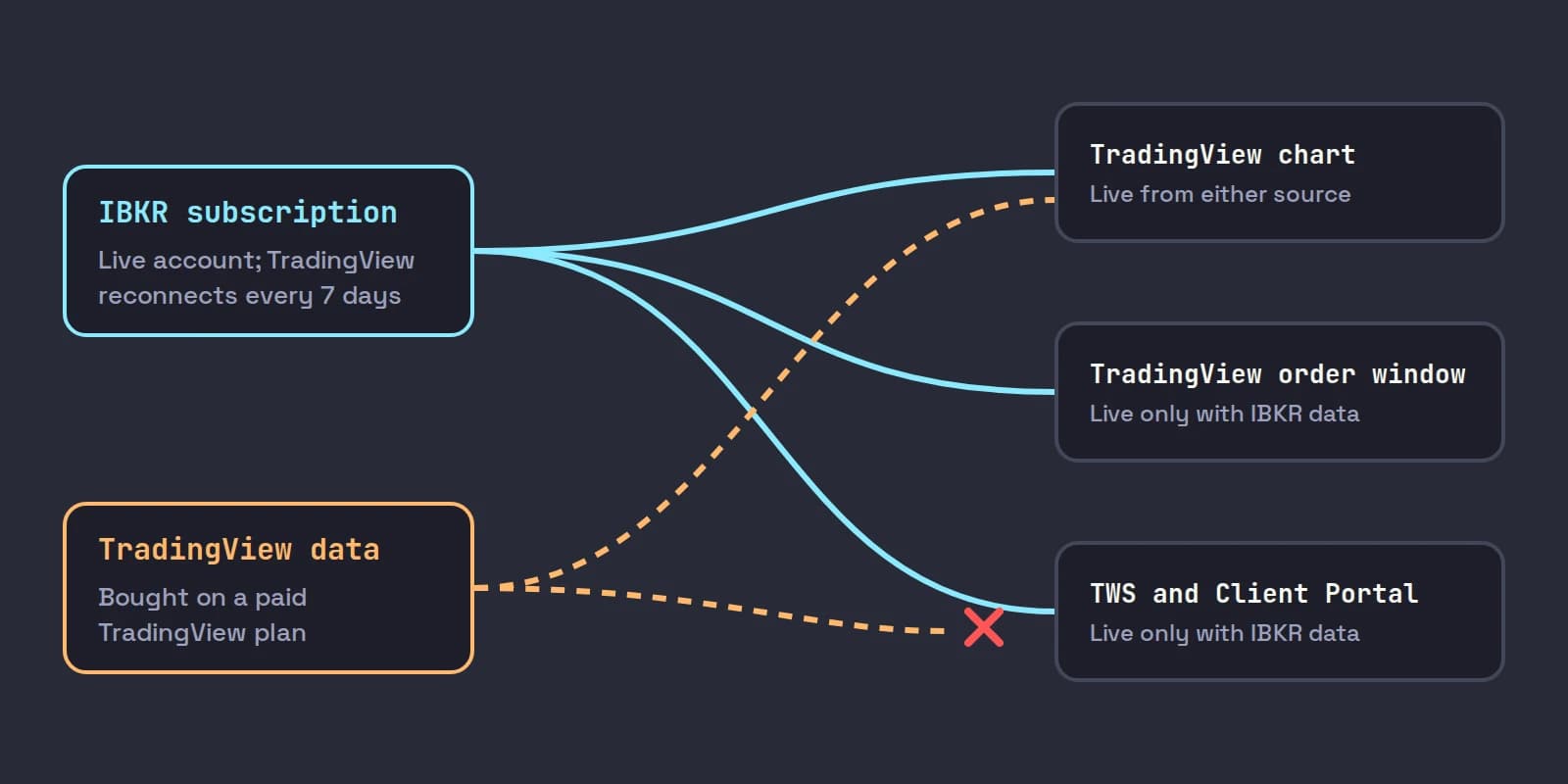
| You pay for data at | TradingView chart | TradingView order window | TWS and Client Portal |
|---|---|---|---|
| IBKR only (live account) | Live, reconnect every 7 days | Live | Live |
| TradingView only | Live | Delayed, with a warning per order | Not live |
| Both | Live | Live | Live |
So for a day trader on IBKR the sensible setup is usually to buy the data once, at IBKR. A non-professional US stock setup there is the US Securities Snapshot and Futures Value Bundle at $10 a month (waived in any month with $30 of commissions), the US Equity and Options Add-On Streaming Bundle at $4.50, and NASDAQ TotalView-OpenView at $16.50 if you want Nasdaq depth, per IBKR's market data pricing. IBKR's TradingView requirements add that to get IBKR data you must keep $500 in the account plus the cost of your subscriptions. Which subscriptions a small-cap trader needs is covered in IBKR market data for day trading.
IBKR's own lesson walks through subscribing to market data in Client Portal, which is the step that makes the live chart and order window work:

TradingView sells its own exchange data too, but its pricing page says you need a paid plan or a trial to add it. Trading through a broker, including Depth of Market trading, is listed on every plan, free Basic included; paid plans run from $14.95 to $239.95 a month at monthly billing.
What you can trade through the TradingView Interactive Brokers integration
IBKR's supported security types page lists stocks, US equity and index options, futures, crypto and forex. Bonds, CFDs, futures options, European and Asian options and warrants are not tradable through TradingView. One caution: IBKR's pages are not fully consistent, and an older line elsewhere still names options and crypto as unsupported. If a symbol shows as non-tradable in the panel, that is the answer for your account.
Small-cap traders should note warrants on that excluded list: a stock's warrants can be charted but not traded from TradingView.
Orders, hotkeys and brackets
TradingView's order ticket takes the order type, side, quantity, stop-loss and take-profit, and you can place, drag and cancel orders on the chart. For speed it has two tools:
- Buy and Sell buttons and hotkeys. Shift+B and Shift+S, or the chart's Buy and Sell buttons, place orders with a saved order preset, including its brackets, without a confirmation in trading mode. TradingView's order presets announcement says there is a limit of 10 presets per user, separate for each broker integration.
- Depth of Market. A DOM ladder for click trading, fed by your IBKR data when you subscribe at IBKR.
Three rules shape how you protect a trade:
- Brackets go on before the fill. IBKR "only allows orders to be bracketed so long as the order is still open and has not been executed" (IBKR: adding a take profit or stop loss). Add the TP and SL on the order ticket or in your preset, not after you are filled; after the fill, protection is a separate sell order you place yourself.
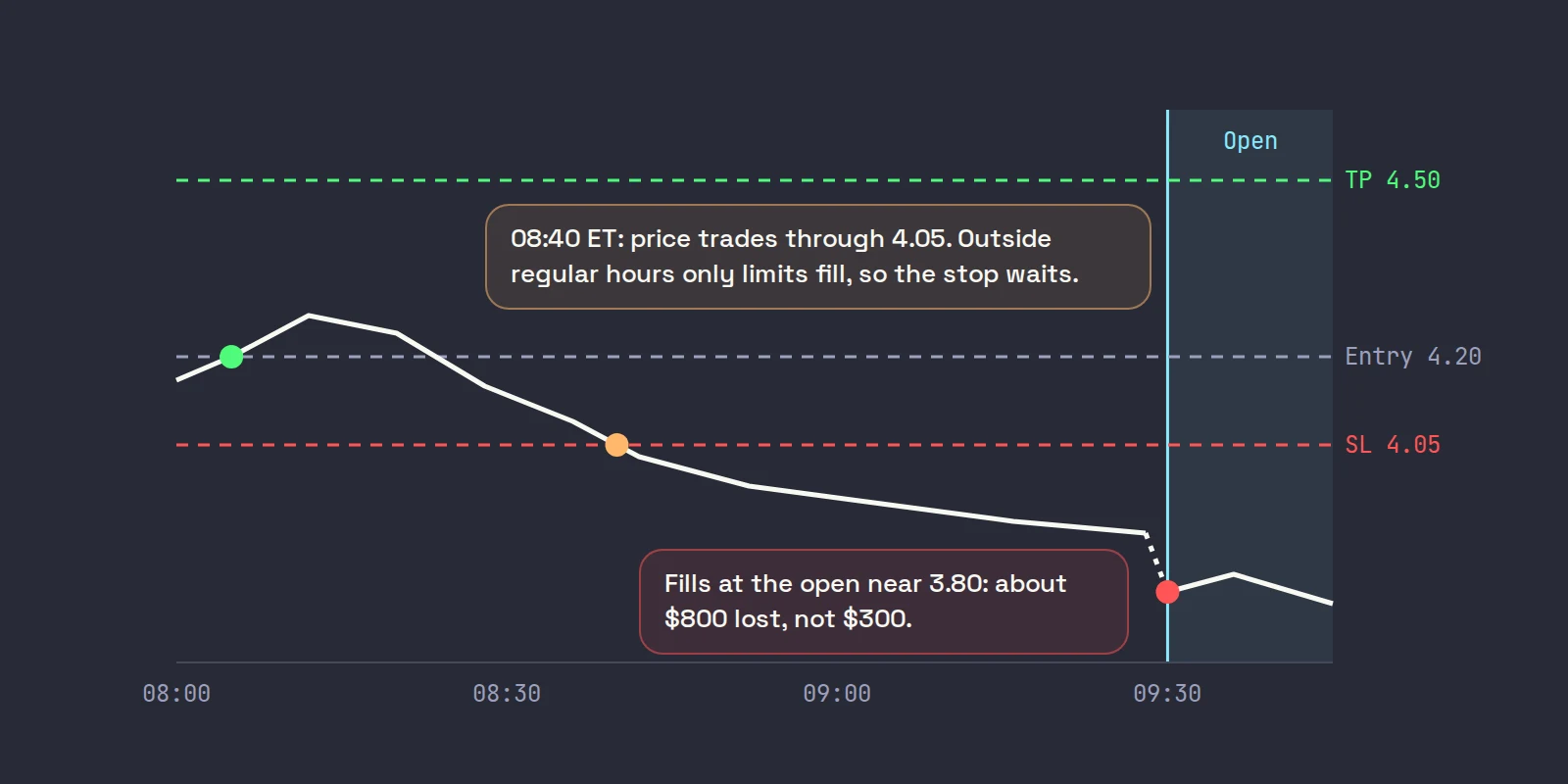
- Outside regular hours, only limits fill. TradingView's extended hours article describes a Fill order outside RTH option for limit orders and a Fill take profit outside RTH option, and nothing for the stop-loss. That matches the exchange rule: before 09:30 ET and after 16:00 ET, US exchanges accept limit orders only, so a plain stop cannot protect a pre-market trade (why pre-market stops fail).
- No automation. IBKR says Pine Script cannot trade an IBKR account through the integration. Indicators and alerts still work.
A worked example. You buy 2,000 shares of ABCD at 4.20 at 08:05 ET from a preset with a 4.05 stop-loss and a 4.50 take-profit, and Fill take profit outside RTH on. If ABCD trades up to 4.50, the take-profit can fill in the pre-market. If it drops through 4.05 instead, the stop waits for the regular session, and at 09:30 the stock may open well below 4.05. Your planned loss was 2,000 times 0.15, or $300; an open at 3.80 makes it $800. In the pre-market you are the stop.
One IBKR login at a time
TradingView's support explains why connecting disconnects you elsewhere: IBKR allows one active session per username, so the newer login ends the older one. The fix is a second username on the same account, added in Client Portal, used only for TradingView. Market data is billed per username, so the TradingView login needs its own subscriptions if you want IBKR data there.
You do not need a connection at all to use TradingView's charts. Charting, drawing levels and alerts work without the broker link. Only trading and the IBKR data feed need the login.
TradingView vs TWS for day trading on IBKR
| TradingView connected to IBKR | TWS | |
|---|---|---|
| Charts | Excellent, the reason most people use it | Good, less polished |
| Runs | In the browser or TradingView's app | Desktop program |
| Hotkeys | Shift+B and Shift+S from a preset | Many keys, each with its own price, size and transmit settings |
| Stop added after the fill | Only as a separate order, not a bracket | Yes, attach or modify |
| Pre-market stop | Only a limit take-profit fills outside RTH | Stop-limit or manual exit |
| Products | Stocks, some options, futures, forex, crypto | Everything IBKR offers |
| Automation | No Pine Script trading | Through the TWS API |
| Cost | Free plan works; paid plans for more charts and indicators | Free |
Our verdict: TradingView on IBKR is a good fit for swing trades and planned day trades with brackets set before the entry. For scalping small caps, where you add and cut size in seconds and need a stop in the pre-market, it is better as the chart beside your execution screen than as the execution screen itself. Whichever you choose, make sure your computer setup can run it alongside everything else, and see IBKR market data lines if you watch many symbols at once.
Where Scalpel fits
Scalpel does not connect to TradingView, and it does not need a TradingView plan. Its charts run on Interactive Brokers' own history and live bars, the same feed as its Level 2 and tape, and on Windows they are drawn with TradingView's free, open-source Lightweight Charts library (Apache 2.0). On a Mac, Scalpel draws the chart with its own built-in chart (chart basics).
What it does differently from TradingView's trading panel: entries sized from your stop and dollar risk at the instant you press, scale-outs in one key, and a working stop you drag on the chart that can exit in the pre-market with a limit sell 5 cents under the last trade (how stops work). Those stops are watched by the app, not resting at IBKR, so they only work while Scalpel runs with a live feed, and no fill is guaranteed. It connects through TWS or IB Gateway (connect Interactive Brokers), is long only and trades US stocks only.
A setup that works: TradingView unconnected on a side screen for higher-timeframe charts and alerts, and Scalpel on the main screen for execution. With no TradingView login, there is no session to collide with. Our getting started video shows the connection:
Trading carries a significant risk of loss. Nothing here is financial advice.
Questions
- Can I connect Interactive Brokers to TradingView?
- Yes. In TradingView click Trade, choose Interactive Brokers, click Connect and log in with your IBKR username, live or paper. The IBKR account needs to be open and funded with at least $1, with trading permissions for what you trade.
- Can I use my IBKR market data on TradingView?
- Yes, on a live account. IBKR says its subscribers see their live data in TradingView's chart and order window. TradingView gives 7 days of access per connection, so you reconnect weekly. Data bought from TradingView does not show in TWS.
- Why does TWS log out when I connect TradingView?
- IBKR allows one active session per username, so the TradingView connection ends the TWS session. Add a second username to your account for TradingView. Market data is billed per username.
- Can I add a stop loss after my order fills in TradingView with IBKR?
- Not as a bracket. IBKR only allows brackets while the order is still open, so attach the stop-loss and take-profit on the order ticket or in your order preset before the entry fills. After the fill, protection is a separate sell order.
- Does Pine Script work with Interactive Brokers on TradingView?
- Not for trading. IBKR says Pine Script cannot place trades through the integration. Pine indicators and alerts still work on the chart.
- Do I need TWS running to trade IBKR on TradingView?
- No. TradingView connects through IBKR's web API with a browser login, so TWS and IB Gateway are not needed. They will be signed out if they use the same username.
Related guides
Guide 1.4Connect Scalpel to Interactive BrokersRun TWS or IB Gateway, match the API port and watch Scalpel connect. Which program to use, the ports (7497, 7496, 4001) and what the link banner tells you.Guide 3.5The chart: timeframes, VWAP, EMAs, MACD and deltaScalpel's chart on IBKR data, no TradingView subscription: 10s to daily bars, scroll-back history, VWAP from 04:00 ET, EMA 9 and 20, MACD and delta.Guide 1.6The IBKR market data you need for Level 2The IBKR market data that gives Scalpel live quotes, Level 2 and the tape, with no third-party feed to pay for, and how delayed or missing data shows.
Keep reading
- IBKR trading platforms: day trading software for Interactive BrokersIBKR trading platforms compared for day trading: TWS, IBKR Desktop and third-party software like DAS, TradingView and Sierra Chart, with prices and setup.
- A day trading computer setup: specs, monitors and internetA day trading computer setup that does not stall: IBKR's TWS specs, how much RAM, monitors and placement, wired internet, a UPS and a backup connection.
- Interactive Brokers vs Webull for day tradingInteractive Brokers vs Webull for day trading: commissions, payment for order flow, Level 2 cost, pre-market hours and hotkeys, checked on each site.
Practice in SIM, against the live book.A lifetime license, every update included, with a 7-day refund guarantee.Ask in DiscordGet Scalpel