Day trading hotkeys: the keys every scalper should set up
By Scalpel Team. , updated . 9 min read.
In short
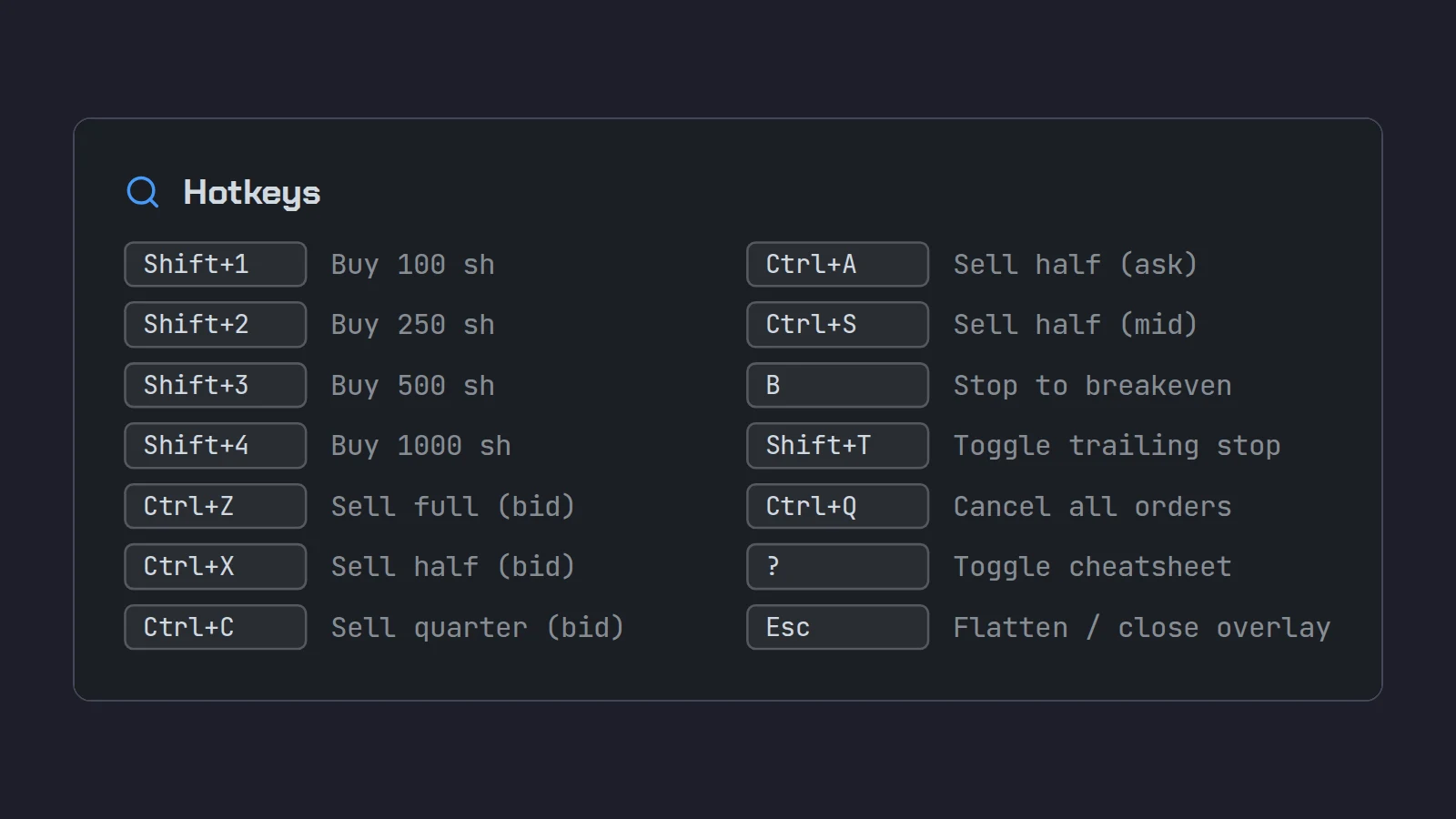
The day trading hotkeys every scalper needs are five: buy (a limit at the ask plus a few cents), sell half and sell all (limits at the bid minus a few cents), cancel and flatten everything. Put them under one resting hand, keep buys and sells on separate rows, give the flatten key a spot you cannot hit by accident, and keep your smallest size on the easiest key. Build them in a paper account and drill until you press them without looking down.
Day trading hotkeys exist because a small-cap move gives you a second or two, and the time it takes to find a button, aim at it and click is time the price keeps moving. A good hotkey setup is short, boring and identical every day. A bad one has twenty keys, three of them dangerous, and a buy key that sits next to the flatten key.
This post is platform-neutral: the set of keys, how each one should be priced and sized, where to put them, and how to practice. Where a platform detail matters we use Interactive Brokers' TWS as the example, because that is what we build on. Scalpel is independent and not affiliated with or endorsed by Interactive Brokers.
Day trading hotkeys: the essential five
Every key below does one job. If a key does two jobs depending on context, sooner or later it does the wrong one.
| Job | What the key sends | How it is priced | The trap |
|---|---|---|---|
| Buy | A buy for your standard size | Limit at the ask plus a small offset | A buy priced at the bid or the last sits while the stock runs |
| Sell half | A sell for half the position | Limit at the bid minus a small offset | A fixed share count goes stale when your size changes |
| Sell all | A sell for the whole position | Limit at the bid minus a small offset | On some platforms it sells a fixed count, not what you hold |
| Cancel | Cancels working orders | No price | "Cancel all" may cancel orders in other stocks too |
| Flatten | Sells every position | Aggressive limit or market | Some platforms make it a pane plus a confirmation, not one press |
That is the core. Three more earn a place once the five are automatic:
- A second buy size. Most scalpers keep a starter size and a full size. Two keys, smallest on the easier one.
- Sell into strength. A sell half priced at the ask, which rests and waits for buyers to lift it. Good into a spike, useless in a drop.
- Stop to breakeven. Only if your platform can move a stop with one key. In TWS that means modifying a broker order, which is slower than it sounds.
Price every key as a marketable limit
A marketable limit is a limit order priced at or through the other side of the book: a buy at the ask or above, a sell at the bid or below. It fills at once against what is there, like a market order, but it has a cap. That cap is the whole point. In a thin small-cap book a market order can sweep several levels before it stops, and you find out the price afterward.
So the buy key prices off the ask plus an offset, and the sell keys off the bid minus an offset. Worked through on a fictional ABCD:
- The quote is 4.18 bid, 4.20 ask. Your buy key sends a limit at 4.20 + 0.05 = 4.25.
- 300 shares are offered at 4.20 and 400 at 4.22. A 500-share buy fills 300 at 4.20 and 200 at 4.22, an average of 4.208.
- If the offers vanish and the next ask is 4.30, the order does not chase. It rests at 4.25 and you decide what to do next.
Your fill comes from the book; the offset is only a slippage budget, the most you will pay above the ask you saw. How to set it by stock price, and whether to use cents or percent, is in our post on TWS hotkey limit price offsets.
One more reason to price everything as a limit: outside regular hours, US exchanges take limit orders only. The SEC's investor bulletin on after-hours trading notes that many brokers accept only limit orders then. A key that sends a market order is dead before 09:30 ET, which is exactly when small-cap gappers make many of their moves.
Size: one key per size, smallest on the easiest key
A hotkey is only as good as the size behind it. There are two common ways to size:
- A fixed share count. 500 shares on every press. Simple, but your risk changes with every stock: 500 shares with a 10 cent stop risks $50, with a 40 cent stop $200.
- A fixed dollar risk. You decide the loss at your stop, and the size comes from the stop distance. Risk $50 with a 20 cent stop is 250 shares; the same $50 with a 10 cent stop is 500.
Most platforms only offer the first on a hotkey. TWS, for example, sizes a Buy key from your preset quantity, a fixed number, or whatever is showing on the ask (IBKR's hotkey guide calls that last one Available). Risk-based sizing then means doing the division in your head before you press. Our post on position sizing for day trading goes through it.
Whichever you use, put the smallest size on the key your finger hits most easily. If you slip, you buy less, not more. And never keep a size on a key that would hurt you if pressed twice.
Where to put the keys
A layout is good when you can find every key by feel, and the dangerous keys are hard to hit by accident. Rules we use:
- One hand rests, one hand is free. The left hand stays on the keys; the right is on the mouse or still. Every trading key sits under the resting hand.
- Buys on one row, sells on another. Your hand learns "top row in, home row out". Mixing them on one row is how a buy gets pressed when you meant to sell.
- Exits nearest your strongest fingers. You press sells under more stress than buys.
- The panic key apart. Flatten should be reachable without looking, but not next to anything you press all day.
- Avoid what your system already uses. Ctrl+C and Ctrl+V are copy and paste everywhere. If a trading key shares them, every copy is a trade.
- Same layout on every platform you use. If your paper platform and your live platform differ, you will press the paper key live one day.
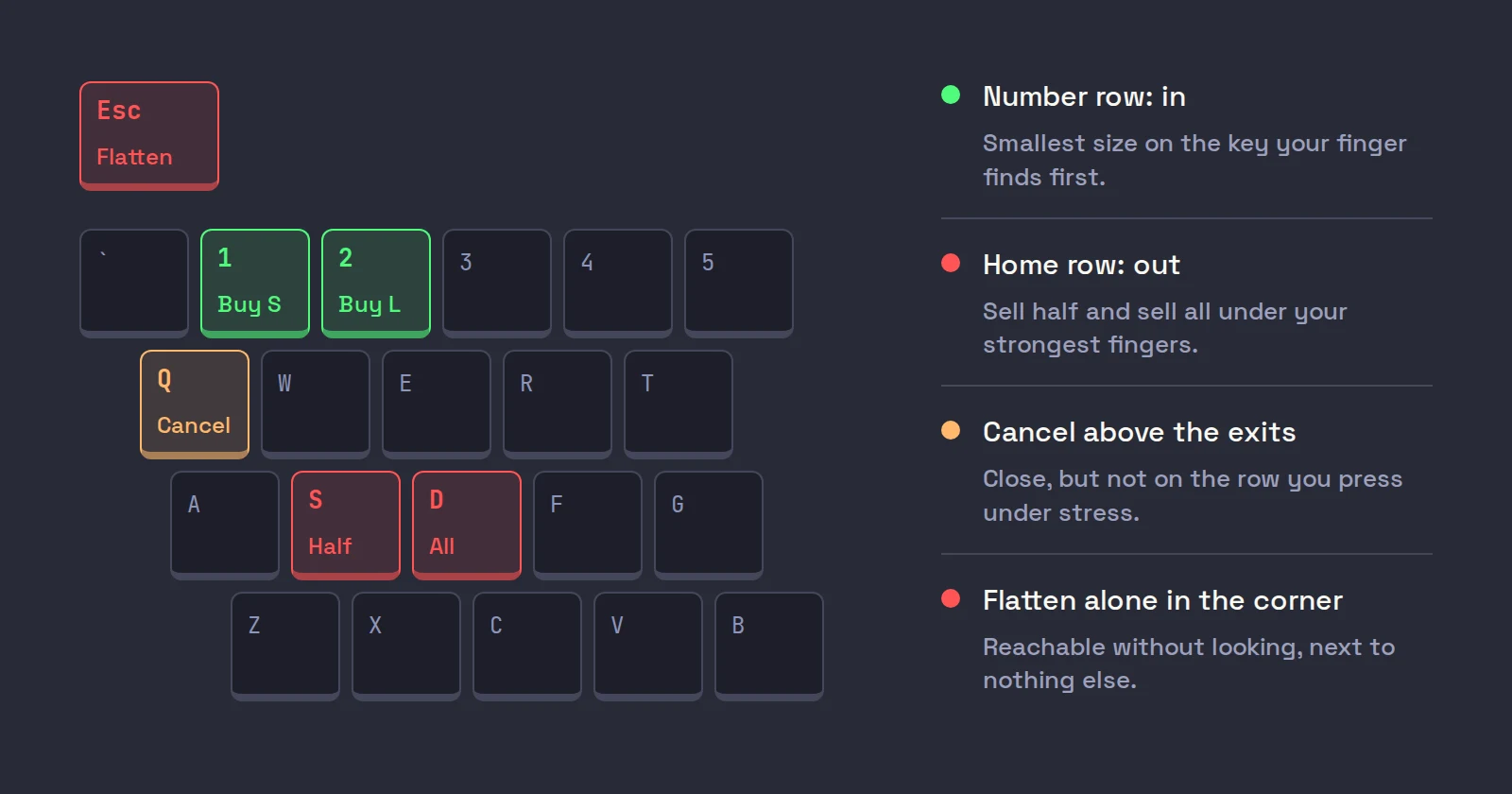
Platforms limit what you can bind. TWS accepts any single key, or Ctrl or Shift with one of the 26 letters, and rejects reserved keys such as Alt (IBKR: TWS hot keys). Single keys are fastest, but a single letter fires whenever the trading window has focus, so a stray keystroke can trade. A modifier is a cheap safety catch. If you want physical separation, a small programmable keypad is an option, with trade-offs of its own.
Why speed matters, and where it stops mattering
Pressing a key is close to the fastest thing a human can do. In a study of 1,469 people, Woods and colleagues (2015, Frontiers in Human Neuroscience) measured a mean simple reaction time of 231 milliseconds, or 213 once hardware delays were taken out: see a light, press a button. A hotkey trade is that, plus the decision. A mouse trade adds moving your hand, finding the button and aiming at it, which is where most of the time goes. The numbers behind that are in our post on keyboard-only day trading.
Two honest limits:
- Speed does not fix a bad decision. The key makes the order instant. It does not make the trade good.
- Speed works both ways. Hotkeys make mistakes instant too: the wrong window, a double press, a size with an extra zero. Our post on hotkey mistakes and the guards that stop them is the other half of this one. At minimum, set your platform's order size and value warnings just above your largest normal order. In TWS those are the precautionary settings in your stock presets.
Hotkey setup for day trading in TWS
If you trade through TWS, the five jobs map to these actions. The full walk-through, with every setting, is our pillar post on TWS hotkeys for day trading.
| Job | TWS action | Note |
|---|---|---|
| Buy | Buy | LMT, Ask plus offset, tick Transmit the order instantaneously once tested |
| Sell half | Sell with a fixed size | No one-key percentage; see TWS hotkeys to sell half |
| Sell all | Close Position | Acts on the selected position's row |
| Cancel | Cancel Contract's Orders or Cancel All Orders | The second cancels every order in TWS |
| Flatten | Close Portion of Positions at 100% | Opens a pane and asks you to confirm |
Two TWS habits matter more than any key. First, TWS hotkeys act on the selected row, not the one you are looking at, so click the stock before you press. Second, a stop can ride along with the buy key as an attached bracket, but a plain stop does not protect you in the pre-market.
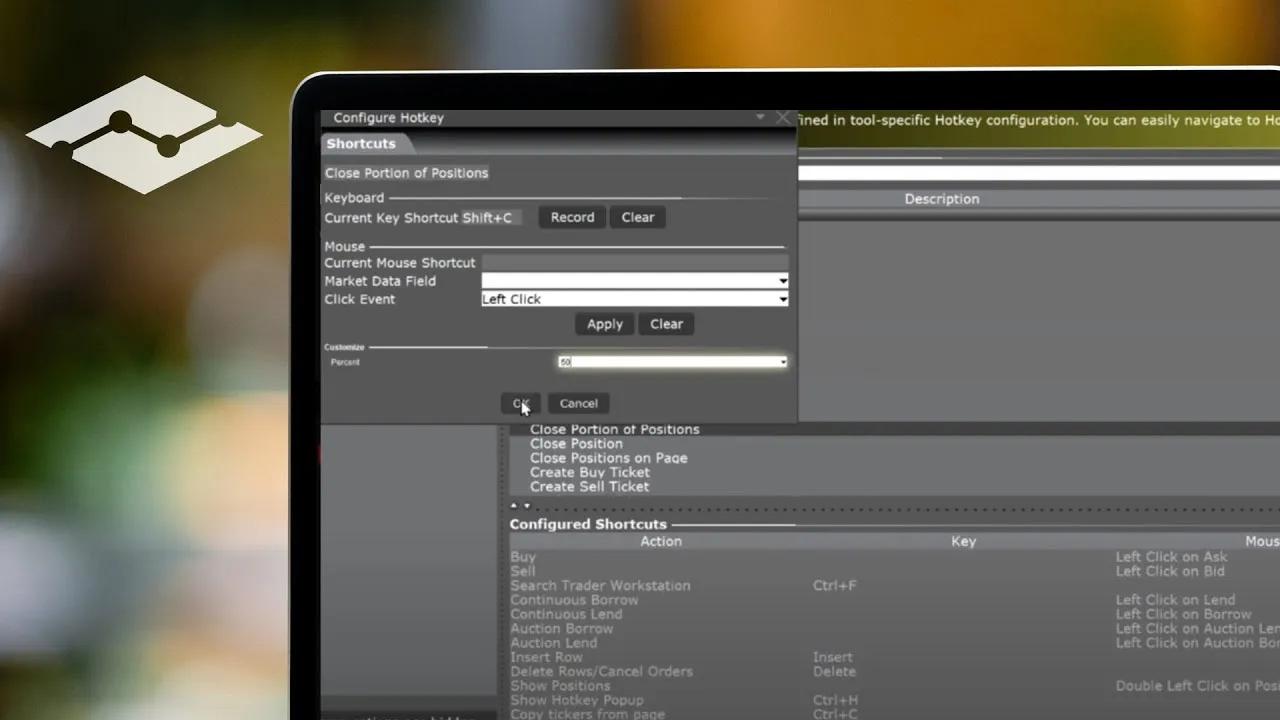
IBKR's own lesson is a five-minute tour of the Hotkeys page, including the Close Portion of Positions shortcut, worth watching once before you build your set:
What hotkeys cost in commissions
Every keypress that trades is an order, and some commission plans charge a minimum per order. At IBKR, the Pro Fixed plan is $0.005 a share with a $1.00 minimum per order, and Tiered starts at $0.0035 a share with a $0.35 minimum (IBKR stock commissions, checked on October 22, 2026; Tiered adds exchange and clearing fees). On Fixed, selling 200 shares in one order costs $1.00, and selling it as two 100-share halves costs $2.00, because each half hits the minimum. Small money, but worth knowing before you set a "sell a quarter" key on a 200-share position.
Practice drills for scalping hotkeys
Hotkeys only help when your hands know them, and that happens in paper, not live. IBKR gives you a paper trading login with the same TWS; other platforms have their own simulators. Our post on paper trading covers how to make that time count.
Name the key
With the platform closed, have someone call out a job ("sell half", "flatten") and press the key on a dead keyboard, until there is no pause between the word and the press.
In and out, twenty times
In paper, on a liquid stock, press buy, wait for the fill, press sell all. Twenty times. Read the fill price each time against the ask you saw. This is where you find out what the keys really send.
Scale out
Buy, sell half, sell all. Then buy twice and sell half. Check what is left each time. This drill finds the stale fixed-size sell key before it finds you.
Panic
Open two positions and press flatten. Time how long it takes to be flat, including any confirmation dialog.
Wrong window
Click into a different stock, or a text box, and press buy. See what happens. On some platforms nothing does; on others, the wrong stock is bought.
Only tick instant transmit once a key has done exactly what you expected every time in paper. Until then, let it build the order and transmit by hand.
Where Scalpel fits
Scalpel is a keyboard-first desktop cockpit that trades your own IBKR account through TWS or IB Gateway with the API enabled. Its hotkeys are the set above, already built: Shift+1 to Shift+4 buy four presets as marketable limits at the ask plus your buy offset (10 cents by default), Ctrl+X sells half and Ctrl+Z sells all at the bid minus your sell offset, Ctrl+Q cancels the focused desk's orders (Shift+Q on a Mac), and Esc with nothing open flattens every position. Each key acts on the focused desk and a voice confirms it.
The parts TWS leaves to you are handled at the keypress: a preset can be sized by dollar risk, so the shares are worked out from the live price and the stop the moment you fire (sizing presets); sell half is half of what you actually hold, rounded down, so it never goes stale (scale out and flatten); and no sell can exceed your position, because Scalpel is long only. Our guide video shows a full trade on the keys:
Every trading key can be rebound in Settings > Hotkeys (settings reference), and the keyboard-only workflow walks through a whole trade without the mouse. Two trade-offs to know: Scalpel's stops are watched by the app rather than resting at IBKR, so they only work while it runs with a live feed, and Esc is a fixed flatten key you cannot rebind.
Trading carries a significant risk of loss. Nothing here is financial advice.
Questions
- What are the best hotkeys for day trading?
- Five keys cover most scalps: buy as a limit at the ask plus a few cents, sell half and sell all as limits at the bid minus a few cents, cancel, and flatten everything. Add a second buy size and a sell-into-strength key only once those five are automatic.
- Should day trading hotkeys send market orders?
- Usually not. A marketable limit, priced a few cents through the ask or bid, fills like a market order but caps the price. Market orders also do not work outside regular hours, when exchanges take limit orders only.
- How do I set up scalping hotkeys without making mistakes?
- Build them in a paper account, leave instant transmit off until each key does exactly what you expect, keep the smallest size on the easiest key, and set your platform's size and value warnings just above your largest normal order.
- Which keys should I use for trading hotkeys?
- Keys under one resting hand, with buys and sells on separate rows and the flatten key apart. Avoid copy and paste combinations, and use a modifier such as Ctrl or Shift if a stray keystroke could otherwise trade.
- How long does it take to learn trading hotkeys?
- The keys themselves take a few paper sessions of drills. Pressing them without looking down under pressure takes longer, which is why the drills should be repeated until there is no pause between deciding and pressing.
Related guides
Guide 4.3Hotkeys: the defaults and how to change themEvery Scalpel hotkey and its default: buys, scale-outs, breakeven, trailing and cancel, each with a spoken confirmation. Esc's rules and how to rebind.Guide 14.3Trade without touching the mouseLoad symbols, move between desks, enter, scale out, manage stops and flatten using only the keyboard: a full hotkey workflow for scalping in Scalpel.Guide 4.1Sizing presets: shares, dollars or riskSet Scalpel's four buy presets to a share count, a dollar clip or a dollar risk from an ATR, swing low or cents stop, and see the size each press will buy.
Keep reading
- TWS hotkeys for day trading: a setup that actually worksSet up TWS hotkeys for day trading: where IBKR hotkeys live, the presets they need, a five-key scalping set with exact settings, and a printable cheat sheet.
- IBKR hotkeys not working? The causes and how to fix each oneIBKR hotkeys not working? Go through the checklist: row not selected, no instant transmit, popups, outside RTH unset, unmarketable prices. Exact TWS fixes.
- Keyboard-only day trading: why the mouse costs you fillsKeyboard only trading skips the slowest part of a click. What Fitts's law and HCI research say, a mouse-free day trading workflow, and when the mouse wins.
Practice in SIM, against the live book.A lifetime license, every update included, with a 7-day refund guarantee.Ask in DiscordGet Scalpel