How to read time and sales for day trading
By Scalpel Team. , updated . 8 min read.
In short
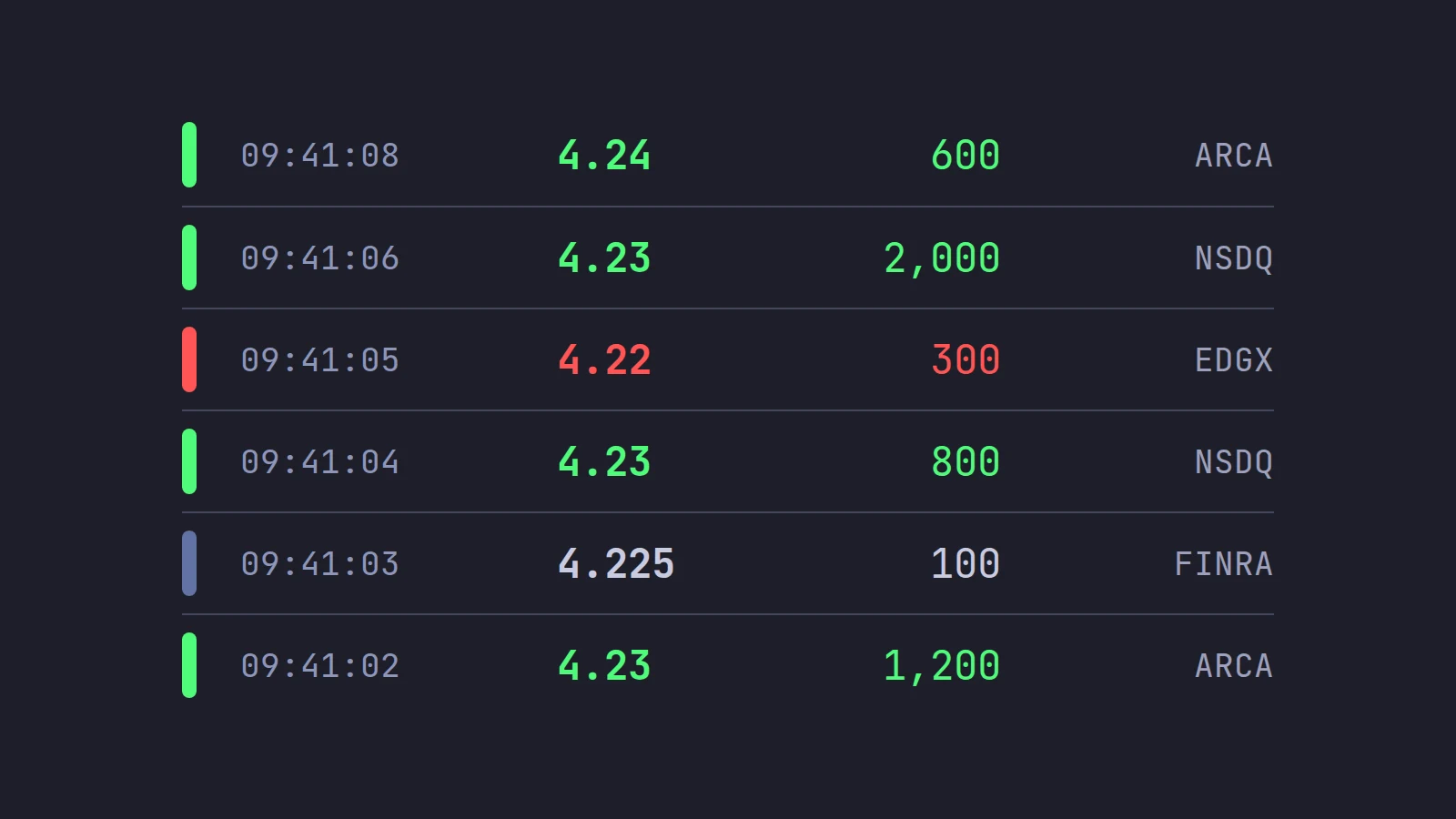
Time and sales, also called the tape or prints, lists every reported trade in a stock as it happens: the time, the price, the size, the exchange or reporting venue, and any condition code, newest at the top. The colors compare each trade with the quote at that moment: at or above the ask is usually green (a buyer paid up), at or below the bid red (a seller hit the bid), and between the two white or gray. To read it, watch the speed of the prints, their size, which color dominates, and whether the price moves when size trades.
Level 2 shows what traders say they will do. Time and sales shows what they did. That makes it the honest half of your screen: orders on the book can be placed and pulled, but a print is a trade. This post covers the time and sales window itself: what each column means, what the colors do and do not tell you, odd lots, condition codes, dark prints, and one worked read. Reading the tape for speed, size and absorption is the next step, covered in tape reading for scalpers.
We describe Interactive Brokers' TWS where a platform matters, because that is what Scalpel connects to. Facts were checked on October 22, 2026. Scalpel is independent and not affiliated with or endorsed by Interactive Brokers.
Time and sales explained: the columns
Every platform's tape is a list of prints, one row per reported trade. IBKR's guide says its Time & Sales window shows "Time, Last price, Size, Exchange, and Condition" by default (IBKR Guides: Time & Sales).
| Column | What it tells you |
|---|---|
| Time | When the trade printed, usually to the second or finer |
| Price | The trade price. A sub-penny price such as 4.225 on a small cap is a clue the trade happened off-exchange |
| Size | Shares in the trade. Some platforms show round lots, so "5" means 500 |
| Exchange | Where it traded or was reported: an exchange such as Nasdaq or NYSE Arca, or a FINRA trade reporting facility for off-exchange trades |
| Condition | A code for anything unusual about the trade: odd lot, extended hours, out of sequence and so on |
Two points catch people out. First, one order can produce many prints: a 3,000-share buy that takes four price levels prints at least four times. Second, the tape is not the book. A print at 4.23 means a trade happened at 4.23; it does not mean anyone is still offering stock there.
Time and sales colors: what green, red and white mean
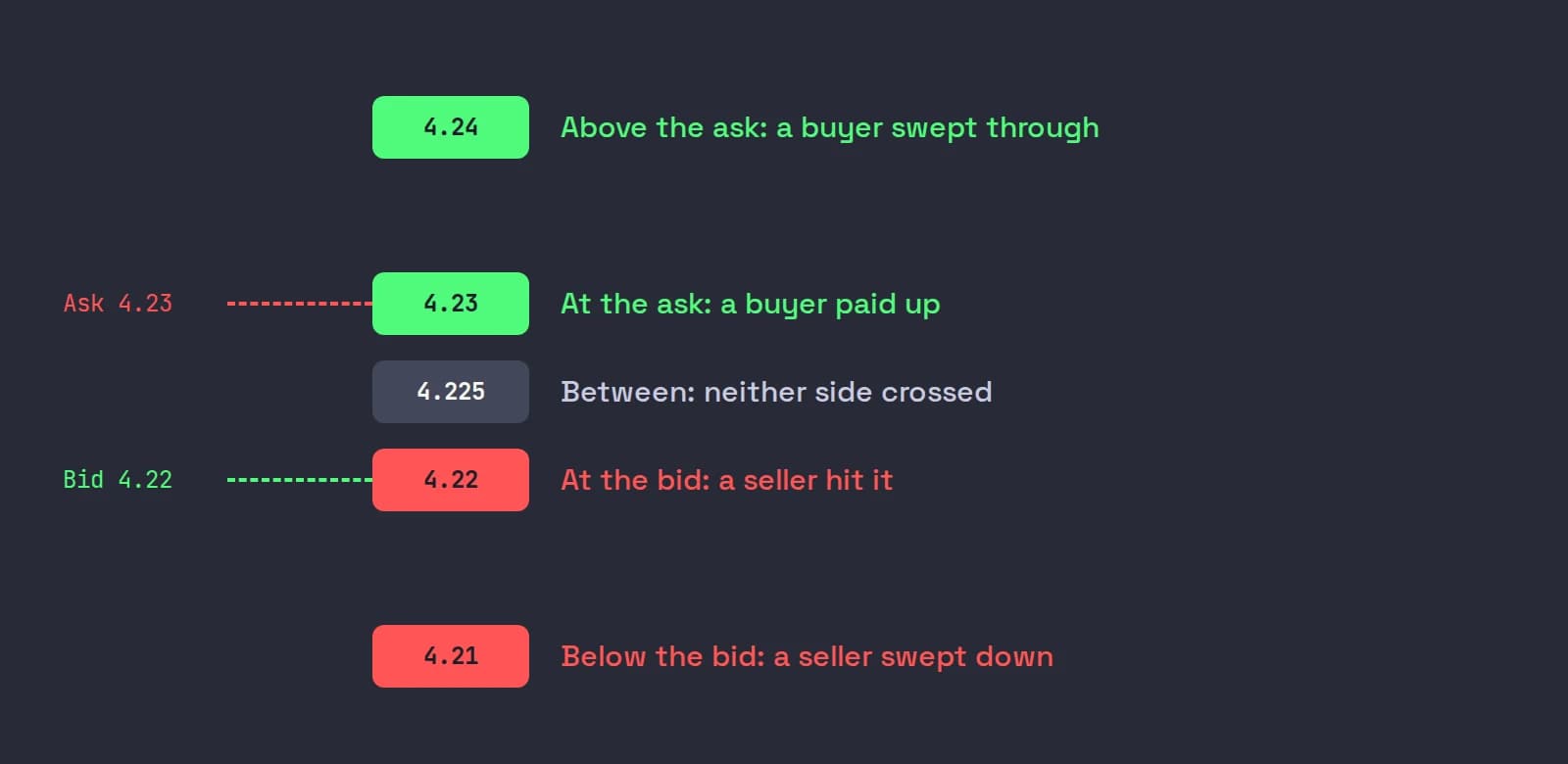
Most platforms color each print by comparing its price with the bid and ask at the moment it traded:
| Print price | Common color | What it suggests |
|---|---|---|
| Above the ask | Bright green | A buyer took the offer and more, often a sweep across levels |
| At the ask | Green | A buyer paid the offer: the buyer was the aggressor |
| Between bid and ask | White or gray | Neither side clearly crossed the spread: midpoint and price-improved trades |
| At the bid | Red | A seller hit the bid |
| Below the bid | Dark red or magenta | A seller hit the bid and more |
Exact colors vary by platform and are usually configurable, so check your settings before trusting a color you did not choose.
Treat the colors as an inference, not a fact. The tape does not say who was the buyer or the seller; the platform guesses from the quote. Academic work has measured how often those guesses are right. Using Nasdaq data that identified the true direction of each trade, Ellis, Michaely and O'Hara (2000, Journal of Financial and Quantitative Analysis) found that the quote rule, the tick rule and the Lee and Ready rule classified 76.4%, 77.66% and 81.05% of trades correctly. All of them did poorly on trades inside the quotes, which is exactly the white and gray part of your tape. On a fast tape the quote can also change between the trade and the moment your platform colors it.
So a column of green is good evidence of buyers paying up. A single green print is not.
Prints, odd lots and condition codes
Odd lots are trades under one round lot, usually under 100 shares. They were not on the consolidated tape until December 9, 2013. In the nine months to June 30, 2013, the SEC measured that 18% to 24% of exchange trades in stocks were odd lots, none of which reached the public tape (SEC data highlight: odd lot rates). Today they print, which is why a busy small-cap tape is full of 7-share and 35-share trades. Most platforms let you hide prints under a size so the larger trades stand out.
Condition codes flag trades that are not ordinary prints during the session. IBKR publishes the full tables for the NYSE-listed tape (CTS) and the Nasdaq-listed tape (UTDF) on its trade conditions page. The ones a day trader sees most:
| Code | Meaning | What to do with it |
|---|---|---|
| I | Odd lot trade | Usually ignore for size reads |
| T | Extended hours trade (CTS), Form T (UTDF) | A pre-market or after-hours print |
| U | Extended hours, sold out of sequence | Reported late outside regular hours: the price may be stale |
| Z | Sold out of sequence | Reported late: do not read it as the current price |
| F | Intermarket sweep | An order sent to several exchanges at once to take liquidity fast, often a sign of urgency |
| O and 6 | Opening and closing prints | The auction trades at the open and the close |
| 4 | Derivatively priced | Priced off another value, not the current market |
| B (CTS), W (UTDF) | Average price trade | A block reported at an average price, not traded at that price now |
In TWS you can hover over the price or size to see a print's conditions, or add the Exchange and Conditions columns. IBKR's guide also notes something important for reading speed: a "+" in front of a tick "indicates aggregated ticks over a certain timeframe, which we implement during an active market." In a fast market, TWS may be showing you a summary, not every print.
Dark prints and the off-exchange tape
Not every print comes from an exchange. Trades between broker-dealers, wholesalers and alternative trading systems are reported to a FINRA trade reporting facility and then printed on the tape. FINRA requires them to be reported "as soon as practicable but no later than 10 seconds after execution", including pre-market trades between 04:00 and 09:30 ET, which carry an extended hours modifier (FINRA Rule 6380A).
That volume is large. In the SEC's figures for the first quarter of 2022, about 40% of US stock share volume was executed off-exchange (SEC Release 34-96495). Platforms label those prints differently: FINRA, TRF, ADF or a single letter. What they have in common:
- They never touched the book. There was no order on Level 2 to see beforehand.
- They can arrive late. Up to 10 seconds is allowed, so a large print at an old price is often a reported block, not a new trade at that price.
- They often print between the bid and ask. Midpoint and price-improved fills are why so many off-exchange prints are white or gray. SEC Rule 612 keeps most quotes on stocks priced at $1 or more in whole cents, so a fill at 4.225 on a small cap did not come from a displayed quote.
Hidden orders and dark pools covers what that hidden volume means for your levels.
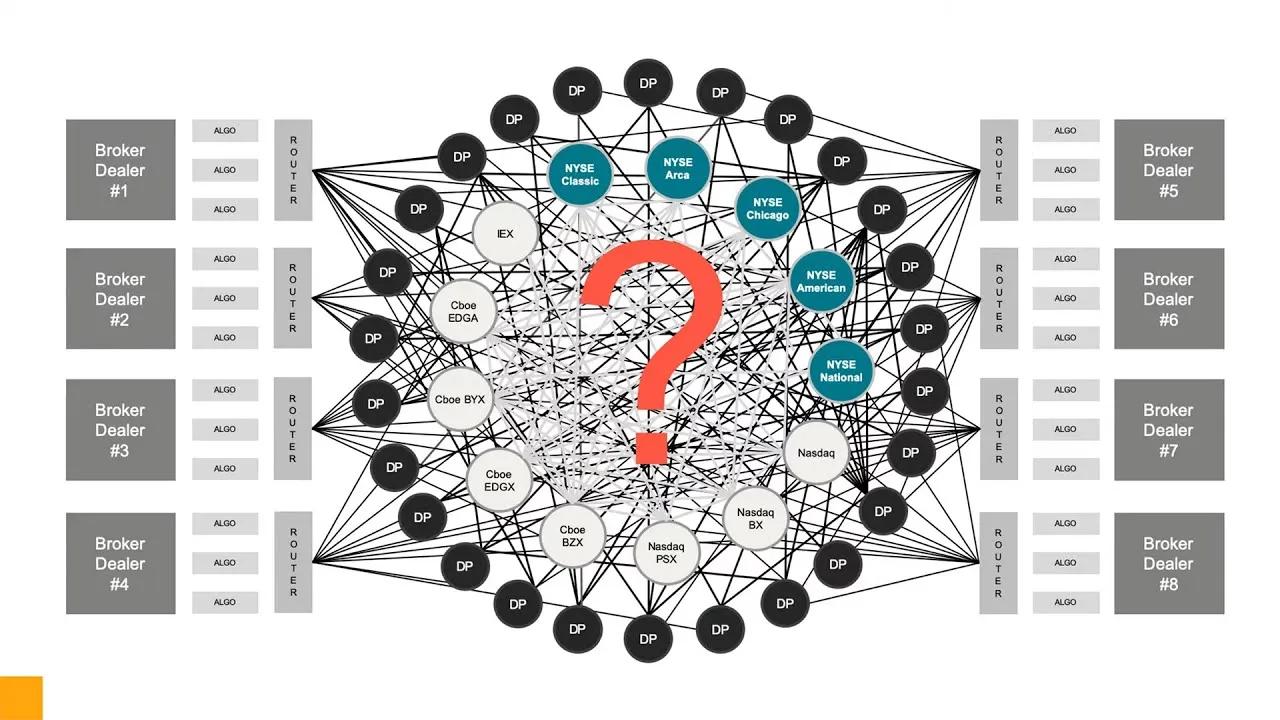
This Interactive Brokers lesson, from IEX's course on US market structure, explains exchanges, dark pools and internalizing brokers, and why trades from dark pools reach the tape marked only as off-exchange, without naming the venue.
A worked read of the tape
ABCD is 4.22 bid, 4.23 ask. Level 2 shows only 300 shares offered at 4.23 on Nasdaq. Here are seven seconds of the tape, oldest first:
| Time (ET) | Price | Size | Exchange | Side |
|---|---|---|---|---|
| 09:41:02 | 4.23 | 500 | Nasdaq | At the ask |
| 09:41:02 | 4.23 | 1,200 | NYSE Arca | At the ask |
| 09:41:03 | 4.225 | 100 | FINRA | Between |
| 09:41:04 | 4.23 | 800 | Nasdaq | At the ask |
| 09:41:05 | 4.22 | 300 | Cboe EDGX | At the bid |
| 09:41:06 | 4.23 | 2,000 | Nasdaq | At the ask |
| 09:41:08 | 4.24 | 600 | NYSE Arca | Above the old ask |
What it says:
- Buyers are in control. 4,500 shares traded at the ask in five seconds against 300 sold at the bid. Adding the 600 at 4.24, buyers took 5,100 shares, sellers 300. The 100 at 4.225 is a midpoint print from off-exchange and counts for neither side.
- 4.23 was much bigger than it looked. Nasdaq showed 300 shares, yet 3,300 traded there on Nasdaq alone. A seller was refilling the offer, an iceberg order.
- The seller finished. The print at 4.24 means the 4.23 offer was gone. That is the moment many momentum traders watch for: the hidden seller is done and the next level is open.
None of this says ABCD goes to 4.30. It says buyers were paying up and the supply at 4.23 has been absorbed. If the next prints are red at 4.23 and 4.22, the read failed.
Setting up time and sales in TWS
Open the window
In Mosaic, click New Window and choose Time & Sales. In Classic TWS it is under Analytical Tools. Link it to your watchlist's color group so it follows the stock you select.
Add the exchange and conditions
Click the configure wheel in the top right and add the Exchange and Conditions columns if they are not showing, so you can tell exchange prints from off-exchange ones and spot odd lots and late reports.
Set a block filter
Right-click a column and use the block filter to hide or show blocks and define a block size that suits the stocks you trade. On a $4 stock, 10,000 shares is $40,000; on a $40 stock it is ten times that.
A tape window works best next to the book, not in another corner of the screen. A TWS day trading layout shows where to put it.
Where Scalpel fits
Scalpel puts the tape in a column beside the Level 2 book on every desk, so the book and the prints are read in one glance. Green bars are prints at the ask, red bars at the bid, gray rows traded between, and each bar's length is the trade's size against the biggest print around it, so a block stands out. By default it shows dollar value rather than shares, and hides prints under 1,000 shares (Display min size); you can switch both in the LEVEL 2 cog. The DELTA numbers above the book add the tape up for you: shares bought at the ask minus shares sold at the bid over 10 seconds, 1 minute and 5 minutes. The time and sales guide covers each setting.
Scalpel's tape column shows price and size only, to stay narrow. If you want time, exchange and condition codes on every print, TWS's Time & Sales window shows more. Scalpel also turns the tape into sound: buys in your right ear, sells in your left, bigger trades as longer notes (tape sound, and the story behind it in tape reading by ear). Our short video shows the tape beside the book.
For the book side of the screen, start with how to read Level 2, or the Level 2 guide for Scalpel's panel.
Trading carries a significant risk of loss. Nothing here is financial advice.
Questions
- What is time and sales in trading?
- A live list of every reported trade in a stock, showing the time, price, size, exchange and any condition code, newest at the top. It is also called the tape or the prints.
- What do the colors mean on time and sales?
- On most platforms green means the trade printed at or above the ask, so a buyer paid up, red means at or below the bid, so a seller hit the bid, and white or gray means it printed between the bid and ask. Colors are an inference from the quote and are sometimes wrong.
- What does a white or gray print mean on the tape?
- The trade printed between the bid and the ask, so neither side clearly crossed the spread. Many of these are off-exchange midpoint or price-improved fills.
- What does the T condition mean on time and sales?
- On the NYSE-listed tape, T marks an extended hours trade; on the Nasdaq-listed tape it is called Form T. Either way it printed outside regular trading hours.
- Why do some prints show a price between cents, like 4.225?
- Sub-penny prices usually come from off-exchange trades, such as a wholesaler giving price improvement or a midpoint trade in an alternative trading system. Under SEC Rule 612, most small caps priced at $1 or more can only be quoted in whole cents.
- Does time and sales show every trade?
- It shows every reported trade, including off-exchange ones reported within FINRA's 10-second window. Some platforms, including TWS in active markets, aggregate ticks, and many hide small prints by default.
Related guides
Guide 3.3Read the time and sales tapeRead the time and sales tape in Scalpel: prints coloured by who took liquidity, size bars, dollar values, the size filter, and the tape against Level 2.Guide 3.4Hear the tape: tape soundHear the tape, inspired by Aggr.trade: buys in the right ear, sells in the left, block trades by their shape. Set the big print value, gate and volume.Guide 3.1How to read Level 2 in ScalpelRead Scalpel's DAS-style Level 2: bids left, asks right, optional colour bands per price, venues, spread, imbalance and delta, and reading players by behaviour.
Keep reading
- How to read Level 2: a plain guide for day tradersHow to read Level 2 step by step: the spread, stacking and thinning, reading the book against the tape, what depth hides, and why pre-market books mislead.
- IBKR Level 2: which subscription, what it costs and how to read itIBKR Level 2 explained: which depth feeds to buy and what they cost today, the TWS limit on books at once, and how to read the book, pre-market included.
- Level 1 vs Level 2 market data: what the difference means for a tradeLevel 1 vs Level 2 market data: top of book vs depth, a worked example of what your size really costs, IBKR prices, and who actually needs Level 2.
Practice in SIM, against the live book.A lifetime license, every update included, with a 7-day refund guarantee.Ask in DiscordGet Scalpel