Tape sound trading: how to read the tape by ear
By Scalpel Team. , updated . 8 min read.
In short
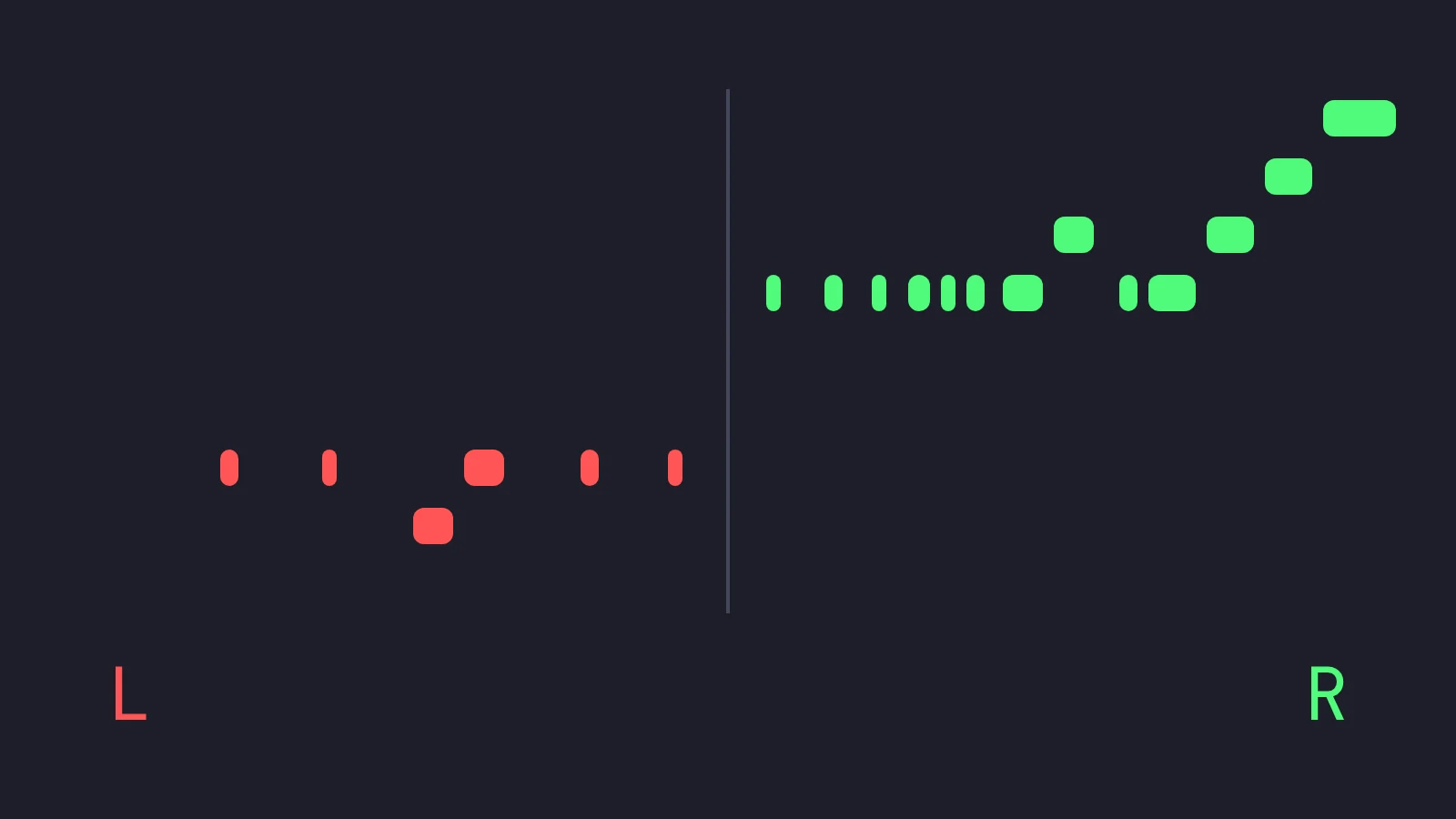
Tape sound trading means hearing the time and sales tape instead of only watching it: each print becomes a short sound, so you hear how fast the stock is trading, which side is taking, and when a big order hits, while your eyes stay on Level 2 and the chart. Lab studies find people react faster to a sound than to a light, and hearing does not compete with your eyes for attention. In Scalpel, buys play bright rising notes in your right ear, sells lower falling notes in your left, and bigger trades play longer figures. The hard part is keeping it from becoming noise.
A scalper's eyes are already full: the Level 2 montage, the tape, the chart and the order bar all want to be read at once. Your ears are idle. We built tape sound and voice callouts into Scalpel to use them, and this post is the reasoning: what the research says about hearing versus seeing, how our tape sound maps prints to notes, how the voice callouts are designed, and the rules that keep audio from turning into a constant buzz you learn to ignore. The tape sound is inspired by Aggr.trade, the open-source trade-flow tool by Tucsky. Scalpel is independent and not affiliated with or endorsed by Aggr.trade or Interactive Brokers.
Why listen to the tape at all
Two lines of research point the same way.
Sound is noticed a little faster. In a simple reaction-time test you press a key the moment a stimulus appears. Shelton and Kumar (2010, Neuroscience and Medicine) measured a mean of about 331 milliseconds for a visual stimulus and about 284 milliseconds for a sound, across 14 participants. Jain and colleagues (2015, International Journal of Applied and Basic Medical Research) tested 120 medical students and found auditory reaction time significantly faster than visual in both men and women; the literature they cite puts the accepted figures for college-age adults at about 190 ms for light and 160 ms for sound.
Treat those numbers with care. They come from a lab task, pressing one key for one beep, not from reading a tape and deciding whether to sell. The samples are small, and Shelton and Kumar note that some earlier studies found the opposite. A gap of a few tens of milliseconds will not make anyone a better trader on its own.
Sound uses a different channel. The larger benefit is that you do not have to look. Wickens's multiple resource theory (2002, Theoretical Issues in Ergonomics Science) holds that tasks using different senses interfere with each other less than tasks competing for the same one. Reading the tape column means taking your eyes off the book. Hearing the tape does not.
Is there evidence that sound makes traders more profitable? Not that we know of. The closest study we found, Nesbitt and Barrass (2004, IEEE Computer Graphics and Applications), built a display of Australian Stock Exchange depth data with both a 3D picture and sound, and tested non-experts on predicting price direction. In their own words, the results of the formal experiment "are complex". Audio is an input, not an edge.
How tape sound trading works in Scalpel
The sound comes from the same prints as the tape column: IBKR's tick-by-tick trade feed for the focused desk, the feed IBKR shows in TWS's Time and Sales window. That feed is scarce; a default IBKR account gets 5 tick-by-tick streams and 3 Level 2 books, which is one more reason a cockpit's sound should follow one desk, not all of them. Each print then goes through five steps.
- Side. A print at or above the ask is a buyer taking; at or below the bid, a seller. A print between the two is silent, because neither side clearly took it (aggressor).
- A sweep is one order. Consecutive same-side prints that arrive together, often one buyer filling across several venues, are added up and play as one sound.
- Weighed in dollars. Price x size, so the same settings work on a $2 stock and a $20 one. Under Sound min value, $1,000 by default, it is silent.
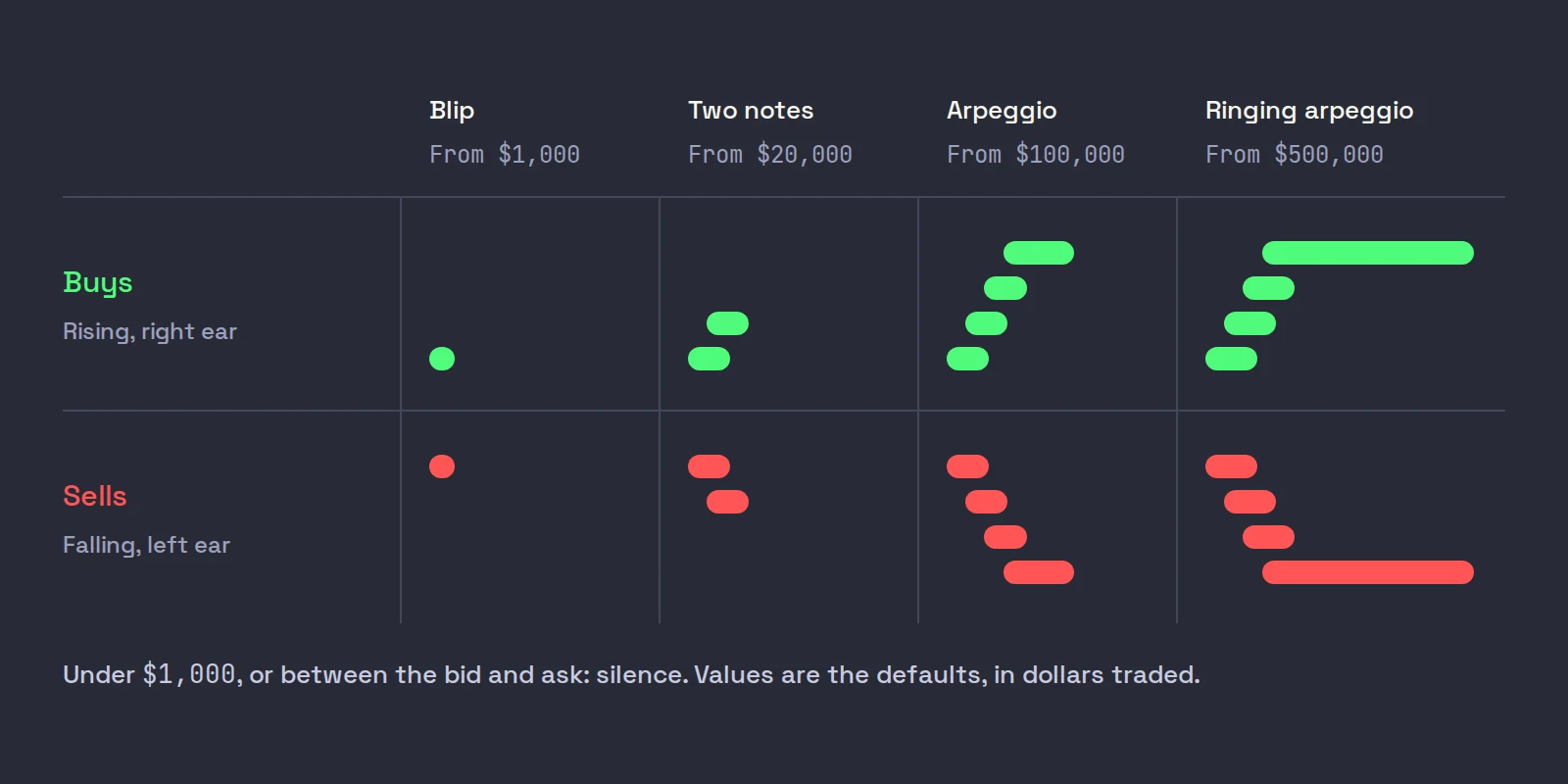
- The shape changes with size, not only the volume:
| Trade value (defaults) | What you hear |
|---|---|
| $1,000 to under $20,000 | One short blip, louder and longer the bigger it is |
| $20,000 (the Big print value) | A two-note figure: up for a buy, down for a sell |
| $100,000 (5 x the big print) | A four-note arpeggio |
| $500,000 (25 x) | The arpeggio with a long, ringing top note |
- One clock for every note. Sounds take turns on a shared schedule: 60 ms apart while the tape is calm, closing to 10 ms apart as a backlog builds, so a busy tape speeds up into a roll instead of piling into a chord. If the sound falls more than a second behind the market, small prints are dropped; big ones always play.
Buys are bright notes climbing an E major arpeggio from E5, set to your right; sells are hollower notes falling from B4, set to your left. The stereo is never hard left and right, so one earbud still hears both sides. Loudness grows with the square root of size, the curve Aggr.trade uses, so a print twice as big sounds noticeably bigger, not violently louder.
What that sounds like on a real move
Take a fictional ABCD at $4.00, quiet before a news headline. You hear an occasional blip, some left, some right: a stock nobody is chasing. Then the blips start coming from the right, faster, until they run together into a roll. A two-note rising figure cuts through it: someone just paid for at least 5,000 shares, $20,000 worth. Two more follow. You have not looked at the tape column once, and you already know buyers are taking the offer with size.
Now the other read. The roll is still on the right, the big figures keep coming, but price on the chart is not moving. Buyers are paying, and something is absorbing them at one price: look at the book for a hidden seller (iceberg orders). The sound told you when to look; the book tells you what it means. For the visual side of the same skill, see our posts on reading time and sales and tape reading for scalpers.
Voice callouts: words for things that change
Tape sound is a continuous texture. Voice callouts are the opposite: short words for events that change your state. Our audio design notes set the split early. Short tones confirm routine actions, such as a key press, while voice is kept for events that change your position or demand attention, and nothing that fires many times a minute gets a voice (voice callouts).
| You do or the market does | You hear |
|---|---|
| A buy preset fills | "Filled, level two" (the preset that fired) |
| You sell half | "Out, half", on the keypress |
| The working stop fires | "Stopped out" |
| The catastrophe net fires | "Catastrophe stop" |
| The daily loss limit trips | "Risk limit hit. Entries blocked." |
| The IBKR link drops | "Connection lost." |
Three rules keep the voice usable. An event plays its voice or its tone, never both. A callout that arrives while another is speaking is dropped, so two sentences never garble each other (the toast and the orders panel still have the full story). And the clips are pre-recorded, kept as short as the message allows, and compiled into the app, so they play the instant the event lands. Our design notes also set a loudness ladder, routine confirmations quietest and danger (a catastrophe stop, the risk lock, a disconnect) loudest, so the ear ranks severity before the eyes move.
Trading sound alerts that are not noise
The failure mode of any alert system is that people stop hearing it. Hospitals learned this the hard way: the Joint Commission's 2013 sentinel event alert on medical device alarms estimated that between 85 and 99 percent of alarm signals do not require clinical intervention, and that clinicians become desensitized to them, a condition it calls alarm fatigue. A trading desk is not an intensive care unit, but the mechanism is the same: a sound that is usually meaningless trains you to ignore it.
So most of the work in Scalpel's audio is subtraction:
- A dollar floor. Prints under $1,000 make no sound, and the floor is separate from the tape's display filter, so you can hear flow you have hidden from the column.
- Silence when the side is unclear. Prints between the bid and ask play nothing.
- Sweeps summed. One aggressive order is one sound, not ten.
- Never behind the market. Small prints are dropped rather than played late; a sound about a trade two seconds old is worse than none.
- One desk at a time. Only the focused desk plays, so you always hear the stock your hotkeys trade.
- Rate limits on alerts. The scanner bell sounds at most once every 1.5 seconds however many names arrive, and the exit warnings fire once, then only again after the condition has cleared and 12 seconds have passed.
- The tape sits under the voice. Tape sound has its own volume, 75 by default, so a stop-out is never buried under a busy tape.
If a busy stock still turns into a buzz, raise Sound min value to $2,500 or $5,000 first, then raise Big print value so only real size plays a figure (tape sound guide).
Doing this without Scalpel
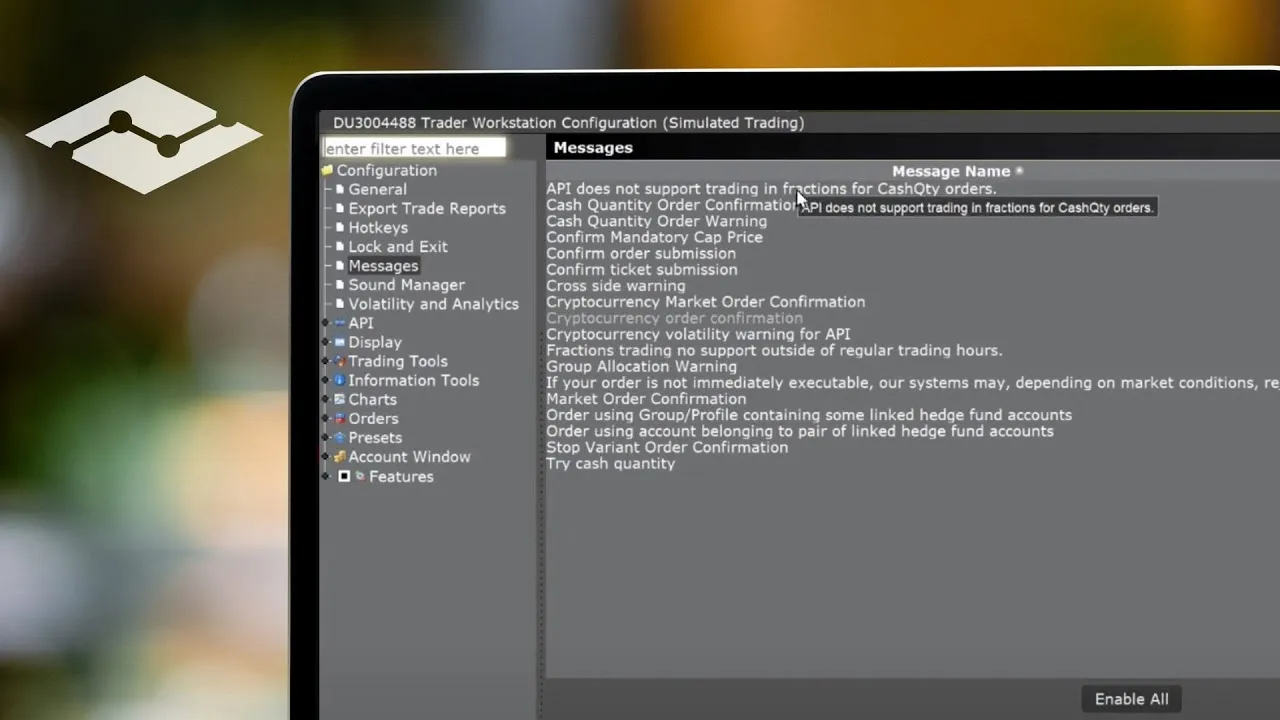
TWS has sounds, but not for the tape. Its Sound Manager, under Global Configuration, attaches a sound to events such as an order filling or being cancelled, and IBKR Campus's lesson on the Messages and Sound Manager shows how to set it up, including a custom sound file. That is the voice-callout half of this post, done by hand: set distinct sounds for fills, cancels and rejections, keep them short, and leave the rest silent. For the tape itself you still have to watch the Time and Sales window.
IBKR's video version of that lesson opens the Sound Manager and shows how to attach a sound to each order event, which is the quickest way to set it up correctly.
Where Scalpel fits
Scalpel is a keyboard-first cockpit for your own IBKR account on Windows 10 and 11 and Macs with Apple silicon, and audio is part of the design rather than an add-on. Tape sound is on by default; you set it in the LEVEL 2 panel's cog, and it plays while Enable audio and Sound effects are on in Settings > Audio (audio settings).
This video plays the callouts and the tape sound, and shows where each is switched.
The voice is also how you hear a stop fire without looking, which matters because Scalpel's stops are held in the app, not at the broker (why Scalpel's stops live in the app). How the audio thread fits into the rest of the program, decoding off the main loop so a sound can never stall a keypress, is in building a trading app in Rust, and the data limits behind the tape feed are in our pillar post on scalping through the IBKR API. IBKR's documentation and the research cited here were checked on October 22, 2026.
Trading carries a significant risk of loss. Nothing here is financial advice.
Questions
- What is tape sound in trading?
- A way to hear the time and sales tape: each trade plays a short sound, so you can hear the pace of trading, which side is taking and when a large order prints, without looking at the tape column.
- Is reaction time faster to sound than to sight?
- In simple lab tests, usually yes: one study measured about 284 ms for a sound against about 331 ms for a light. The gap is small, and the bigger benefit for a trader is not having to move your eyes.
- Does listening to the tape make you a better trader?
- There is no good evidence that it does on its own. It tells you when the flow changes so you know when to look; the decision still comes from the book and the chart.
- How do I stop trading sound alerts from becoming noise?
- Raise the minimum size that makes a sound, silence prints you cannot classify, play only the stock you are trading, and keep spoken alerts for events that change your position. Sounds that are usually meaningless train you to ignore them.
- Can TWS play a sound for each trade on the tape?
- Not that we know of. TWS's Sound Manager plays sounds for events such as fills and cancellations. For the tape itself you watch the Time and Sales window.
Related guides
Guide 3.4Hear the tape: tape soundHear the tape, inspired by Aggr.trade: buys in the right ear, sells in the left, block trades by their shape. Set the big print value, gate and volume.Guide 10.1Voice callouts and soundsWhat Scalpel says and plays: fills, exits, stops, the risk lock, mode switches, session times, exit warnings and scanner alerts, and how to mute each.Guide 11.7Settings: AudioScalpel's Audio tab: the master switch, sound effects, voice callouts and volume, what each one mutes, and where the tape sound switch lives instead.
Keep reading
- Scalping through the IBKR API: what the TWS API can and cannot doIBKR API scalping, from building a trading app on the TWS API: market data lines, Level 2 and tick-by-tick caps, pacing, scanner limits, pre-market stops.
- IBKR API with Python: a working starter for tradersIBKR API Python starter: ibapi vs ib_async, connecting to TWS, a quote stream and a guarded paper order, with code tested against TWS API 10.51.
- TWS API market depth: reqMktDepth and SMART depth in practiceTWS API market depth explained: reqMktDepth, SMART depth, keeping a Level 2 book from updateMktDepthL2, error 317 and 309, with Python code.
Practice in SIM, against the live book.A lifetime license, every update included, with a 7-day refund guarantee.Ask in DiscordGet Scalpel