IBKR API with Python: a working starter for traders
By Scalpel Team. , updated . 9 min read.
In short
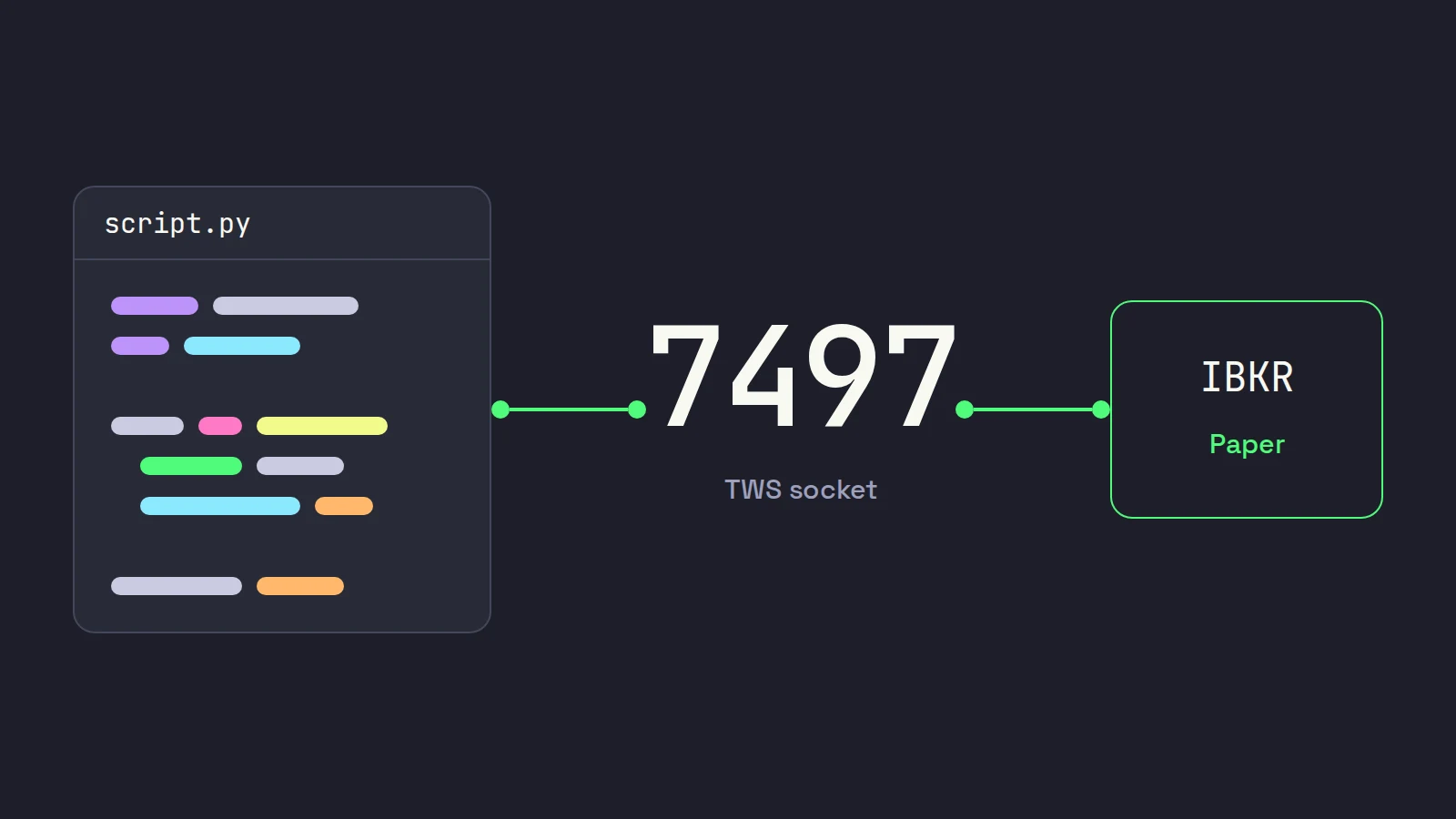
To use the IBKR API from Python, run TWS or IB Gateway, logged in, with the API enabled, then connect a script to its socket (127.0.0.1, port 7497 for a TWS paper login by default) with a client id no other program uses. Pick IBKR's own ibapi, installed from IBKR's download and not from PyPI, or the community ib_async (pip install ib_async), which is shorter to write. Wait for the connection handshake, request data, and send your first orders only to a paper account that your code checks by account ID, because the port number alone proves nothing.
We build Scalpel, a trading cockpit, on the Interactive Brokers TWS API, so we spend our days on the far side of the same socket your Python script will talk to. This is the starter we would hand a trader who wants to use the IBKR API in Python: which library to pick, code that connects, streams a quote and places a paper order, and the limits that trip up first scripts. Every snippet was checked against IBKR's TWS API 10.51.01 and ib_async 2.1.0 on October 22, 2026. Scalpel is independent and not affiliated with or endorsed by Interactive Brokers.
What you need before writing IBKR API Python code
Before you start
- An IBKR Pro account. IBKR's API requirements list a funded IBKR Pro account, a current TWS or IB Gateway, and a current API release.
- TWS or IB Gateway running and logged in. The API is a socket into one of those programs, not a web service. IB Gateway has no trading screens and, by IBKR's own figure, uses about 40% fewer resources. We compare the two in IB Gateway vs TWS.
- The API switched on. In TWS: Enable ActiveX and Socket Clients ticked, the socket port noted, and Read-Only API unticked only when you are ready to send orders. Our enable TWS API guide has every setting.
- Python 3.11 or later. That is IBKR's minimum for
ibapi;ib_asyncasks for 3.10 or later. - A paper login. Paper is a separate username with its own account ID. Use it for everything in this post.
ibapi or ib_async: choosing a Python library
There are two serious choices, and they suit different people.
ibapi | ib_async | |
|---|---|---|
| Who makes it | Interactive Brokers | A community project, successor to ib_insync |
| Install | From IBKR's download, then pip install . | pip install ib_async |
| Style | You subclass two classes and handle callbacks on a thread you start | Blocking calls or asyncio, results come back as objects |
| Python | 3.11 or later | 3.10 or later |
| IBKR support | Yes | IBKR API Support cannot help with it |
The PyPI trap. pip install ibapi looks right and is not. The ibapi package on PyPI is version 9.81.1, uploaded on December 6, 2020. IBKR's API download page lists Stable 1050.02 (September 9, 2026) and Latest 1051.01 (September 29, 2026), and its notes say the Python client ships in the Latest build. Current tutorials will not run against the 2020 package: method signatures have changed since. Download the Latest build, go to IBJts/source/pythonclient and run python -m pip install . inside your virtual environment.
What happened to ib_insync. IBKR's page on ib_insync and ib_async says the original package is built on a legacy API release and no longer updated, and points users to ib_async. The ib_async project explains why: ib_insync's author, Ewald de Wit, died unexpectedly in early 2024, and the maintainers renamed it because they lost access to the original repositories. IBKR adds that it endorses neither and will always point clients to its own API.
Our verdict: if you are writing research scripts, a scanner of your own or a small helper, start with ib_async: in this post its version of each job is about a third the length of the ibapi one. Choose ibapi if you need IBKR's support desk, or want a feature the day IBKR ships it. For the record, Scalpel uses neither: it is written in Rust on the open-source ibapi crate, which we cover in building a trading cockpit in Rust.
A TWS API Python example with ibapi
IBKR's Python client has three moving parts. EClient sends requests. EWrapper receives everything TWS sends back, as callbacks you override. A reader thread, which connect() starts for you, puts incoming messages on a queue, and run() drains that queue and calls your callbacks; IBKR's Python implementation notes spell this out. So run() must go on its own thread, or your script blocks forever.
This script connects, waits for the handshake, and streams a quote for 10 seconds:
import threading
import time

from ibapi.client import EClient
from ibapi.contract import Contract
from ibapi.ticktype import TickTypeEnum
from ibapi.wrapper import EWrapper

HOST, PORT, CLIENT_ID = "127.0.0.1", 7497, 41
SYMBOL = "ABCD"  # put a real US stock symbol here


class App(EWrapper, EClient):
    def __init__(self):
        EClient.__init__(self, self)
        self.ready = threading.Event()

    def nextValidId(self, orderId: int):
        # TWS sends this once the handshake is done: only now is it safe to send requests.
        self.next_order_id = orderId
        self.ready.set()

    def error(self, reqId, errorTime, errorCode, errorString, advancedOrderRejectJson=""):
        print(f"[{errorCode}] req {reqId}: {errorString}")

    def tickPrice(self, reqId, tickType, price, attrib):
        print(TickTypeEnum.toStr(tickType), price)


app = App()
app.connect(HOST, PORT, CLIENT_ID)
threading.Thread(target=app.run, daemon=True).start()
if not app.ready.wait(5):
    raise SystemExit("No reply: is TWS or IB Gateway running with the API on this port?")

stock = Contract()
stock.symbol = SYMBOL
stock.secType = "STK"
stock.exchange = "SMART"
stock.currency = "USD"

app.reqMarketDataType(3)  # 3 = delayed (free). Use 1 if you pay for live data.
app.reqMktData(1001, stock, "", False, False, [])
time.sleep(10)
app.cancelMktData(1001)
app.disconnect()
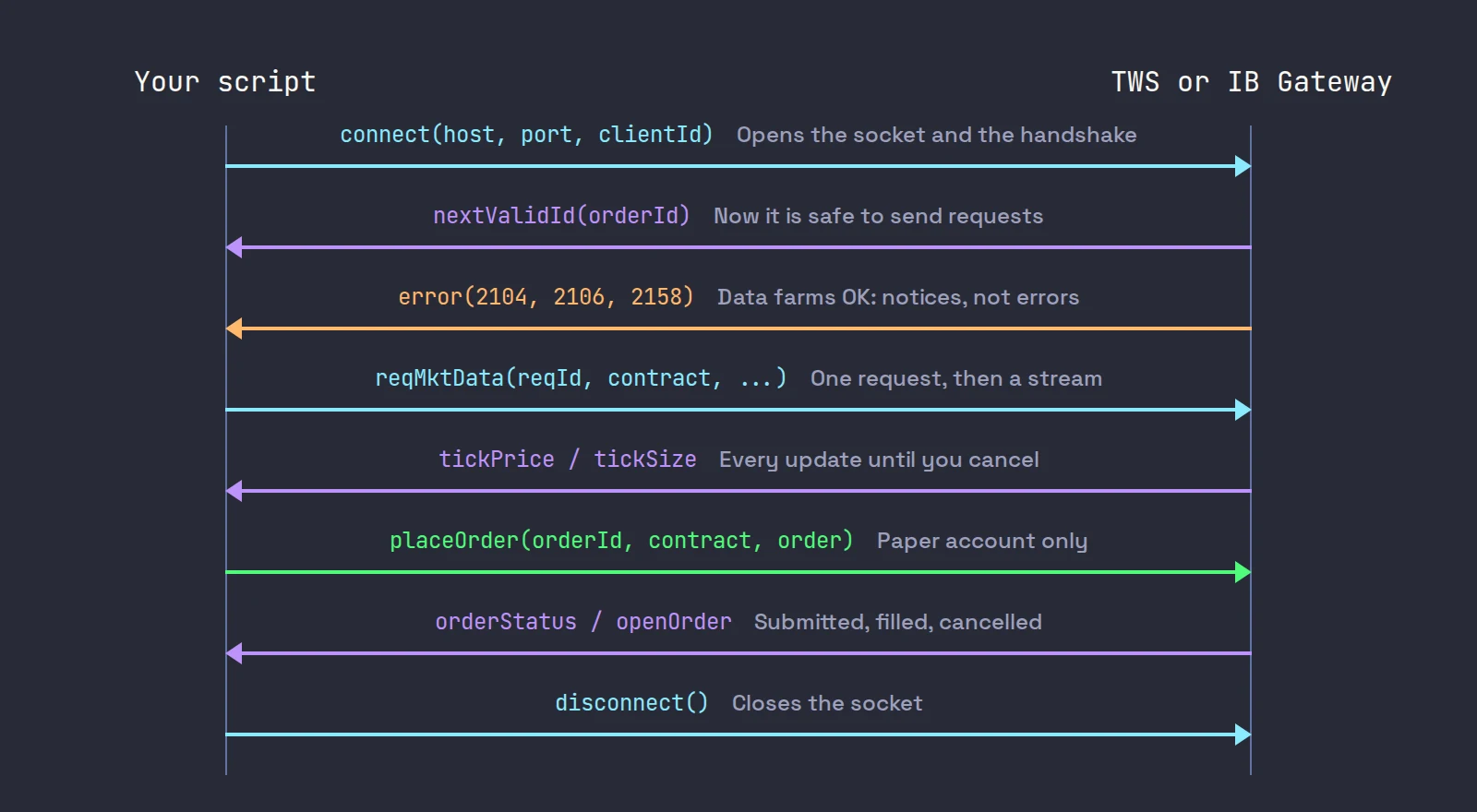
Four things in it are there because we, or IBKR's docs, learned them the hard way:
- Wait for nextValidId. IBKR's connection docs say requests sent before it arrives can be dropped. A
sleep(1)usually works, which is why it breaks on a slow day. - Match the error signature to your release. Current
ibapipasseserrorTimeas the second argument. Older tutorials defineerrorwithout it, and the callback then fails on the first message. - Most "errors" are not. The first lines you see are codes 2104, 2106 and 2158: data farm connections are OK. Code 200 means IBKR does not know the contract, which is what the placeholder ABCD gets you.
- Delayed data is free and live data is not.
reqMarketDataType(3)asks for delayed quotes so the script works without a subscription. For live quotes you need the exchange subscriptions on the account; see IBKR market data for day trading.
IBKR's own lesson walks through the same three classes on screen, and is worth nine minutes before you write a larger program:

The same quote with ib_async
ib_async hides the thread and the callbacks. The same job:
from ib_async import IB, Stock

ib = IB()
ib.connect("127.0.0.1", 7497, clientId=42)
ib.reqMarketDataType(3)  # delayed; drop this line with a live subscription

stock = Stock("ABCD", "SMART", "USD")  # put a real symbol here
if ib.qualifyContracts(stock)[0] is None:
    ib.disconnect()
    raise SystemExit("IBKR does not know that symbol.")

ticker = ib.reqMktData(stock)
ib.sleep(3)
print(stock.symbol, "bid", ticker.bid, "ask", ticker.ask, "last", ticker.last)
ib.disconnect()
qualifyContracts asks IBKR for the contract's details and fills in its contract id; for a symbol IBKR does not know, it returns None in that slot. Use ib.sleep() rather than time.sleep(): it keeps the event loop running, so the ticker actually updates. In a Jupyter notebook, call util.startLoop() first.
Place a paper order from Python
Do not trust the port to tell you which account you are on. IBKR's initial setup page says TWS listens on 7496 after a live login and 7497 after a paper one, and that these "are just default values" you can change. People do change them: we have seen a live TWS login listening on 7497 on one of our own machines. The account ID is the check that holds. Copy your Paper Trading Account Number from Client Portal and make the script refuse anything else:
from ib_async import IB, LimitOrder, Stock

PAPER_ACCOUNT = "YOUR_PAPER_ACCOUNT_ID"  # from Client Portal: Settings, Paper Trading Account
LIMIT = 1.00  # set this well under the current bid, so the order rests and does not fill

ib = IB()
ib.connect("127.0.0.1", 7497, clientId=43)
if PAPER_ACCOUNT not in ib.managedAccounts():
    ib.disconnect()
    raise SystemExit("This login is not the paper account: no order sent.")

stock = Stock("ABCD", "SMART", "USD")  # put a real symbol here
if ib.qualifyContracts(stock)[0] is None:
    ib.disconnect()
    raise SystemExit("IBKR does not know that symbol.")

order = LimitOrder("BUY", 10, LIMIT, account=PAPER_ACCOUNT, tif="DAY", outsideRth=True)
trade = ib.placeOrder(stock, order)
ib.sleep(2)
print("status:", trade.orderStatus.status)

ib.cancelOrder(order)
ib.sleep(2)
print("status:", trade.orderStatus.status)
ib.disconnect()
We ran it against a live login on October 22, 2026: it printed the refusal and sent nothing, which is the point. On paper you should see a working status such as Submitted or PreSubmitted, then Cancelled.
Two order details matter for day traders. outsideRth=True lets the order work before 09:30 and after 16:00 ET; without it, a 07:00 order waits for the open. And outside regular hours exchanges take limit orders only (extended hours), so a script that sends market orders works at 10:00 and fails at 08:00.
Paper accounts have no market data of their own. IBKR's paper account lesson on IBKR Campus explains how to share the live username's subscriptions with paper in Client Portal; without that, paper gets delayed data.
Limits that bite a first IBKR Python script
| Limit | Default | What happens past it |
|---|---|---|
| Requests per second | 50 (market data lines divided by 2) | Rejected with error 100, or quietly queued, depending on a TWS setting |
| Market data lines | 100 per username, shared with TWS windows | Error 101, "Max number of tickers has been reached" |
| API connections per TWS session | 32 | A 33rd client cannot connect |
| Client id | One connection per id | Error 326, "client id is already in use" |
The request rate comes from IBKR's pacing rules: your lines divided by 2, per second, so 50 on the default 100 lines. A streaming subscription costs one request when you open it, not one per tick. The loop that catches people is the one that requests history or contract details for 200 symbols in a row; space those out. Historical data has stricter rules of its own, and lines run out faster than you expect: our pillar on what the TWS API can and cannot do for scalping covers both, and IBKR market data lines explains how the 100 are counted.
If you get no connection at all, the cause is nearly always the API switch, the port, or another program on the same client id. Fix TWS not accepting the connection goes through each one.
Once the basics work, the two requests traders reach for next are Level 2 and IBKR's scanner. We wrote separate posts on reading market depth through the TWS API and running IBKR's scanner from code, each with Python examples.
Where Scalpel fits
A script is the right tool for research, alerts and one-off jobs. For trading by hand at speed you need a screen, and that is what we built: a desktop cockpit on the same API, with Level 2, tape, chart and hotkey orders for up to six symbols, app-monitored stops, IBKR's scanner, and SIM paper trading against the live book with IBKR commissions. It never trades for you. It runs next to TWS or IB Gateway on the same computer (connect Scalpel to Interactive Brokers), and our two-minute getting started video shows the first connection:
If you run scripts next to Scalpel on the same TWS, give them client ids it does not use. Scalpel takes 1 and 2 (account and orders), 10 to 15 (one per desk), 70 to 72 (scanner quotes, news and the scanner) and, only while session recording is on, 100 to 123. The 41 to 43 in this post are clear of all of them. Scalpel's SIM is its own paper mode, separate from IBKR's paper account; the SIM guide explains the difference.
Trading carries a significant risk of loss. Nothing here is financial advice.
Questions
- Can I use the Interactive Brokers API with Python?
- Yes. IBKR publishes an official Python client, ibapi, in its TWS API download, and the community library ib_async wraps the same API in a simpler style. Both connect to TWS or IB Gateway running on your computer.
- Should I pip install ibapi?
- No. The ibapi package on PyPI is version 9.81.1 from December 2020. Download the current TWS API from IBKR, then run pip install . in its source/pythonclient folder.
- Is ib_insync still maintained?
- No. IBKR says the original ib_insync is built on a legacy API release and is no longer updated, and points users to ib_async, which continues the same design.
- What port does the IBKR API use?
- By default TWS listens on 7496 for a live login and 7497 for paper, and IB Gateway on 4001 for live and 4002 for paper. These are only defaults, so check the account ID in your code rather than trusting the port.
- Does the IBKR API need TWS running?
- Yes. The API is a socket into TWS or IB Gateway, which must be running and logged in on the machine or network your script connects to. IB Gateway is the lighter option with no trading screens.
- How many requests per second can I send to the IBKR API?
- Your market data lines divided by 2, per second: 50 on the default 100 lines. Streaming data counts once, when you open the subscription.
Related guides
Guide 1.5Enable the API in TWS and IB GatewayTurn on Enable ActiveX and Socket Clients in TWS or IB Gateway, set the socket port, allow 127.0.0.1 and switch off read-only API so Scalpel can trade.Guide 1.4Connect Scalpel to Interactive BrokersRun TWS or IB Gateway, match the API port and watch Scalpel connect. Which program to use, the ports (7497, 7496, 4001) and what the link banner tells you.Guide 13.2TWS is running but not accepting the connectionThe banner says TWS or IB Gateway is running but not accepting the connection: enable the API socket, allow Scalpel or trust 127.0.0.1, and reconnect.
Keep reading
- Scalping through the IBKR API: what the TWS API can and cannot doIBKR API scalping, from building a trading app on the TWS API: market data lines, Level 2 and tick-by-tick caps, pacing, scanner limits, pre-market stops.
- TWS API market depth: reqMktDepth and SMART depth in practiceTWS API market depth explained: reqMktDepth, SMART depth, keeping a Level 2 book from updateMktDepthL2, error 317 and 309, with Python code.
- IBKR API scanner: reqScannerSubscription in practiceIBKR API scanner in practice: scan codes from reqScannerParameters, filters, 50 rows and 10 scans, errors 165, 322 and 10360, and a live pre-market run.
Practice in SIM, against the live book.A lifetime license, every update included, with a 7-day refund guarantee.Ask in DiscordGet Scalpel