IBKR market data lines: the 100 line limit and how to get more
By Scalpel Team. , updated . 6 min read.
In short
IBKR market data lines are the number of symbols one username can stream live at the same time, in TWS watchlists and through the API together. Every account starts with 100. After the first month IBKR gives you the greatest of 100, your monthly commissions divided by 8, or your equity times 100 divided by $1,000,000, and a Quote Booster pack adds 100 more for $30 a month, up to 10 packs. For a day trader the real limits sit underneath: at 100 lines you can stream Level 2 for only 3 symbols and tick-by-tick data for 5.
Most traders meet market data lines as an error: a watchlist row that stops updating, a Level 2 window that refuses to open, or a trading app that says depth is unavailable. The allowance is simple once you see the three numbers behind it, and for a day trader it is rarely the 100 that runs out first. This post explains what a line is, how IBKR calculates your allowance, what Quote Booster buys, how depth and tick-by-tick limits scale, and what a scalper actually needs. Prices and limits checked on October 22, 2026.
Scalpel is independent and not affiliated with or endorsed by Interactive Brokers.
What a market data line is
IBKR's documentation describes market data lines as dictating "how much market data can be retrieved simultaneously from a given user," including "all data pulled through Trader Workstation watchlist and the API" (IBKR: market data lines). One live symbol is one line, wherever it is open. IBKR's own example: with 100 lines, a TWS watchlist showing 50 symbols and one API program streaming 25 leaves a second API program room for 25 more.
Three things follow from that:
- Lines belong to a username, not to a screen. TWS, IB Gateway and every API program logged in under the same username draw on one pool, whichever of IB Gateway or TWS you run.
- A line is a live stream. A symbol you closed, or a row you deleted, gives its line back.
- Lines are not subscriptions. You still need the data itself, such as US stock streaming quotes and a depth feed, which are separate monthly fees (IBKR market data for day trading). Lines cost nothing; the data's price depends on your non-professional or professional subscriber status.
To see how many you are using, press Ctrl+Alt+= in TWS on Windows or Linux (Cmd+Opt++ on a Mac). It opens a small window with your allowance and your current use.
The 100 line limit, and how IBKR raises it
IBKR says all clients start with 100 concurrent lines and always keep at least 100. From the second month, the allowance is the greatest of three numbers (IBKR: how market data is allocated):
| Source | Formula | What it takes to beat 100 |
|---|---|---|
| The floor | 100 | Nothing |
| Commissions | Monthly commissions in USD divided by 8 | More than $800 of commissions a month |
| Equity | Equity in USD times 100, divided by $1,000,000, rounded down | More than $1,000,000 of equity |
IBKR's worked example: a month with $500 of commissions and $1,245,000 of equity gives 62.5 from commissions and 124 from equity, so the account gets 124 lines. A $25,000 account paying $300 a month in commissions gets 37.5 from commissions and 2 from equity, so it stays on 100. Almost every individual day trader lives on the floor unless they buy boosters.
Quote Booster: how to get more lines
A Quote Booster pack costs $30.00 a month and adds 100 simultaneous Level 1 quotes on top of your allowance from every other source. IBKR's FAQ caps it at 10 packs (IBKR: What is the Quote Booster?). From IBKR's market data pricing page:
- Booster quotes work in the desktop platforms and in the API.
- Quotes are available once you subscribe, and show the next time you log in.
- A cancelled pack keeps working until the end of the billing cycle.
- Like all IBKR market data, it is not pro-rated: subscribe on the 25th and you pay the whole month.
You add it in Client Portal with your other subscriptions: the User menu, Settings, then Market Data Subscriptions under User Settings.
IBKR's video walks through the market data subscription screens in Client Portal, the same place a Quote Booster pack is added.

Depth and tick-by-tick: the limits day traders actually hit
Level 2 and tick-by-tick data are far heavier than a quote, so IBKR limits them separately. The relationship to lines, from IBKR's specialized market data lines table:
| Market data lines | Tick-by-tick streams | Level 2 (depth) symbols | Quote Booster packs |
|---|---|---|---|
| 100 | 5 | 3 | 0 |
| 101 to 200 | 10 | 3 | 1 |
| 201 to 300 | 15 | 3 | 2 |
| 301 to 400 | 20 | 3 | 3 |
| 401 to 500 | 25 | 4 | 4 |
| 1,001 to 1,100 | 55 | 10 | 10 |
Tick-by-tick streams are 5% of your lines. Depth is the tight one: three symbols at a time on a default account. IBKR's pricing page adds that you can open several depth windows on the same symbol without using more of the limit, and that the cap runs from a minimum of 3 to a maximum of 60 symbols.
Symptoms of running out of market data lines
| What you see | What ran out | IBKR's message |
|---|---|---|
| A new watchlist row or API symbol never updates | Lines | 101: "Max number of tickers has been reached." |
| A fourth Level 2 window or API depth request is refused | Depth | 309: "Max number (3) of market depth requests has been reached." |
Both messages are quoted from IBKR's API error code list. For error 101, IBKR's note says the count covers "TWS and the API altogether" and points you back to Ctrl+Alt+=. A symbol on delayed data is a different problem, usually a missing subscription or a second session on your username; see fix delayed data.
How many market data lines does a scalper need?
Fewer than you might think, and the count is worth doing once. A typical setup for scalping small caps:
| What streams | Lines | Tick-by-tick | Depth |
|---|---|---|---|
| A scanner list of 30 names | 30 | 0 | 0 |
| Three stocks you are trading or watching closely, with Level 2 and tape | 3 | 3 | 3 |
| A TWS watchlist of 20 names | 20 | 0 | 0 |
| Total on a default account | 53 of 100 | 3 of 5 | 3 of 3 |
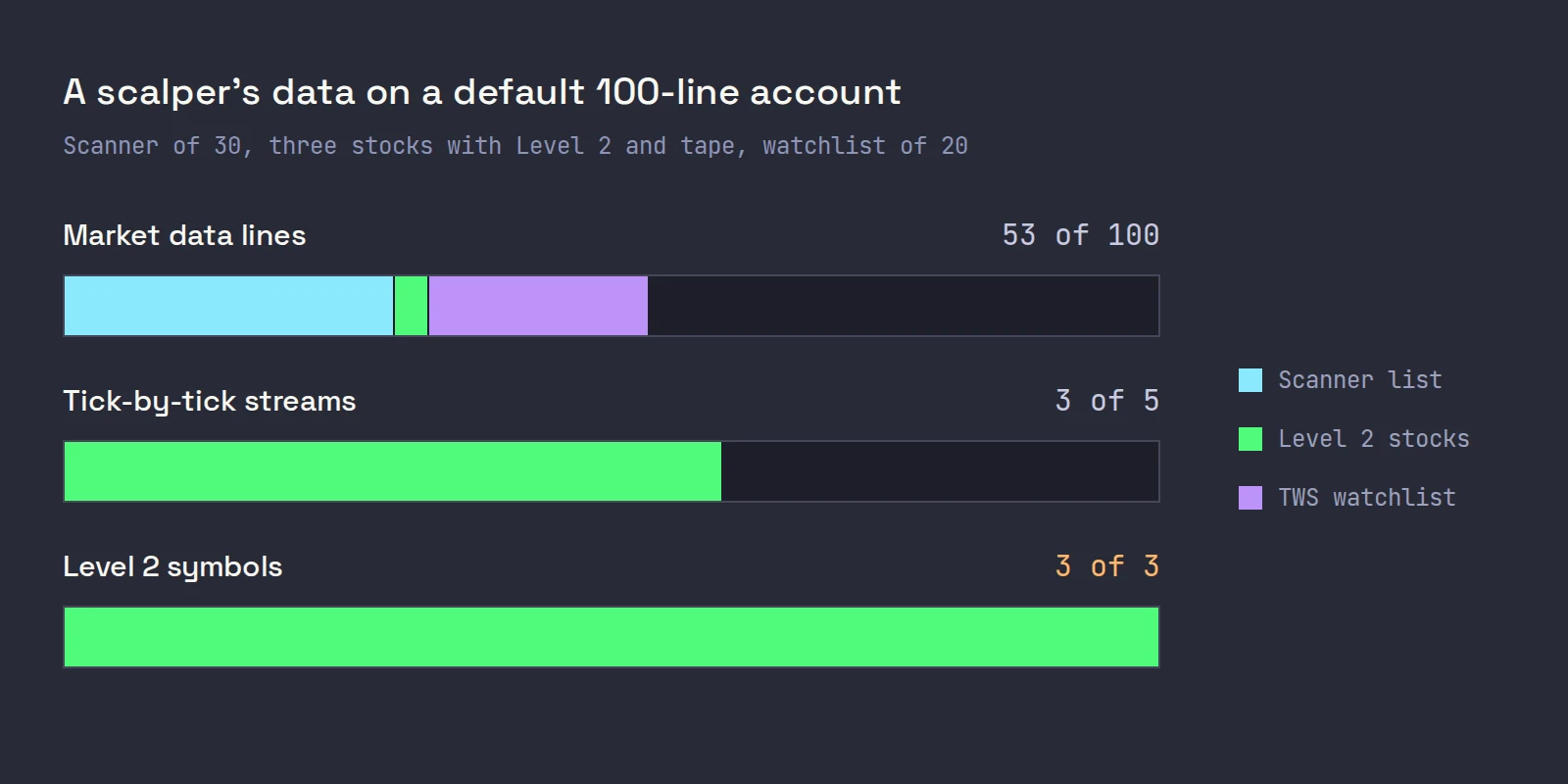
Lines are fine with room to spare. Depth is full. So the practical rules are:
- Keep Level 2 for the stocks you could trade in the next minute. Three books is a real constraint only if you try to watch six stocks at full depth, and you cannot read six books at once anyway.
- Close what you are not watching. A depth window left open on yesterday's runner holds one of your three books.
- Count every program on the username. TWS, a scanner script and a trading app all draw on the same lines.
- Buy boosters for breadth, not depth. If you genuinely run wide scanners or big watchlists, $30 buys 100 more names. For a fourth book, ask first (above).
For which depth feeds to subscribe to, see IBKR Level 2, and for how depth arrives through the API, Level 2 through the TWS API. Your pricing plan matters here too: on IBKR Lite you pay no commissions, so the commission formula never lifts you above 100.
Where Scalpel fits
Scalpel uses your IBKR market data through the API, so it draws on the same allowance as TWS. Each trading desk streams a quote, tick-by-tick trades for its tape, and SMART depth for its Level 2 ladder, so a trading desk uses one line, one tick-by-tick stream and one depth book. The IBKR scanner list uses one line per listed name: 30 by default, set by List size in Settings > Connection (set up the IBKR scanner).
On a default account that means three trading desks get full depth. A fourth desk keeps its quote, tape and chart and shows a Depth unavailable for toast with IBKR's reason.
Clearing a desk or switching it to SCAN gives its line and its book back (arrange desks). If a desk flags DELAYED or NO DATA instead, it is a subscription or session problem, not lines. The troubleshooting video walks through those data problems:
For the rest of the IBKR setup, from account to hotkeys, see day trading on Interactive Brokers. Scalpel is long only and US stocks only, and its stops are app-monitored, so they work only while it runs with a live feed.
Trading carries a significant risk of loss. Nothing here is financial advice.
Questions
- How many market data lines does IBKR give you?
- 100 to start, and never fewer. After the first month IBKR uses the greatest of 100, your monthly commissions divided by 8, or your equity times 100 divided by $1,000,000. Quote Booster packs add 100 lines each.
- How much is IBKR Quote Booster?
- USD 30.00 a month per pack. Each pack adds 100 simultaneous Level 1 quotes, IBKR caps it at 10 packs, and like all IBKR market data it is not pro-rated.
- How many Level 2 books can I stream on IBKR?
- Three symbols at a time on a default 100-line account. The limit grows with your lines, up to 60, and several depth windows on the same symbol count once. Ask IBKR how many boosters your account needs for a fourth book, because its pages differ.
- How do I check my market data lines in TWS?
- Press Ctrl+Alt+= on Windows or Linux, or Cmd+Opt and the plus key on a Mac. TWS shows your allowance and how many lines are in use across TWS and the API.
- What does Max number of tickers has been reached mean?
- It is IBKR error 101: the symbols streaming in TWS and through the API together have used every market data line on your username. Close watchlist rows or programs you do not need, or add a Quote Booster pack.
Related guides
Guide 1.6The IBKR market data you need for Level 2The IBKR market data that gives Scalpel live quotes, Level 2 and the tape, with no third-party feed to pay for, and how delayed or missing data shows.Guide 8.1Set up the IBKR scannerTurn on Scalpel's IBKR scanner: switch a desk to SCAN, set price, change, volume and share filters, and know how many market data lines the list uses.Guide 2.2Add, remove and resize desksRun up to six desks, resize them with the grips, even them out, colour them, copy one layout to all, and switch a desk between TRADER and SCAN.
Keep reading
- Day trading on Interactive Brokers: the complete setup (2026)Interactive Brokers day trading, set up end to end: 2026 margin rules, Level 2 data costs, TWS vs IB Gateway, hotkeys, Tiered vs Fixed and a checklist.
- Scalping on Interactive Brokers: can you, and how to set it upIs TWS good for scalping? IBKR's routing and fills are fine; TWS is the friction. What slows scalpers down and a step by step TWS scalping setup to fix it.
- A TWS day trading layout for scalpers: the Mosaic setupA TWS day trading setup step by step: Mosaic windows, color-linked groups, 1 and 5-minute charts, time and sales, saving the layout and settings for speed.
Practice in SIM, against the live book.A lifetime license, every update included, with a 7-day refund guarantee.Ask in DiscordGet Scalpel