IBKR API scanner: reqScannerSubscription in practice
By Scalpel Team. , updated . 9 min read.
In short
The IBKR API scanner is TWS's Advanced Market Scanner over the socket. Call reqScannerParameters() once to get the XML list of scan codes and filters, then reqScannerSubscription(reqId, subscription, [], filters) with an instrument, a location such as STK.US.MAJOR, a scan code such as TOP_PERC_GAIN and filter tags such as priceAbove. Results arrive through scannerData and scannerDataEnd as ranked contracts with no prices, refreshed about every 30 seconds, at most 50 rows a scan and 10 scans at once. Float cannot be used as a filter, and you need a quote request, and a market data line, for every symbol you want live numbers on.
IBKR's scanner is the cheapest serious scanner a day trader on Interactive Brokers can get: it costs nothing extra and it runs in the pre-market. We built Scalpel's scanner on it, so this is the practical version of IBKR's documentation: how to find valid scan codes and filters, a working Python subscription, the limits and error codes you will meet, and what we do with the results. API details were checked against IBKR's reference and a live TWS session on October 22, 2026; the Scalpel details come from its source code. Scalpel is independent and not affiliated with or endorsed by Interactive Brokers.
How the IBKR API scanner works
IBKR's market scanner introduction describes the whole thing in a few lines, and every line has a consequence:
| IBKR says | What it means for your code |
|---|---|
| Results "simply consist of a list of contracts" | No price, change or volume. Request quotes yourself |
| A subscription keeps sending "periodic updates until the request is cancelled" | You get a fresh ranked list on each pass, each one closed by scannerDataEnd |
| "a maximum result of 50 results per scan code" | Ask for more rows and you still get 50 |
| "only 10 API scans can be active at a time" | Shared by every API program on the same login |
| Filters "generally" need market data subscriptions | A filter on a market you do not subscribe to can come back empty |
Three calls do the work. reqScannerParameters() returns the XML catalogue of everything the scanner understands. reqScannerSubscription(reqId, subscription, scannerSubscriptionOptions, scannerSubscriptionFilterOptions) starts a scan; the options list is for IBKR's internal use and stays empty, and the filters are a list of tag and value pairs. cancelScannerSubscription(reqId) stops it.
Find scan codes and filters with reqScannerParameters
You cannot guess scan codes or filter names: they come from the parameters XML, which TWS returns through the scannerParameters callback. On our live session on October 22, 2026, that XML was 2,087,485 characters, about 2 MB. It listed 649 scan types, 242 of them for US stocks, and 763 filter codes. A short script turns it into something you can read:
import xml.etree.ElementTree as ET

root = ET.parse("scanner_params.xml").getroot()

stock_scans = [
    (scan.findtext("scanCode"), scan.findtext("displayName"))
    for scan in root.iter("ScanType")
    if "STK" in scan.findtext("instruments", "").split(",")
]
print(len(stock_scans), "scans for US stocks, for example:", stock_scans[:5])

filters = {f.findtext("code") for f in root.iter("AbstractField") if f.findtext("code")}
print(len(filters), "filter codes")
print("floatSharesBelow listed:", "floatSharesBelow" in filters)
Its last line is the trap. The XML lists floatSharesBelow, and the API refuses it: in our live tests it came back as error 10360, "Scan filter floatSharesBelow is not allowed". IBKR's parameters reference does warn that these are the parameters of TWS's scanners, "not all available in API". So treat the XML as a list of candidates, and test each filter before you build on it.
The codes most momentum traders want, all present in our copy of the XML:
| Scan code | Display name in TWS | Before the open |
|---|---|---|
TOP_PERC_GAIN | Top % Gainers | Works, change measured from yesterday's close |
SCAN_stVolumeVsAvg3min_DESC | 3min Volume vs Average Volume Desc | Works |
HOT_BY_VOLUME | Hot Contracts by Volume | Works |
HALTED | Halted | Works |
HIGH_OPEN_GAP | Top Close-to-Open % Gainers | Empty until 09:30 ET: there is no open yet |
TOP_OPEN_PERC_GAIN | Top % Gainers Since Open | Measures from the open, so it is for the regular session |
And the filters that matter for small caps: priceAbove and priceBelow, changePercAbove, volumeAbove, numSharesBelow (shares outstanding, the closest allowed stand-in for float) and stkTypes, which takes values such as exc:ETF. IBKR's advice when a scan misbehaves is to build the same scan in TWS's Advanced Market Scanner first: if TWS cannot do it, the API cannot either.
IBKR's own lesson covers requesting the parameters and running a first scan in Python, and is a good companion to the code below:

reqScannerSubscription in Python
This script saves the parameters XML, then runs a pre-market gainers scan for $1 to $20 stocks up 10% or more and prints the top of each pass for 70 seconds:
import threading
import time

from ibapi.client import EClient
from ibapi.scanner import ScannerSubscription
from ibapi.tag_value import TagValue
from ibapi.wrapper import EWrapper

SCAN_ID = 7001


class ScanApp(EWrapper, EClient):
    def __init__(self):
        EClient.__init__(self, self)
        self.ready = threading.Event()
        self.rows = {}

    def nextValidId(self, orderId: int):
        self.ready.set()

    def scannerParameters(self, xml: str):
        with open("scanner_params.xml", "w", encoding="utf-8") as f:
            f.write(xml)
        print(f"Saved {len(xml):,} characters of scanner parameters")

    def scannerData(self, reqId, rank, contractDetails, distance, benchmark, projection, legsStr):
        self.rows[rank] = contractDetails.contract.symbol

    def scannerDataEnd(self, reqId: int):
        ranked = [self.rows[r] for r in sorted(self.rows)]
        print(time.strftime("%H:%M:%S"), len(ranked), "rows:", ranked[:10])
        self.rows.clear()

    def error(self, reqId, errorTime, errorCode, errorString, advancedOrderRejectJson=""):
        print(f"[{errorCode}] req {reqId}: {errorString}")


app = ScanApp()
app.connect("127.0.0.1", 7497, 46)
threading.Thread(target=app.run, daemon=True).start()
if not app.ready.wait(5):
    raise SystemExit("No reply: is TWS or IB Gateway running with the API on this port?")

app.reqScannerParameters()  # once, to see every scan code and filter

sub = ScannerSubscription()
sub.instrument = "STK"
sub.locationCode = "STK.US.MAJOR"
sub.scanCode = "TOP_PERC_GAIN"
sub.numberOfRows = 50

filters = [
    TagValue("priceAbove", "1"),
    TagValue("priceBelow", "20"),
    TagValue("changePercAbove", "10"),
]
app.reqScannerSubscription(SCAN_ID, sub, [], filters)
time.sleep(70)  # long enough to see IBKR refresh the scan
app.cancelScannerSubscription(SCAN_ID)
app.disconnect()
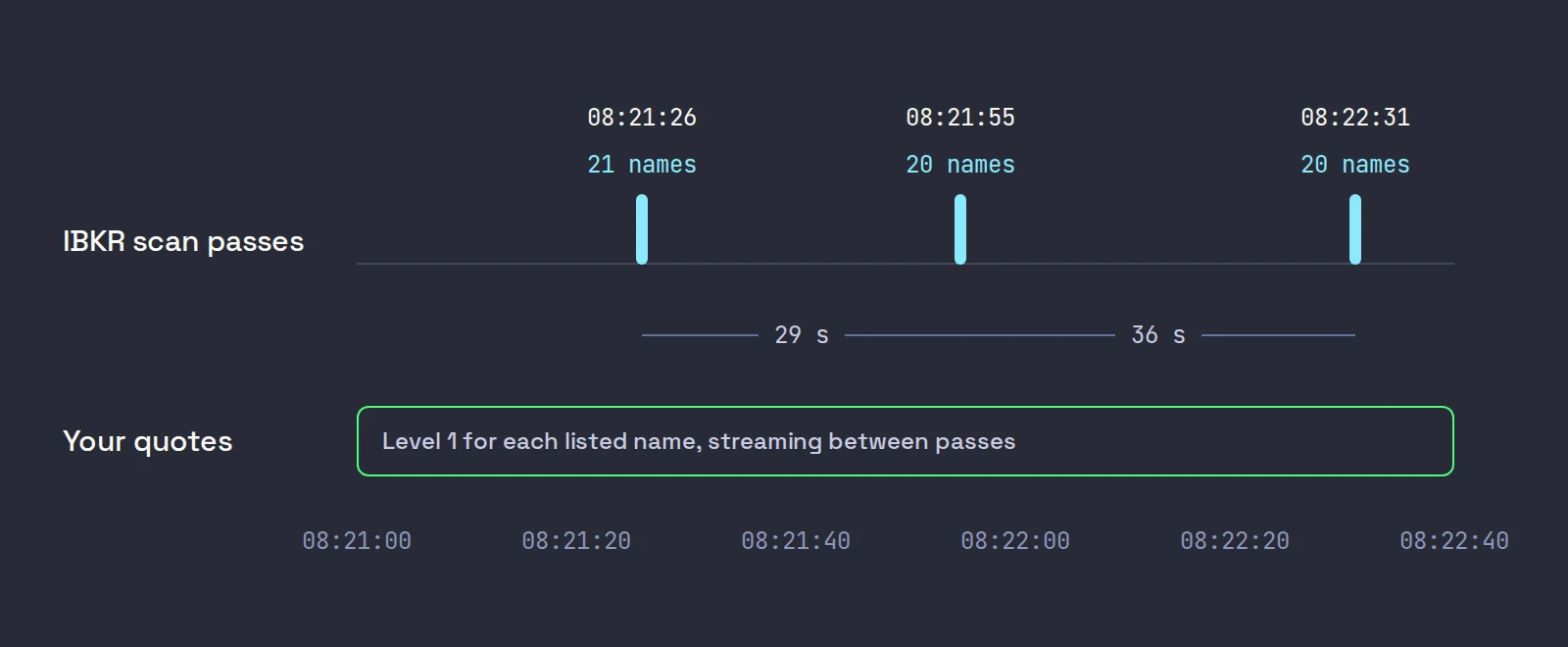
We ran it at 08:21 ET on October 22, 2026, against a live TWS login. Three passes arrived, at 08:21:26, 08:21:55 and 08:22:31, with 21, 20 and 20 names: 29 and 36 seconds apart, and well short of 50 rows, because only that many stocks passed the filters before the open. Each pass is the complete list again, not a change list, which is why the script clears its rows after every scannerDataEnd.
STK.US.MAJOR covers the major US exchanges. Use STK.US.MINOR for OTC stocks, or STK.US for both; all three are in the XML. The rank starts at 0 for the top name.
With ib_async, one call runs a single pass and cancels the subscription for you:
from ib_async import IB, ScannerSubscription, TagValue

ib = IB()
ib.connect("127.0.0.1", 7497, clientId=47)

sub = ScannerSubscription(instrument="STK", locationCode="STK.US.MAJOR", scanCode="TOP_PERC_GAIN", numberOfRows=50)
filters = [TagValue("priceAbove", "1"), TagValue("priceBelow", "20"), TagValue("changePercAbove", "10")]

rows = ib.reqScannerData(sub, [], filters)  # one pass, then the subscription is cancelled
for row in rows[:10]:
    print(row.rank, row.contractDetails.contract.symbol)
ib.disconnect()
For a list that keeps updating, use ib.reqScannerSubscription instead and read its updateEvent. If you are new to either library, our IBKR API Python starter covers connecting and client ids first.
Interactive Brokers API scanner limits and errors
| What you hit | What happens | What to do |
|---|---|---|
| More than 50 rows | You get 50 | Run more scans and merge them |
| An 11th scan | Error 322, IBKR's generic server error, not a clear limit message | Count your scans across every program on the login |
| A filter the API refuses | Error 10360, for example on floatSharesBelow | Use numSharesBelow, and read float from filings |
| Too many filters | An empty scan: IBKR's request reference warns that over-filtering can return nothing | Loosen one filter at a time |
| Error 165 with results | "Historical market Data Service query message" in IBKR's error code list, sent with scanner results | Treat it as a notice, never as the end of the stream |
| Live numbers for 50 names | 50 quote requests, 50 of your 100 default market data lines | Cap the list you quote |
The 322 and 165 rows come from our own work, written up in the pillar on what the TWS API can and cannot do for scalping. Error 165 cost us the most. TWS sends it next to scanner results as an "N items retrieved" notice, often before the data, and the Rust client we use ended the scan on it, so two of our five scans never delivered a row. Our Python run above received no 165 at all, and ib_async 2.1.0 responds to one by clearing its result list and waiting for the next pass rather than ending. Whatever your library, check what it does with 165 before you trust a scan that has gone quiet.
The line cost is the one people underestimate. The scan itself needs no quote subscription, but a list of symbols with no prices is not much use while trading, and each quote holds one line for as long as you stream it. Fifty names on a default account leaves 50 lines for everything else, including TWS's own watchlists.
What Scalpel does with the IBKR scanner
Scalpel's scanner is IBKR's scanner, run by Scalpel on its own API connection. From the source:
- Five scans, side by side.
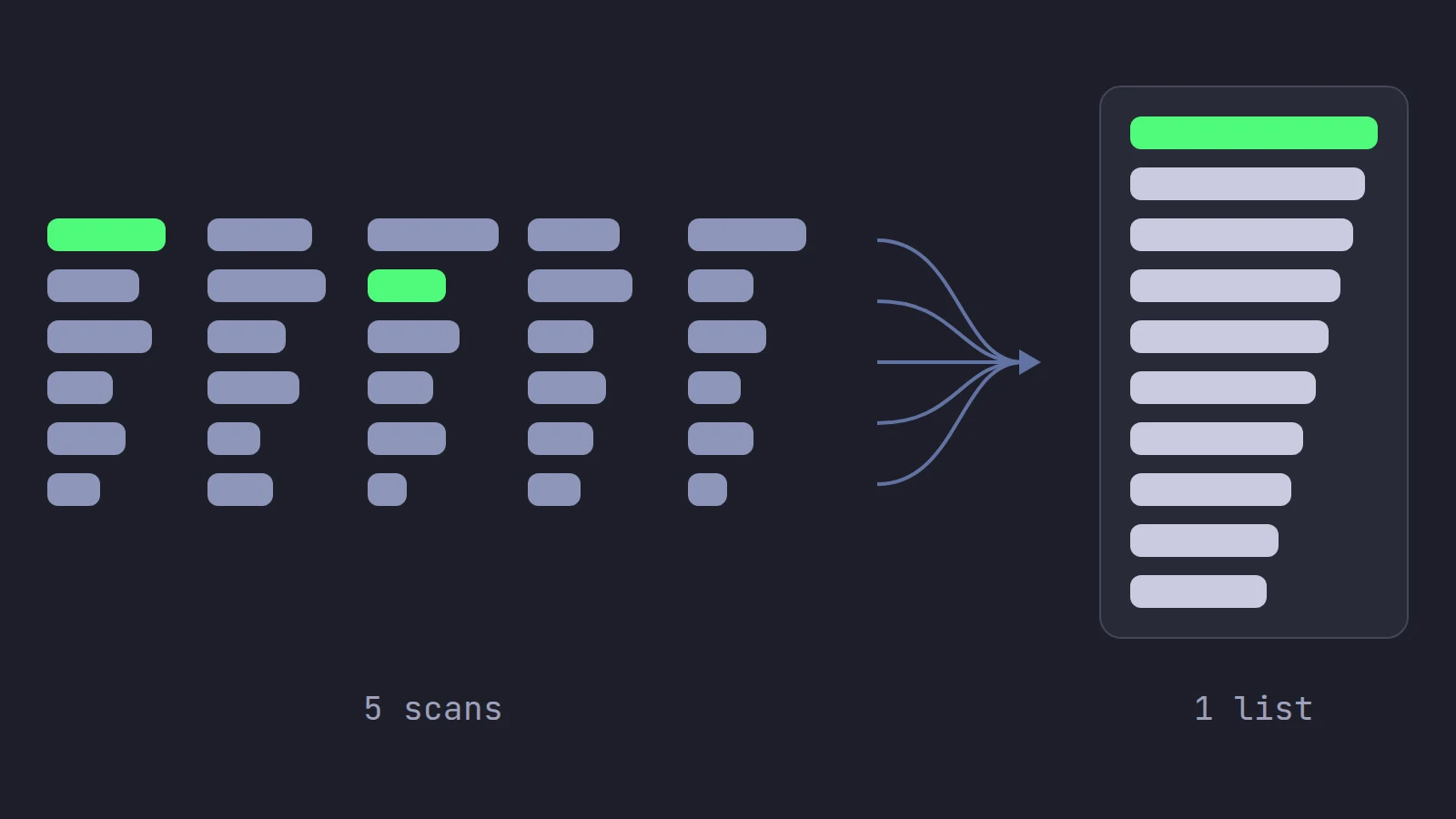
TOP_PERC_GAIN,SCAN_stVolumeVsAvg3min_DESC,HALTED,HOT_BY_VOLUMEandHIGH_OPEN_GAP, all onSTK.US.MAJORat 50 rows, all with the same filters. That uses half of the 10-scan allowance and leaves the rest for anything else you run. - Your settings become filter tags. Price min and Price max become
priceAboveandpriceBelow, Min change % becomeschangePercAbove, Min volume becomesvolumeAbove, Max shares out (M) becomesnumSharesBelow, and Stocks only (no ETFs) becomesstkTypeswithexc:ETF. Filters left empty are not sent. Changing any filter cancels and resubscribes all five scans. - Defaults that do not hide runners. $0.10 to $100, up 10% or more, 30 names. The shares-out cap is off by default because a name IBKR has no share count for would be dropped, and those are often the fresh small caps that move.
- One merged list. Every scan's top name first, then every scan's second, and so on, so the top of any scan gets in at once. A name on two scans keeps its better place, and a name that drops off every scan keeps its slot for 3 minutes while there is room, so a stock at the edge of a scan does not flicker in and out.
- Retries that match the errors. A scan that ends after it has delivered data is resubscribed 3 seconds later; one that fails without delivering (a refused filter, a pacing refusal) waits 30 seconds, and the failure is logged once rather than every time.
- Prices from a second connection. IBKR only names the symbols. A separate quote connection streams Level 1 for each listed name, one line each, and the panel's change, ranking and relative volume update tick by tick between IBKR's passes. Float, which the scan cannot filter on, is replaced by shares outstanding read from SEC EDGAR filings.
The IBKR scanner setup guide walks through every field, scan types explains the panels built on the list, pre-market scanning covers the hours before the open, and fix the scanner when it is off or empty covers the empty states. For the trading side of scanning rather than the code, see momentum trading on IBKR: scanner setup for gappers. Once a name is on a desk, the next request is its book, which we cover in Level 2 through the TWS API.
Our scanner section video shows the list, the merge and the desk loading in two minutes:
A scanner finds stocks that are moving; it does not find trades. Small-cap momentum is fast and most people who try it lose money.
Trading carries a significant risk of loss. Nothing here is financial advice.
Questions
- Does the IBKR API have a stock scanner?
- Yes. reqScannerSubscription runs the same scans as TWS's Advanced Market Scanner and returns up to 50 ranked contracts per scan, refreshed about every 30 seconds, with up to 10 scans active at once.
- How do I get the list of IBKR scanner parameters?
- Call reqScannerParameters once. TWS returns an XML document, about 2 MB on our session, through the scannerParameters callback, listing every scan code, location code and filter. Not every filter in it is allowed through the API.
- Can the IBKR API scanner filter by float?
- No. floatSharesBelow is listed in the parameters XML but the API refuses it with error 10360. numSharesBelow, a cap on shares outstanding, is the closest filter that works.
- Why does the IBKR API scanner return no prices?
- The scanner only returns contracts and their rank. For price, change or volume you request market data for each symbol separately, and each streaming quote uses one market data line.
- Does the IBKR API scanner work in the pre-market?
- Yes. Top percent gainers, volume and halt scans return pre-market movers. Scans that measure from the open, such as the close-to-open gap scan, stay empty until 09:30 ET.
- How many scanner subscriptions can I run through the IBKR API?
- Ten at a time, shared by every API program on the same login. In our tests an eleventh failed with error 322, a generic server error rather than a clear limit message.
Related guides
Guide 8.1Set up the IBKR scannerTurn on Scalpel's IBKR scanner: switch a desk to SCAN, set price, change, volume and share filters, and know how many market data lines the list uses.Guide 8.2Scan types: momentum, running up and setupsWhat Scalpel's high-of-day momentum, running up and setups scans find, the running up filters, setup letter chips, and when each scan announces a name.Guide 13.7Scan panels say the IBKR scanner is off or waitingScan panels say IBKR scanner is off, Waiting for TWS or No matches: switch the scanner on, connect TWS, or widen its filters. Each fix, step by step.
Keep reading
- Scalping through the IBKR API: what the TWS API can and cannot doIBKR API scalping, from building a trading app on the TWS API: market data lines, Level 2 and tick-by-tick caps, pacing, scanner limits, pre-market stops.
- IBKR API with Python: a working starter for tradersIBKR API Python starter: ibapi vs ib_async, connecting to TWS, a quote stream and a guarded paper order, with code tested against TWS API 10.51.
- TWS API market depth: reqMktDepth and SMART depth in practiceTWS API market depth explained: reqMktDepth, SMART depth, keeping a Level 2 book from updateMktDepthL2, error 317 and 309, with Python code.
Practice in SIM, against the live book.A lifetime license, every update included, with a 7-day refund guarantee.Ask in DiscordGet Scalpel